Best Offline & Private Calorie Tracker Apps in 2026
Compare offline calorie tracker apps for iPhone and Android by local storage, account needs, barcode access, photo AI, cloud use, and privacy signals.
By ProTrack AI Team · Updated: September 3, 2026 · Features and prices checked: September 3, 2026 · Best overall pick: ProTrack AI
Quick answer
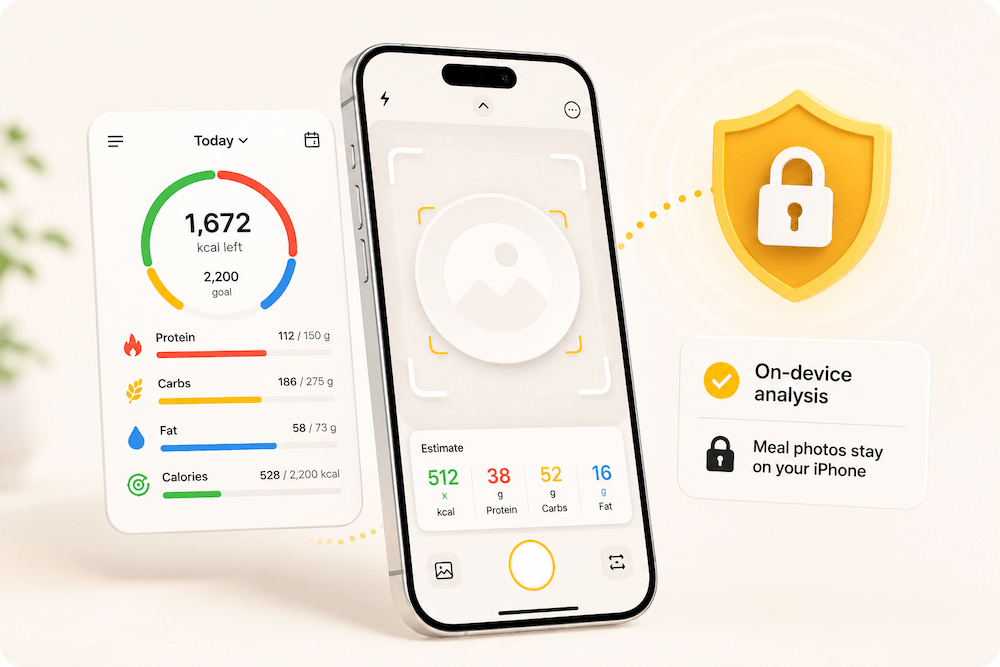
For iPhone, ProTrack AI is our best offline-private pick because its core diary and optional meal-photo analysis run on device without an account; new barcode lookups need internet. For Android, Waistline is the clearest local-diary choice, while barcode searches still use the online Open Food Facts database.
Related comparisons: no-AI versus optional-AI trackers, free barcode scanner apps, and MyFitnessPal alternatives.
What is a private offline calorie tracker?
A private calorie tracker is a nutrition logging app that minimizes data collection, does not sell or share your food diary, and ideally stores your data locally on your device, not on a cloud server. The most private options require no account, use on-device AI for meal photo scanning, and declare minimal data collection in their App Store privacy label.
An offline calorie tracker can log meals, display your diary, and analyze meal photos without an internet connection. Some features, such as barcode lookups for new packaged foods, still require a connection, but core tracking works locally. We compared how each app handles that limit in the free barcode scanner guide.
The strongest apps in this category combine on-device AI photo scanning + no account + a local food diary. Check optional analytics, sync, and barcode services separately because those features may still connect to the internet.
Why privacy matters in calorie tracking
A calorie tracker can reveal more than calories. It may store meal photos, food habits, weight goals, exercise data, medication-related notes, body measurements, and health trends. That makes privacy a real product feature, not just a nice-to-have.
For a source-by-source look at a mainstream cloud tracker, our MyFitnessPal privacy and service-provider guide separates service providers, advertising recipients, store labels, member visibility, exports, and account deletion.
Research on mobile health apps supports this concern. A 2024 systematic review analyzed 33 studies on mHealth app adoption and found recurring themes around personal data protection, awareness, confidentiality, and breach concerns.
"Patient and end-user concerns about confidentiality, privacy, and security consistently affect adoption of mobile health apps."
Source: Journal of Medical Internet Research, Systematic Review (2024), 33 studies
Privacy also affects consistency. The best calorie tracker is the one you will actually use. In a mobile dietary self-monitoring study, adherence declined over time, and the data identified a clear threshold:
Tracking at least two eating occasions per day was the best adherence marker associated with six-month weight-loss outcomes.
Source: Journal of the Academy of Nutrition and Dietetics (2019)
That is why this guide ranks apps by more than food database size. We looked for apps that reduce logging friction and reduce privacy risk.
How we ranked the apps
We prioritized five factors:
- Offline or on-device logging: Can key features work without a server?
- Photo privacy: Are meal photos processed on device or uploaded for AI analysis?
- No-account usability: Can someone start tracking without creating a profile?
- Food logging coverage: Photo scan, barcode scan, manual logging, recent meals, and editable results.
- Trust signals: App Store privacy labels, ratings, update recency, public privacy claims, and clarity about limitations.
Apple's App Store privacy labels are useful, but they are developer-reported, so they should be treated as a starting point rather than a full audit.
Offline vs private vs on-device: what is the difference?
Offline means an app can perform useful tasks without an internet connection: viewing your diary, editing meals, checking daily totals, or scanning a meal photo locally.
Private means the app minimizes collection, sharing, tracking, and account-based profiling. A private app may still use optional sync or analytics, so read the details.
On-device AI means the AI model runs locally on your phone instead of sending your photo or meal description to a remote server.
The best setup for privacy: on-device AI + no account + local food diary + clear privacy label + editable results.
How we check whether a calorie tracker works offline
We use current store listings and official project documentation. Core diary offline means logging, viewing, and editing saved entries can work without a server. Food search is marked partial when only built-in, downloaded, or cached foods work. Barcode and photo AI are assessed separately because an app can store its diary locally while sending a barcode or photo to an online service.
| App and official source | Platform | Core diary offline | Food search offline | Barcode offline | Photo AI offline | Account | Storage and sync | Export | Ads/tracking signal | Access | Last documentation check |
|---|---|---|---|---|---|---|---|---|---|---|---|
| ProTrack AI | iPhone | Yes | Partial | No | Yes | No account | On device; no sync | Not documented | Data Not Collected | Limited free; $5.99 weekly or $39.99 lifetime | Sep 3, 2026 |
| Simple Calories | iPhone, iPad | Yes | No database | No | No | No account | On device; no cloud | Not documented | Data Not Collected | Free | Sep 3, 2026 |
| Knabberfuchs | iPhone | Yes | Yes, downloaded DB | No | No | No account | On device; no sync | Yes | Data Not Collected | Free | Sep 3, 2026 |
| Waistline | Android | Yes | Partial | No | Not documented | No account | On device; optional Open Food Facts upload | Yes | No data collected/shared | Free, open source | Sep 3, 2026 |
| EasyFit | Android | Yes | Partial, built-in foods | Not documented | Not documented | Not documented | On device; sync not documented | Not documented | Ads; may collect device IDs | Free with ads | Sep 3, 2026 |
| HiKi | Android | Yes | Partial | Not documented | Not documented | No account | On device; optional upload/sync | Not documented | Ads; store says no data collected | Free with IAP | Sep 3, 2026 |
| OpenNutriTracker | Android | Yes | Partial, cached foods | Partial, cached foods | Not documented | No account | Encrypted local data; no sync | Not documented | Play lists possible collection/sharing | Free, open source | Sep 3, 2026 |
Partial means the official materials limit offline use to built-in, downloaded, or previously cached foods. It does not mean a fresh barcode or food-database search works without internet. Store privacy labels are developer-reported signals, not independent audits.
Best offline calorie trackers for iPhone
ProTrack AI is the best fit when offline meal-photo analysis matters. For manual-only logging with no AI feature advertised, Simple Calories is the cleanest fully offline option, but it deliberately omits a food database and barcode scanner. Knabberfuchs can search a downloaded country database offline and export a backup. Its September version notes clarify that photo recognition uses an optional Google Gemini key and barcodes query Open Food Facts, so neither feature is offline.
No-AI and offline are different requirements. An app can avoid AI and still use online food searches or advertising; optional AI can also run on-device. For explicit no-AI claims and conventional diaries with optional AI, use our no-AI calorie tracker comparison. The rankings here remain focused on connectivity and local storage.
Best offline calorie trackers for Android
Waistline has the clearest current local-diary claim and supports export/import, but new barcode searches connect to Open Food Facts. HiKi offers offline access with optional upload/sync. EasyFit stores data locally and includes a built-in food set, though its listing does not document every offline feature. OpenNutriTracker keeps encrypted user data locally, but current project documentation says new food searches use its backend and Open Food Facts; cached items can work offline.
Do barcode scanners work offline?
Usually not for a new product. A barcode only identifies an item; the app still needs nutrition data from a local database, a downloaded database, a cache, or a live service. ProTrack AI, Waistline, Macrios, and Knabberfuchs use Open Food Facts for new product details, so those lookups need internet. A saved or cached food may remain available afterward, depending on the app.
Offline does not always mean private
Local diary storage reduces cloud exposure, but it does not settle every privacy question. Ads, analytics, optional sync, crash reports, online barcode services, and photo-processing services can still transmit data. Compare the storage and ads/tracking columns above, then read the current store privacy label before installing.
1. ProTrack AI: best overall private AI calorie tracker for iPhone
Best for: people who want to snap a meal photo, get calories and macros, and keep meal photos off cloud servers.
ProTrack AI is the strongest overall pick for this guide because it matches the exact intent behind "offline calorie tracker" and "private calorie tracker." The app is built around local AI meal photo scanning: take a photo, get an estimate for calories, protein, carbs, and fat, review the result, edit it, and save it to your daily log. You can try the on-device photo scanner in your browser before installing anything.
According to its App Store listing, ProTrack AI uses secure local AI to analyze meal photos directly on device, meal photos stay on the iPhone, no account is required, and the food diary stays on device. It also supports barcode scanning, manual meal logging, plain-English result fixes, one-tap relogging, 7/30/90-day progress charts, custom calorie and protein goals, and a home screen widget.
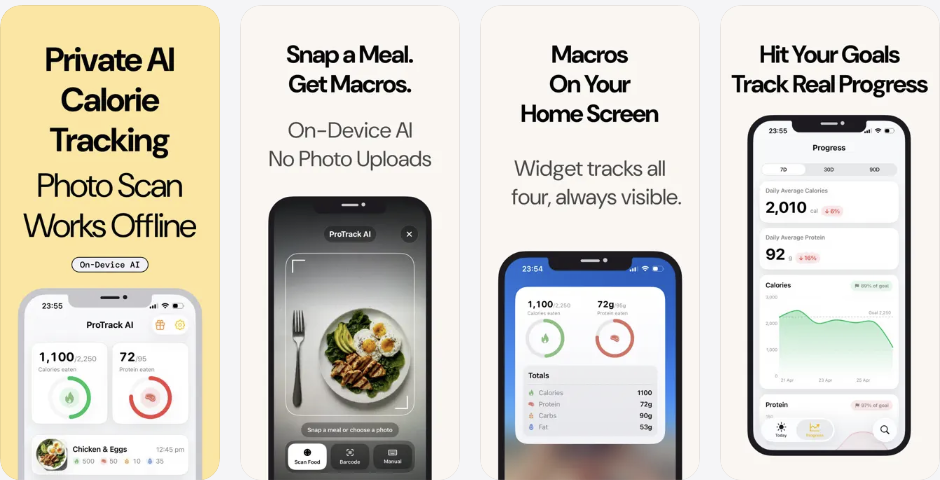
The key privacy detail: ProTrack's photo scanning works locally. The App Store version history confirms food scanning runs fully on-device with no cloud uploads.
Where ProTrack AI wins
- On-device AI photo analysis. Meal photos never leave your iPhone.
- No account required.
- Calorie and macro tracker for calories, protein, carbs, and fat.
- Editable AI estimates before saving.
- Barcode scanning via Open Food Facts, a nonprofit volunteer-powered food database with over 1.7 million products from 150 countries.
- Progress trends, home screen widget, and searchable history, all stored locally.
What to know before using it
Want to try the barcode lookup without installing anything? Use the free food barcode scanner in your browser to check the calories and macros of a packaged product.
ProTrack AI currently requires iOS 26 or later. Barcode lookup needs an internet connection for new product details. ProTrack AI does not collect app-usage analytics, and its current App Store privacy label says Data Not Collected. Meal photos and food history stay on device. The free tier includes a limited number of AI scans; see the ProTrack AI pricing page for the $5.99/week and $39.99 lifetime options that remove the limit.
Verdict
ProTrack AI is the best pick for iPhone users who want a private, on-device calorie tracker with AI food scanning they can try for free.
2. Calometric: best local diary with on-device voice and OCR
Best for: users who want a local diary and on-device voice, search, and nutrition-label input.
Calometric remains a strong privacy-conscious competitor, but its photo workflow changed. The current App Store listing says photo analysis now uses a larger cloud model and sends a photo only after the user grants permission. Voice logging, food search, and nutrition-label OCR still run on device. The diary is local, no account is required, and barcode lookup uses Open Food Facts.
Its App Store privacy label says Data Not Collected. The base app is a paid purchase with a photo-scan allowance, while extra scan packs and an optional Coach subscription are available. That makes Calometric local-first for its diary and several input methods, but not an offline photo-AI option.
Verdict
Choose Calometric for a local diary with on-device voice and label scanning. Choose ProTrack AI if offline, on-device meal-photo analysis is the priority.
3. Macrios: best local-first macro and gym tracker
Best for: users who want offline macro tracking combined with gym and fitness logging.
Macrios is a local-first calorie, macro, and fitness tracker. Its App Store page says it stores data on device, requires no account, has no ad tracking, supports barcode scanning through Open Food Facts, and can connect to Apple Health if the user chooses. Its privacy label says Data Not Collected.
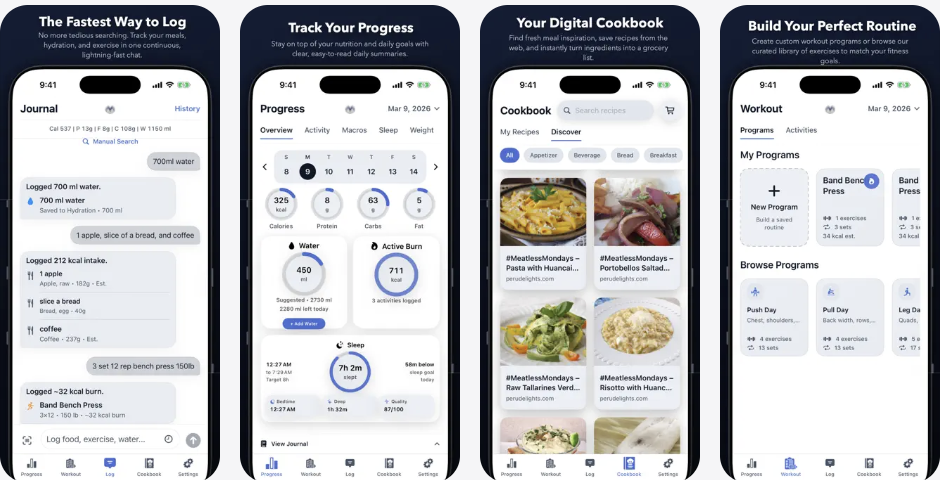
Macrios is a good option for users who want calorie tracking, macros, hydration, exercise programs, grocery lists, and offline-friendly fitness logging in one app.
Verdict
A strong privacy-first fitness companion, but not as directly focused on private AI meal photo scanning as ProTrack AI.
4. Foodnoms: best mature privacy-conscious Apple ecosystem tracker
Best for: users who want a polished Apple-native tracker with strong privacy commitments.
Foodnoms is a polished nutrition tracker for iPhone, iPad, Mac, and Apple Watch. It supports custom nutrition goals, barcode scanning, nutrition label scanning, Siri and Shortcuts, widgets, Apple Health, and Foodnoms AI. It has 4.7 stars from 6.9K App Store ratings.
For the account, cloud, AI, and platform differences, read our Foodnoms vs MyFitnessPal comparison.
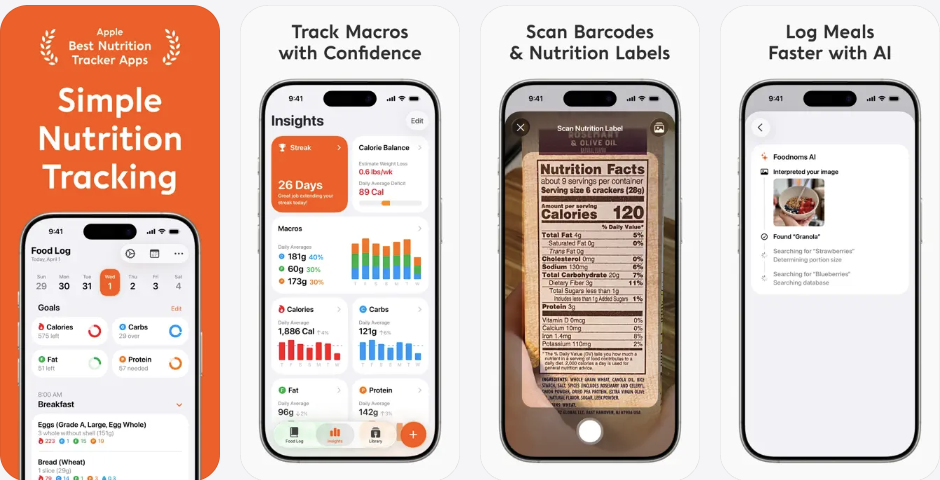
Foodnoms' website states that personal data is not shared with advertisers or sold to data brokers, users can choose iCloud or Foodnoms Cloud sync, and the product has no ads.
The caveat is that its App Store privacy label lists data linked to identity, including email address, name, health data, customer support content, and user ID.
Verdict
Great Apple-native tracker for users who want polish, goal depth, and Apple ecosystem integration, but not the cleanest offline/on-device/no-cloud answer.
5. Calory AI: best simple calorie counter with no signup
Best for: lightweight calorie tracking without account creation.
Calory is a simple calorie-counting app for iPhone, iPad, and Apple Watch. Its App Store listing says no registration or sign-up is required and that information entered is stored on iCloud. Premium includes AI food scanning, macro tracking, water tracking, custom foods, recipes, and barcode scanning in the US.
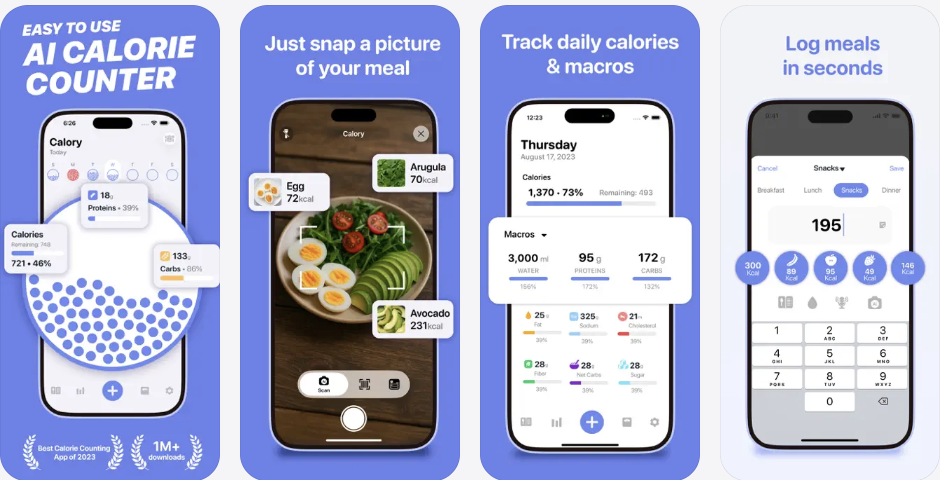
Its App Store privacy label lists Usage Data and Diagnostics as Data Not Linked to You. The public App Store copy does not make the same clear on-device AI photo scanning claim as ProTrack AI.
Verdict
Good choice for simple, lightweight calorie tracking without account creation.
6. MyNetDiary: best mainstream no-account tracker
Best for: mainstream food database accuracy without mandatory account creation.
MyNetDiary is a mature mainstream calorie tracker with a generous free tier. Its App Store listing says it has no ads, no account required, free barcode scanning, and over 2 million staff-verified food items. It claims 31 million users and holds 4.8 stars from 150K ratings.
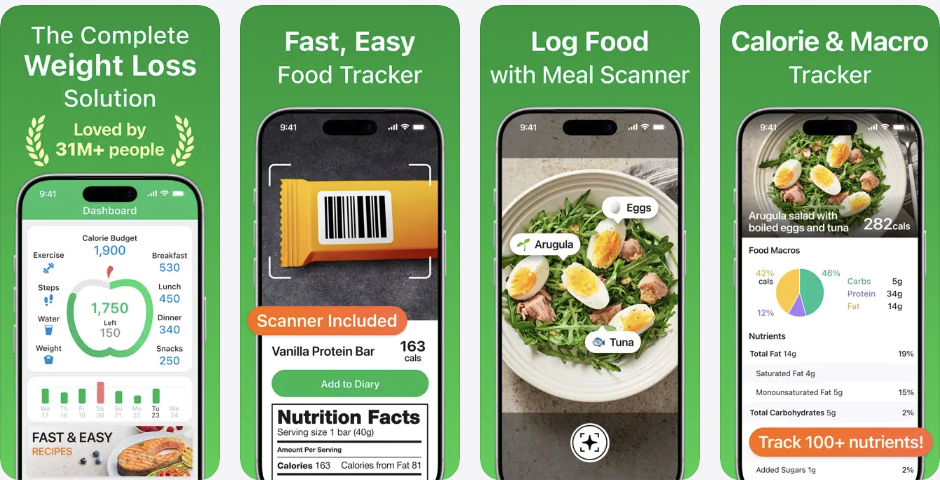
The privacy trade-off: its App Store privacy label lists Purchases, Identifiers, Usage Data, and Other Data as data that may be used to track users across apps and websites owned by other companies.
Verdict
Excellent for mainstream food database accuracy and no-account onboarding, but not the best answer for strict private or offline tracking.
7. Cronometer: best for detailed micronutrient tracking
Best for: users who care about vitamins, minerals, and verified micronutrient data.
Cronometer is a strong choice for micronutrient tracking. Its App Store listing says it has more than 1.1 million verified foods and integrates with Apple Health, Apple Watch, and Fitbit. It has 4.8 stars from 91K ratings.
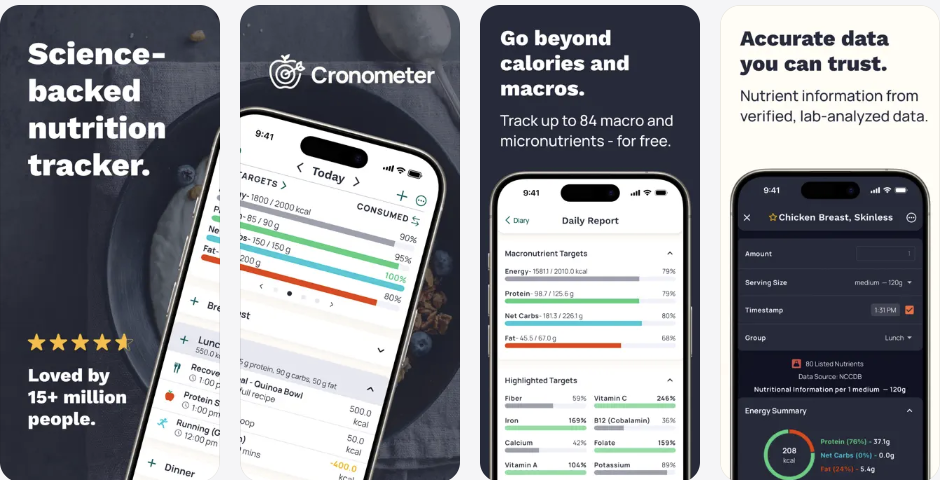
However, Cronometer is not a privacy-first choice for this specific article. Its App Store privacy label lists Contact Info, Identifiers, and Usage Data as Data Used to Track You, plus multiple linked categories including health and fitness data, contact info, user content, identifiers, and sensitive info.
Verdict
Best for nutrient depth, not best for offline or private tracking.
8. Lose It! Best for mainstream weight-loss community
Best for: users who want large food databases, community features, and weight-loss tracking.
Lose It! is a large, established weight-loss app. Its App Store listing says it has helped over 57 million users, has a food database of 56 million items and recipes, and supports calorie tracking, macros, barcode scanning, AI voice logging, and community features.
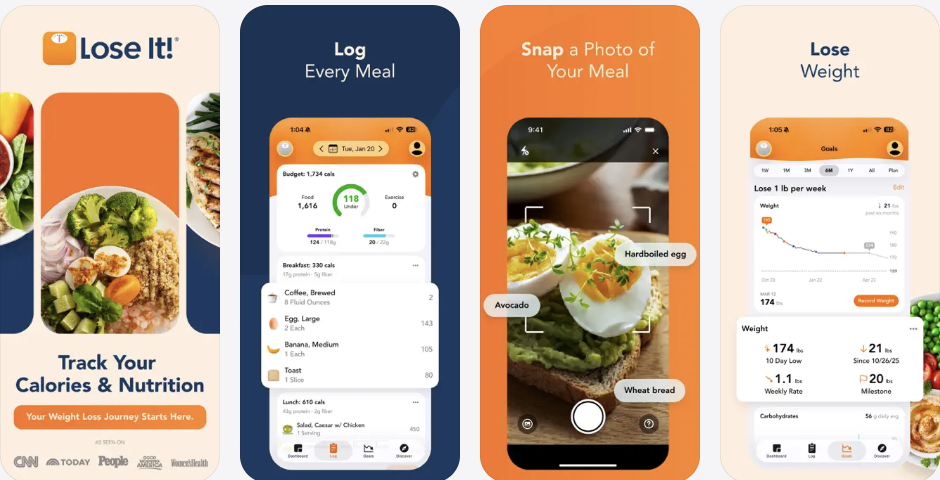
For privacy-focused users, the trade-off is significant. Its App Store privacy label lists Contact Info, Identifiers, and Usage Data as Data Used to Track You, and it lists linked categories including email, name, health and fitness, sensitive info, photos and videos, identifiers, usage data, and diagnostics.
Verdict
Strong for mainstream weight-loss features and community, weak for private or offline-first intent.
9. MyFitnessPal: best-known database, but not privacy-first
Best for: users who need the largest possible food database and mainstream recognition.
MyFitnessPal is one of the best-known calorie counters. Its App Store page lists 2.3 million ratings, 4.7 stars, AI nutrition coaching, and food logging from 20.5 million foods. To see what its users ask Google before comparing apps, read our original search behavior study.
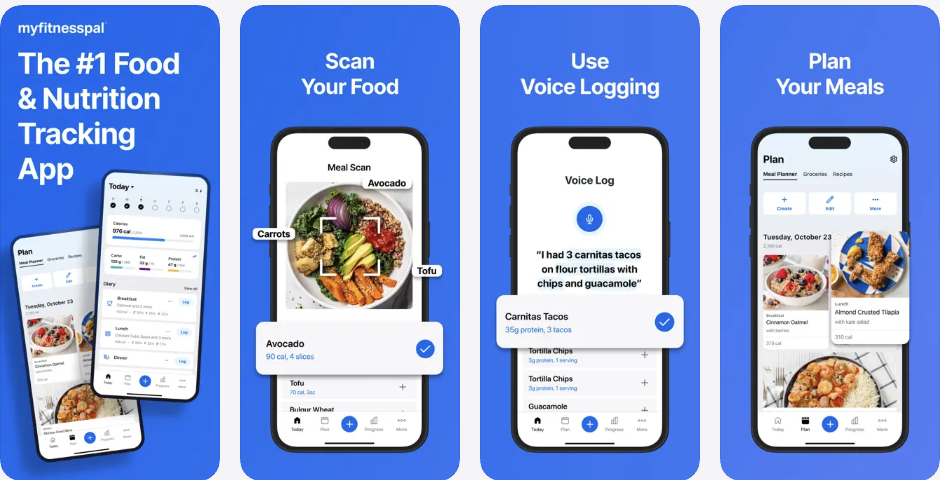
For users searching "private calorie tracker" or "offline calorie tracker," MyFitnessPal is not the strongest fit. Its App Store privacy label lists Identifiers and Usage Data as Data Used to Track You, plus linked data categories including health and fitness, contact info, user content, identifiers, diagnostics, and advertising data.
That makes MyFitnessPal a poor match for this guide's criteria, though it may still be the right app on someone else's. Where a single macro is what you actually track, the protein tracker rankings score much of this same list on protein visibility rather than privacy. The photo-scanning angle gets equivalent treatment in our AI calorie tracker roundup, and price-first readers can weigh lifetime access options across the category.
There is also a historical trust issue: MyFitnessPal suffered a 2018 breach that exposed roughly 143.6 million accounts, including email addresses, usernames, and password hashes, according to Have I Been Pwned.
Verdict
Great for database size and mainstream recognition, not the best choice for users prioritizing offline use and privacy.
Comparison table
| App | On-device AI | No account | Local diary | Privacy label | Best for |
|---|---|---|---|---|---|
| ProTrack AI | Yes | Yes | Yes | Data Not Collected | Best free-to-try private AI calorie tracker |
| Calometric | Photo scan uses cloud | Yes | Yes | Data Not Collected | Local diary + on-device voice/OCR |
| Macrios | No | Yes | Yes | Data Not Collected | Best local-first macro + gym tracker |
| Foodnoms | AI meal logging | Site claims no signup | iCloud / cloud | Some data linked to identity | Best polished Apple ecosystem tracker |
| Calory AI | Premium only | Yes | iCloud | Usage/diagnostics not linked | Best simple calorie counter |
| MyNetDiary | Meal Scan | Yes | Not privacy-first | Data used to track you | Best mainstream no-account tracker |
| Cronometer | AI features | Account model | Not privacy-first | Data used to track you | Best micronutrient database |
| Lose It! | Premium photo | Account model | Not privacy-first | Data used to track you | Best weight-loss community |
| MyFitnessPal | Premium scan | Account model | Not privacy-first | Data used to track you | Best-known large database |
Final recommendation
If your priority is private AI meal photo tracking, start with ProTrack AI. It is the best overall pick for iPhone users who want to scan meals, track calories and macros, and avoid uploading meal photos to the cloud.
If you want a local iPhone diary with on-device voice and nutrition-label OCR, look at Calometric, but remember that its current photo scan uses a cloud model. For Android, Waistline is the clearest local-diary option in this review. If you want a mature Apple-native tracker and are comfortable with optional cloud services, Foodnoms is a polished choice.
For most privacy-conscious iPhone users, ProTrack AI hits the best balance: on-device photo scanning, no account, editable results, barcode and manual logging, progress trends, and a free-to-try download.
Try ProTrack AI free
On-device AI food scanning. No account. Meal photos stay on your iPhone.
Try Free · No Account Needed Scan to download
FAQ
What is the best private calorie tracker app in 2026?
The best private calorie tracker app for iPhone in 2026 is ProTrack AI if you want offline meal-photo analysis and no required account. Its photo analysis and diary run on device. The free tier has a limited scan allowance, and new barcode lookups need internet.
Is there an offline AI calorie tracker for iPhone?
Yes. ProTrack AI is offline-first for core tracking: the food log, history, goals, widgets, and AI photo scanning work locally. Barcode lookups need a connection to fetch new packaged food details.
Does ProTrack AI upload meal photos?
ProTrack AI's App Store listing says meal photos stay on your device and that food scanning runs fully on-device with no cloud uploads.
Do barcode scanners work offline?
Usually not for new packaged foods. Barcode scanners often need an online database lookup. ProTrack AI uses Open Food Facts for packaged food nutrition details, and its listing says barcode lookups need a connection for new products.
What is the best offline calorie tracker for Android?
Waistline is the clearest current Android option for a local food diary. Its Google Play listing says food diary data stays on the device, while barcode search connects to Open Food Facts. That makes the diary offline-friendly but new barcode lookup online.
Are AI calorie estimates accurate?
AI calorie estimates should be treated as estimates, not medical or dietetic advice. The best apps let you review and edit portions, ingredients, and macros before saving. ProTrack AI lets users adjust AI results before logging.
Is MyFitnessPal private?
MyFitnessPal is popular and has a large food database, but it is not the best private or offline-first choice. Its App Store privacy label lists Identifiers and Usage Data as data used to track users, and the app had a major 2018 breach affecting about 143.6 million accounts.
Is calorie tracking medical advice?
No. Calorie tracking apps are for personal tracking and estimates. People with medical conditions, pregnancy, eating disorder history, diabetes, or medication-related nutrition needs should consult a qualified clinician or registered dietitian.
Disclaimer: ProTrack AI provides nutrition estimates for personal tracking and is not medical advice. App Store privacy labels are developer-reported and should be treated as a starting point, not a complete audit. See Apple's guidance on App Store privacy information.
Sources
- ProTrack AI App Store listing
- Calometric App Store listing and version history
- Simple Calories App Store listing
- Knabberfuchs App Store listing and version history
- Waistline Google Play listing
- EasyFit Google Play listing
- HiKi Google Play listing
- OpenNutriTracker Google Play listing
- OpenNutriTracker official source repository
- JMIR: Patients' Perspectives on Privacy and Security of mHealth Apps, Systematic Review (2024)
- Journal of the Academy of Nutrition and Dietetics: Defining Adherence to Mobile Dietary Self-Monitoring (2019)
- Google Search Central: Creating Helpful, Reliable, People-First Content
- Apple Support: About App Store privacy information
- Open Food Facts: Open food product database
- Foodnoms: Privacy and data policy
- Have I Been Pwned: MyFitnessPal data breach
- FTC: Updated Health Breach Notification Rule (2024)