Private AI calorie
tracker for iPhone
Point your camera at a meal and get a full calorie and macro estimate in seconds, processed entirely on your iPhone, not a cloud server.
On-device photo scanning. Meal photos stay on your iPhone.

Point your iPhone camera here
to download ProTrack AI.
- Meal photos analyzed on your iPhone, not a server
- Track calories, protein, carbs, and fat
- Edit every result before anything is saved
- Check your macros without opening the app
How it works
Log a meal in seconds
Three ways to log a meal. All of them fast.
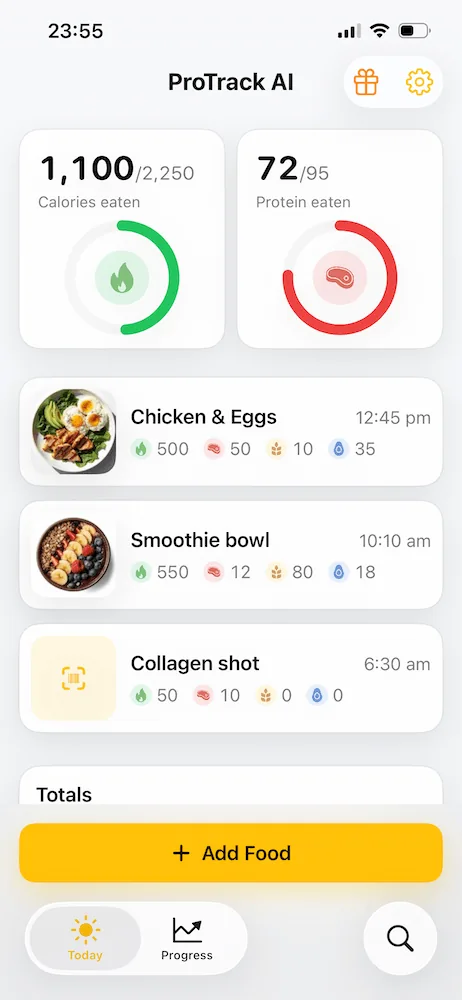
Scan your meal
Take a photo or pick one from your library. ProTrack AI identifies the meal and gives you a full calorie and macro estimate without sending the photo anywhere.
Check the macros
See the full calorie and macro breakdown before you save anything. Adjust a portion, swap an ingredient, or correct the name, then confirm when it looks right.
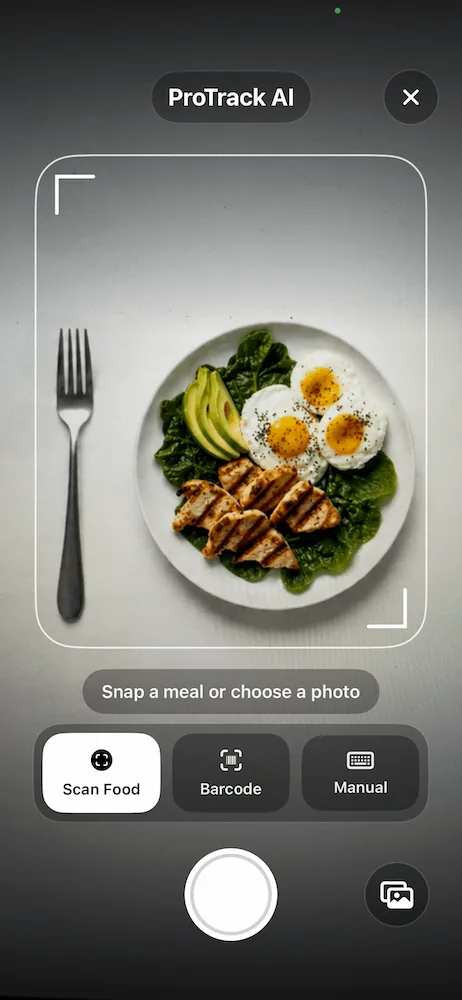
Track your day
Every meal adds to your daily totals. Check calories and protein against your goal, see the full macro breakdown, and build a history you can search later.
Private & on-device
Meal photos stay
on your iPhone
ProTrack AI is an on-device calorie and macro tracker. The AI model that scans meal photos runs locally on your iPhone, with no internet connection required for photo analysis, and no images are uploaded to a cloud server.
No account required, no photos uploaded, no server processing your food data. Your meals are your business.
- AI runs on your iPhone, not a server
- Photos stay on your device
- You approve every result before it's saved
- Your food history lives only on your phone
Features
Built for people who actually stick with tracking
Photo Scan
Point your camera at any meal and get a full macro estimate in seconds.
Barcode Scanner
Scan any barcode to pull in nutrition facts instantly. No typing required.
Private by Default
The AI runs on your iPhone. Your meal photos never touch a cloud server.
Editable Results
Adjust portions, swap ingredients, or correct macros before anything gets saved.
Daily Goals
Set a daily calorie and protein target. Change it any time from Settings.
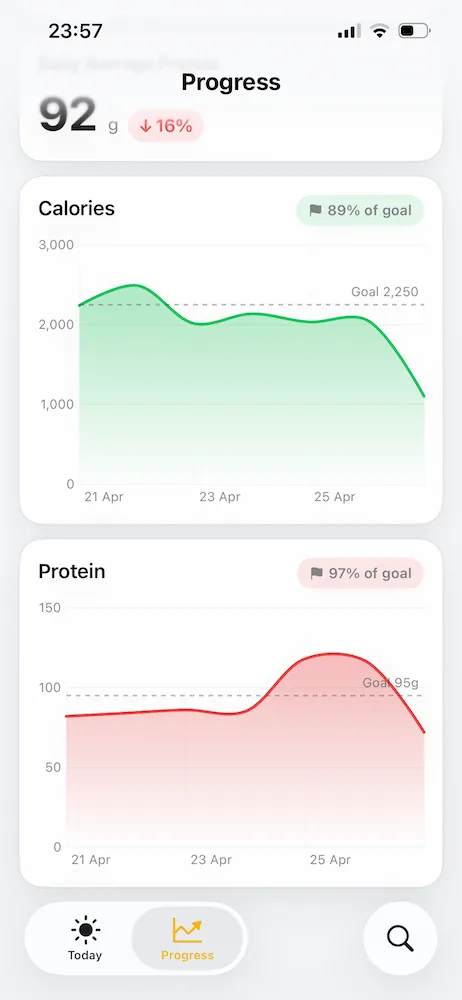
Progress Trends
See how your intake trends over 7, 30, and 90 days.
Home Screen Widget
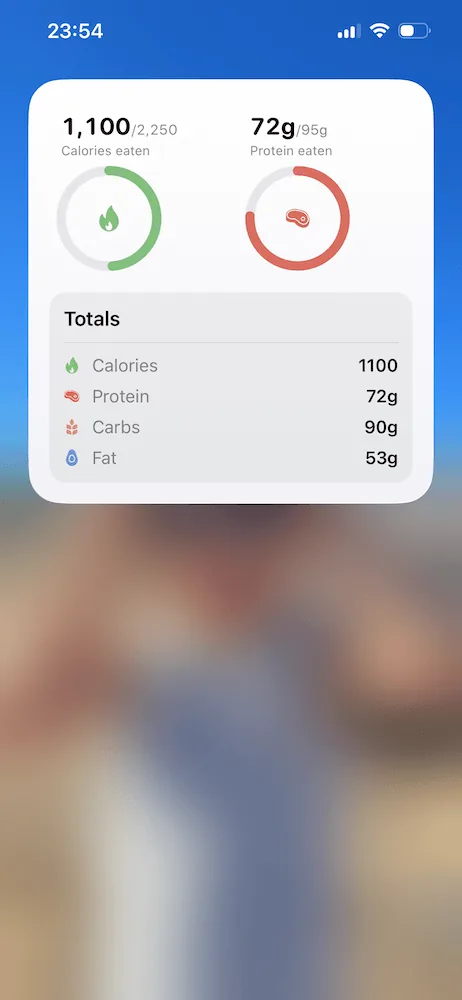
See your macro progress at a glance, right from your Home Screen.
Searchable History
Search past meals, duplicate a log, or see exactly what you ate last Tuesday.
Progress
Know where you stand today
Every meal you log shows up in your daily totals. Check calories and protein against your goal, or pull up the full macro breakdown whenever you need it. Add the widget and it's always visible. No app required.
Pricing
Free to try. Unlimited when you need it.
Try ProTrack AI for free and see if it fits how you eat. When you're ready to scan without limits, upgrade to Go Unlimited inside the app.
Free
Photo scanning, barcode lookup, and manual logging included
- AI meal photo scans (limited)
- Manual food logging
- Daily calorie and macro tracking
Go Unlimited
Unlimited food and barcode scans, full history, and weekly insights
- Unlimited photo scans
- Barcode scanning
- Full meal history and search
- Weekly progress insights
Prices may vary by App Store region. Upgrade and manage subscriptions in the app.
From the blog
Insights
MyFitnessPal Service Providers: Data Sharing & Privacy
See what MyFitnessPal says it collects, who may receive it, and how advertising controls, exports, and account deletion differ.
Read moreFatSecret vs MyFitnessPal: Free Features & Pricing
Compare free barcode scanning, food logging, AI tools, integrations, privacy, exports, and current paid plans.
Read moreCronometer vs MyFitnessPal: Free Features & Pricing
Compare free barcode scanning, micronutrients, food data, integrations, privacy, exports, and current paid plans.
Read moreWhy People Search for MyFitnessPal Alternatives
Original search data connects replacement queries with barcode access, free features, pricing, and daily logging friction.
Read moreMyNetDiary vs MyFitnessPal: Free Features & Pricing
Compare free barcode access, food data, paid plans, integrations, privacy, and what transfers when switching.
Read moreMyFitnessPal Cost 2026: Free vs Premium
Compare current US paid plans, free logging, the barcode paywall, and simpler alternatives.
Read moreFoodnoms vs MyFitnessPal: Features, Privacy & Price
Compare free scanning, Apple Health, offline access, privacy, prices, and what transfers when switching.
Read moreBest Offline & Private Calorie Tracker Apps in 2026
Compare iPhone and Android apps by local storage, offline food and barcode access, on-device photo AI, accounts, sync, and privacy signals.
Read more9 Best MyFitnessPal Alternatives in 2026 (Free & Paid)
Compare 9 free and paid alternatives by barcode access, platforms, nutrition depth, privacy, data migration, and current price.
Read moreBest Simple Calorie Tracker Apps With No Forced AI
Compare no-AI-disclosed manual diaries and optional-AI trackers, plus barcode, Apple Watch, and private logging options.
Read moreBest Free Barcode Scanner Calorie Apps for iPhone
See which scanners are truly free, which need an account, and where privacy and offline tracking differ.
Read moreBest Lose It Alternative for iPhone in 2026
ProTrack AI vs Lose It on privacy, offline meal scans, macros, food databases, and pricing. See which app wins for which iPhone user.
Read moreBest Lifetime Calorie Tracker Apps for iPhone
Compare verified one-time prices, photo and barcode logging, privacy, offline use, and the tradeoffs before buying lifetime access.
Read moreBest Cal AI Alternatives for iPhone
Compare private Cal AI alternatives after the acquisition, reported breach coverage, and App Store billing controversy.
Read moreBest AI Calorie Tracker Apps for iPhone in 2026
Compare AI calorie tracker photo apps for meal scanning, macro estimates, offline use, privacy, and on-device food photo analysis.
Read moreBest Protein Tracker Apps for iPhone in 2026
Compare the best iPhone apps to track protein intake, macros, barcode scans, AI meal photos, widgets, privacy, offline use, and lifetime access.
Read moreFAQ
Good questions
Does ProTrack AI upload my meal photos?
Photo scanning is designed to run on device. Your meal photos are not uploaded to a cloud server for AI photo analysis.
How accurate are the calorie and macro estimates?
ProTrack AI provides estimates based on the visible food and portion. You should review each result and edit anything that needs correction before saving.
Can I scan packaged foods?
Yes. Use Barcode mode to scan packaged foods and add nutrition details faster.
Can I track more than protein?
Yes. ProTrack AI tracks calories, protein, carbs, and fat.
Can I change my goals?
Yes. You can set daily calorie and protein goals during onboarding and update them later in Settings.
Does ProTrack AI have a widget?
Yes. The Home Screen widget shows daily calorie, protein, carb, and fat progress at a glance.
Is ProTrack AI an offline or on-device calorie tracker?
ProTrack AI is an on-device calorie tracker. The AI model that scans meal photos runs locally on your iPhone without an internet connection, and no photos are uploaded for processing. Manual food logging and your meal history are also stored on your device, not in the cloud.
What makes ProTrack AI a private macro tracker?
ProTrack AI is a private macro tracker because the AI that estimates your calories, protein, carbs, and fat runs on your iPhone, not a remote server. Your meal photos are never uploaded to the cloud for analysis. Your food history stays on your device, and no account is required to use the app.
Is ProTrack AI medical advice?
No. ProTrack AI provides nutrition estimates for personal tracking and is not medical advice.
Log what you eat.
Keep it to yourself.
Free to try. No account needed. Your meal photos stay on your device.
Download on the App Store