Best Cal AI Alternatives for iPhone: Private, On-Device Calorie Trackers
Looking for a Cal AI alternative? Compare private iPhone calorie trackers after Cal AI's acquisition, reported breach coverage, and App Store billing controversy.
By ProTrack AI Team · Updated: June 27, 2026 · Best privacy pick: ProTrack AI
Quick answer
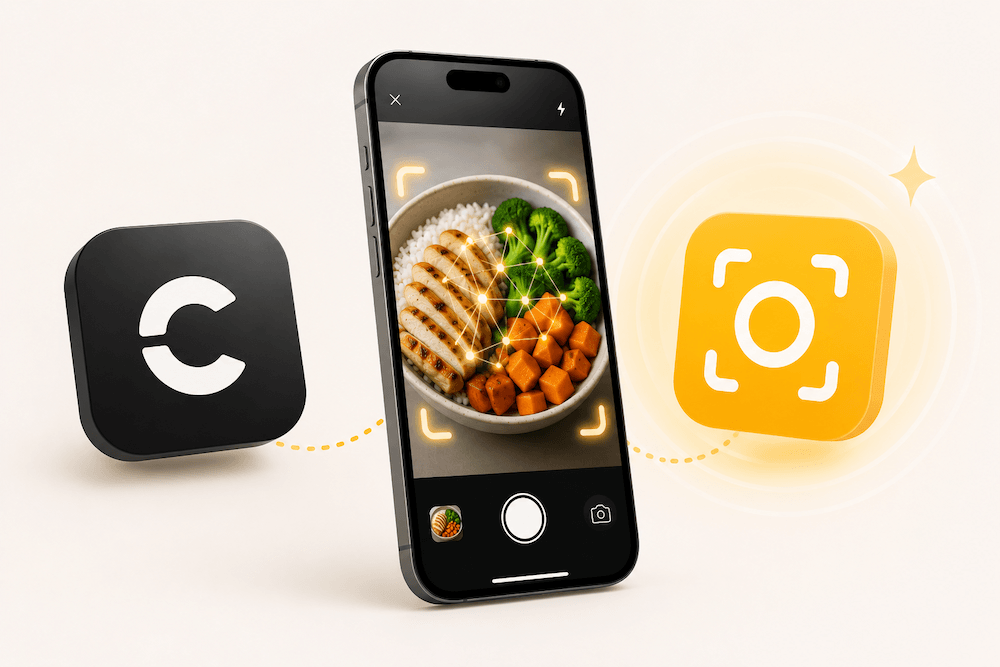
The best Cal AI alternative for privacy-conscious iPhone users is ProTrack AI. ProTrack AI scans meal photos directly on your iPhone, keeps meal photos off cloud servers, requires no account, stores your food history locally, and lets you review calorie and macro estimates before saving.
For a broader category roundup, compare the best AI calorie tracker apps for iPhone. This page is narrower: it is for people actively searching for a Cal AI alternative and deciding what to download next.
Free to download. No account or credit card required to start.
Key takeaways
- Best private Cal AI alternative: ProTrack AI is the strongest choice if you want on-device meal photo scanning, no account, local food history, editable estimates, and no cloud meal-photo analysis.
- Why people are switching: TechCrunch reported that MyFitnessPal acquired Cal AI, several outlets reported an alleged breach, and TechCrunch later reported Cal AI was briefly removed from the App Store over purchasing-rule issues.
- Best no-subscription local option: Boba claims local AI, no account, no cloud, and no subscription, but as of June 27, 2026 its U.S. App Store listing shows a paid upfront price.
- Best minimal local option: Nouri is privacy-forward and local-first, but it requires iOS 26 and is less of a direct Cal AI-style food-photo replacement.
- Accuracy rule: Treat every AI food scan as an estimate. Choose an app that makes portions, oils, sauces, and ingredients easy to review before saving.
Searching for a Cal AI alternative usually means one thing: you like the idea of snapping a meal photo and getting calories instantly, but you are no longer sure Cal AI is the app you want to trust with your food photos, weight goals, diet history, and subscription data.
Cal AI helped make AI calorie tracking mainstream. TechCrunch reported that Cal AI reached more than 15 million downloads and more than $30 million in annual revenue before MyFitnessPal acquired it. But Cal AI has also become part of three trust-related stories: acquisition by MyFitnessPal, reported breach coverage, and a temporary App Store removal tied to purchasing and billing-rule issues.
That is why this guide focuses on a specific type of replacement: private calorie trackers for iPhone, especially apps that process meal photos on device instead of sending every plate, snack, and body-goal detail to a cloud server.
What happened to Cal AI?
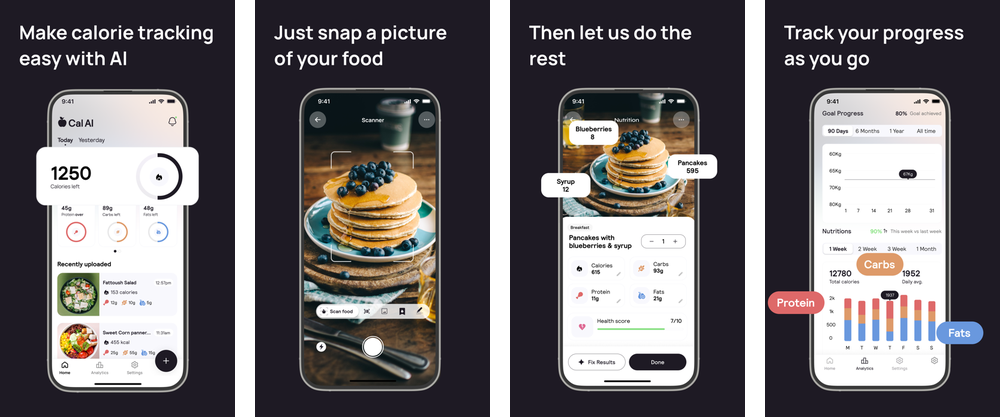
Cal AI grew fast because it solved a real problem: manual calorie tracking is annoying. Instead of searching databases and building meals ingredient by ingredient, users could take a photo and get a calorie estimate quickly.
Then three things changed the trust conversation. First, MyFitnessPal announced its Cal AI acquisition in March 2026. For many users, that raised a fair question: will Cal AI remain the same independent app, or become part of a larger nutrition-data ecosystem?
Second, several security outlets reported an alleged Cal AI data breach. Cybernews reported a claimed dump of nearly 15 GB of Cal AI data and noted the incident had not been officially confirmed at the time of its reporting. Kiteworks described the reported Cal AI exposure as involving about 3.2 million users and a claimed unauthenticated Firebase backend issue.
Third, TechCrunch reported that Apple briefly removed Cal AI from the App Store after Apple said the app had attempted to skirt in-app purchase guidelines and used manipulative tactics. The app later returned after the developer addressed the issues.
None of this means every Cal AI user needs to panic. It does mean privacy-conscious users now have a sharper question before choosing any AI food scanner: does this app need to upload my meal photos at all?
Is Cal AI safe?
A better question is: safe compared with what risk model?
Cal AI is still available on the App Store, and an App Store listing alone does not prove an app is unsafe. But users searching "is Cal AI safe" are usually asking whether Cal AI is the best choice for sensitive nutrition data after the acquisition, breach reports, and billing controversy.
Here is what is publicly visible. The Cal AI App Store privacy label says identifiers and usage data may be used to track users across apps and websites, and it lists categories such as purchase history, photos or videos, product interaction, sensitive info, diagnostics, email address, and user ID. Apple says App Store privacy details are developer-reported, so they are useful signals, not independent audits. Cal AI's privacy notice describes collection and disclosure categories that can include identifiers, commercial information, internet activity, visual information such as photos, inferences, and sensitive personal information including health and nutrition data.
The practical answer is this: Cal AI may be fine for users who prioritize speed and are comfortable with its data model. It is less ideal for users who want the smallest possible data footprint. If your goal is to keep meal photos, calorie history, macro goals, and food routines on your own iPhone, choose an on-device alternative like ProTrack AI.
Why privacy matters for AI calorie trackers
A meal photo can look harmless. A year of meal photos is different.
A calorie tracker can reveal what time you eat, whether you are cutting weight, bulking, fasting, following a religious diet, managing a medical diet, taking GLP-1 medication, avoiding allergens, recovering from an eating disorder, or trying to change your body composition. That is why nutrition data should be treated as sensitive, even when an app is marketed as a lifestyle tool.
Regulators increasingly view consumer health apps as privacy-sensitive. The FTC says privacy and security are especially important for apps that collect and share health information, and its updated Health Breach Notification Rule covers health apps and similar technologies. HHS points mobile health app developers to federal-law guidance covering HIPAA, the FTC Act, the Health Breach Notification Rule, FDA rules, COPPA, and other rules depending on app function and data use.
There is also consumer demand for simpler privacy choices. Pew Research Center found that 67% of U.S. adults understand little to nothing about what companies do with their personal data, and roughly 73% feel they have little or no control over data collected about them by companies.
This is where on-device AI matters. Apple's Core ML documentation says running a model strictly on device can remove the need for a network connection, helping keep data private and the app responsive. For calorie tracking, that translates into a simple privacy advantage: if the app can analyze your meal photo on your iPhone, there is no need to upload that photo just to estimate calories.
How we ranked the best Cal AI alternatives
| Factor | Why it matters |
|---|---|
| On-device photo analysis | Reduces exposure because meal photos do not need to leave your iPhone. |
| No account requirement | Fewer identifiers, fewer credentials, and less profile-building. |
| App Store privacy label | Useful signal for tracking, linked data, and data categories, though not an independent audit. |
| Editable AI estimates | AI estimates are useful, but users need to correct portions, oils, sauces, and hidden ingredients. |
| Calorie and macro tracking | High-intent users usually want calories, protein, carbs, and fat, not just a photo diary. |
| Barcode and manual logging | Photo AI is not enough for packaged foods, supplements, restaurant meals, or corrections. |
| iPhone experience | This guide is optimized for iPhone users, not generic web or Android-first tools. |
Food tracking works best when people actually stick with it. Research on behavioral weight loss found that greater self-monitoring frequency was associated with greater weight loss, while burden and boredom can get in the way. That is the real promise of AI calorie apps: they reduce logging friction. But AI estimates still need review. WIRED's 2026 food-tracking app test found meaningful differences between AI calorie estimates and emphasized checking ingredients and adjusting results.
Best Cal AI alternatives for iPhone
| Rank | App | Best for | Privacy angle | Best reason to switch from Cal AI |
|---|---|---|---|---|
| 1 | ProTrack AI | Private, on-device iPhone calorie tracking | Meal photos stay on iPhone; no account required | Best overall Cal AI alternative for privacy-conscious iPhone users |
| 2 | Boba | No-subscription local AI calorie tracking | Claims no cloud, no account, no subscription | Strong local-first choice if you accept paid upfront pricing |
| 3 | Nouri | Minimal local AI nutrition estimates | Listing says everything stays local | Good for users who want a lightweight local-first iOS 26 tool |
| 4 | SnapCalorie | Photo-first portion estimation | Says data is encrypted and not sold | Good if you care more about advanced photo estimation than local-only processing |
| 5 | Welling | AI coaching, chat, voice, and photo logging | More coach-like, less privacy-first | Good for accountability and conversational logging |
| 6 | Empirical Health | Calorie tracking plus broader health context | Cross-platform health and bloodwork-oriented profile | Good if you want nutrition data connected to health metrics |
1. ProTrack AI - best private Cal AI alternative for iPhone
Best for: iPhone users who want AI meal-photo logging without cloud photo uploads.
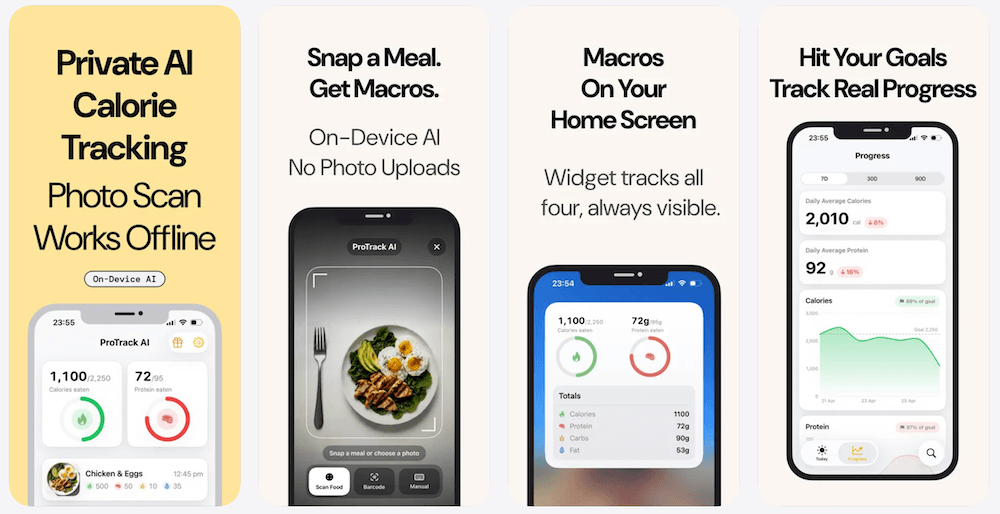
ProTrack AI is the strongest Cal AI alternative for users whose first concern is privacy. It gives you the core Cal AI-style behavior - take a meal photo, get calories and macros - but with a different architecture: the AI scan runs locally on your iPhone. The ProTrack AI homepage explains that meal photo analysis runs on device, no images are uploaded to a cloud server, no account is required, and food history lives on your phone.
That difference matters. If a cloud calorie app is breached, the user has to hope the server-side database, storage bucket, authentication model, access controls, and vendors were all configured correctly. If the meal photo never leaves the phone for analysis, there is less data exposed in the first place.
ProTrack AI also solves a practical problem with AI food scanning: estimates are not perfect. The app lets you review the full calorie and macro breakdown before saving, then adjust portions, swap ingredients, or correct the result before it becomes part of your diary.
The ProTrack AI App Store listing describes secure local AI meal analysis, and the current privacy label says Data Not Collected. ProTrack AI does not collect app-usage analytics.
| Feature | ProTrack AI |
|---|---|
| Meal photo scanning | Yes |
| On-device AI | Yes |
| Cloud photo upload for AI analysis | No |
| Account required | No |
| Tracks calories and macros | Yes - calories, protein, carbs, and fat |
| Editable AI results | Yes |
| Barcode scanner | Yes |
| Best use case | Private iPhone calorie and macro tracking |
Verdict: Choose ProTrack AI if you want a calorie tracker that feels modern but does not ask you to trade away your meal-photo privacy for convenience.
Make the switch before your next meal
Use ProTrack AI when you want the Cal AI-style photo scan, but with on-device analysis, editable calories and macros, no required account, and no cloud meal-photo processing.
Free to download · No account · No cloud photo upload
2. Boba - best no-subscription local Cal AI alternative
Best for: users who want local AI and do not want a recurring subscription.
Boba's App Store listing says it runs entirely on your phone, with no cloud, no account, no analytics, and no subscription. It also says the only outbound request is to Open Food Facts when a user scans a barcode.
The important pricing caveat: as of June 27, 2026, Boba's U.S. App Store listing shows a paid upfront price. That makes it a strong no-subscription Cal AI alternative, but not a free one in the current U.S. listing.
The main reason ProTrack ranks higher is that ProTrack presents a more complete private calorie-tracking workflow for serious users: meal photo scanning, macro tracking, editable estimates, barcode scanning, local history, widgets, and free-to-try access.
Verdict: Choose Boba if your top priority is local AI and no recurring subscription. Choose ProTrack AI if you want a more complete private tracker with a free-to-try App Store flow.
3. Nouri - best minimalist privacy-first option
Best for: iPhone users who want a lightweight, local-first AI nutrition companion.
Nouri's App Store listing says it uses Apple's Foundation Models in iOS 26, provides on-device estimates, and keeps everything local to the phone.
Nouri can be a good fit if you want a minimal tracker and like the idea of local AI. However, users switching from Cal AI specifically should check the current feature set carefully. Cal AI users often expect photo-first logging, barcode support, macro editing, history, and a full food diary. Nouri's public listing emphasizes privacy and simplicity, while ProTrack is the stronger direct Cal AI replacement if you want private meal-photo scanning plus a fuller calorie and macro tracker.
Verdict: Choose Nouri if you want a simple local AI nutrition estimate tool on iOS 26. Choose ProTrack AI if you want a more direct Cal AI alternative built around private meal-photo scanning, calories, macros, barcode scans, and editable saved logs.
4. SnapCalorie - best for photo-first portion estimation
Best for: users who prioritize image-based portion estimation and nutrient depth.
SnapCalorie says users can take a photo and get instant nutrition information, and the SnapCalorie App Store listing says the app identifies food, measures portions using the iPhone camera, and provides calories, macros, and 100+ nutrients.
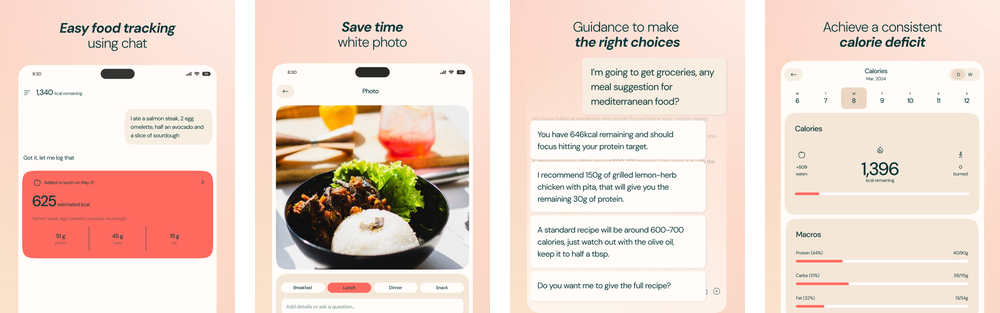
That makes SnapCalorie attractive for users who care about portion estimation and nutrient depth. The trade-off is positioning. SnapCalorie is not positioned as a fully on-device, no-cloud, no-account calorie tracker in the same way ProTrack is.
Verdict: Choose SnapCalorie if you want advanced photo-first nutrition estimation. Choose ProTrack AI if your top requirement is keeping meal photo analysis on your iPhone.
5. Welling - best for AI coaching and conversational logging
Best for: users who want an AI nutrition coach, not just a food scanner.
Welling is less of a strict Cal AI clone and more of an AI coaching experience. Welling says users can snap a photo, send a voice note, or text the app like a friend, and the Welling App Store listing describes it as an AI calorie tracking assistant that can track calories, protein, and fiber from a message or photo.
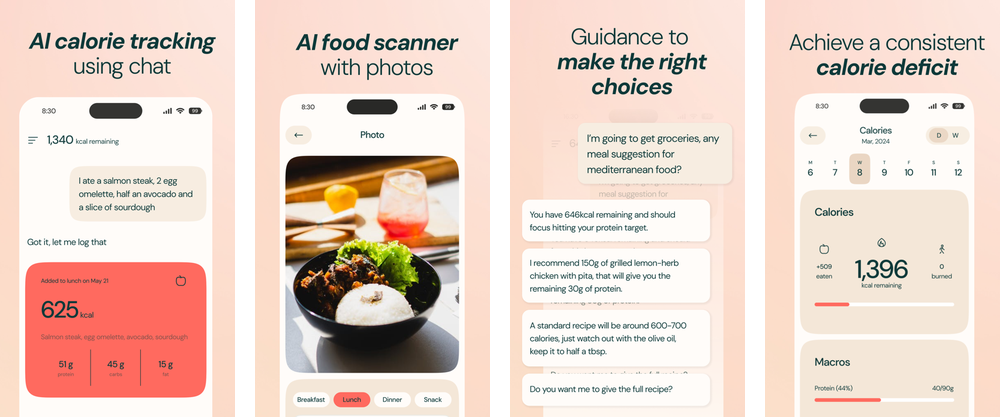
That makes Welling a good alternative for users who left Cal AI because they wanted more coaching, reminders, and conversational flexibility. It may be useful for beginners who do not want to think in database entries. The downside is that Welling is not the strongest pick for people whose switch is driven by privacy.
Verdict: Choose Welling if you want a coach-like experience with photo, voice, and text logging. Choose ProTrack AI if you want focused calorie tracking with a stronger on-device privacy model.
6. Empirical Health - best for broader health context
Best for: users who want calorie tracking connected to broader health metrics.
Empirical Health has a dedicated Cal AI alternatives page and says its nutrition tracking lets users point the camera at a meal to estimate calories, protein, fat, and carbs. The Empirical Health App Store listing describes AI nutrition tracking alongside Apple Watch data, blood tests, and broader health metrics.
That makes Empirical interesting for users who want more than weight-loss logging. It is not just "how many calories were in lunch?" but "how does food relate to my broader health picture?"
The trade-off is that users who are specifically trying to minimize sensitive data collection may not want to connect calorie tracking with bloodwork or broader health context. That can be valuable, but it is a different privacy profile from a local iPhone food diary.
Verdict: Choose Empirical Health if you want calorie tracking tied to broader health insights. Choose ProTrack AI if you want the simpler privacy promise: meal photos and food history stay on your iPhone.
ProTrack AI vs Cal AI
| Category | ProTrack AI | Cal AI |
|---|---|---|
| Best for | Privacy-conscious iPhone users | Fast, viral AI calorie logging |
| Meal photo scanning | Yes | Yes |
| On-device analysis | Yes, according to ProTrack | Not positioned as the primary privacy promise |
| Account required | No | Users should check current onboarding |
| Cloud photo upload | No cloud upload for AI photo analysis, according to ProTrack | Users should review current privacy policy and app behavior |
| App Store tracking label | No "Data Used to Track You" found in current listing | Current listing says identifiers and usage data may be used to track users |
| Reported breach history | No public breach found in research for this article | Reported or alleged breach involving millions of records |
| Best reason to choose it | Private, on-device calorie tracking | Popular, fast, familiar photo-first workflow |
The core difference is not "AI vs AI." It is where the AI runs and how much data the app needs to collect.
What is the best free Cal AI alternative?
If you mean free to download and try before upgrading, ProTrack AI is the better overall pick for privacy-conscious iPhone users because it combines on-device scanning, no account requirement, editable calorie and macro results, barcode scanning, widgets, and local food history. The ProTrack AI website says the app is free to try, with an unlimited upgrade available inside the app starting at $5.99/week or $39.99 for lifetime access. You can compare that option with other calorie trackers with lifetime access.
If you mean completely free with no paid upgrade, check current App Store pricing before choosing. Boba's listing claims no subscription, but as of June 27, 2026 the U.S. listing shows a paid upfront price. Nouri appears free in the current U.S. listing, but it requires iOS 26 and is more minimal.
For users serious about long-term tracking, "free" should not be the only criterion. A calorie tracker is handling sensitive health-adjacent data. The better question is: what is the lowest-data app that you will actually keep using?
Are AI calorie trackers accurate?
AI calorie trackers are useful, but they are still estimators.
Photos can miss hidden ingredients, cooking oils, sauces, sugar, butter, dressing, liquid calories, food under the visible layer, and true portion weight. WIRED's food-tracking app testing found different AI trackers returned noticeably different calorie estimates for the same meal, requiring the user to confirm ingredients and adjust results.
That is why editability matters. A good AI calorie tracker should not pretend the first estimate is perfect. It should make the first draft fast, then let you correct it. ProTrack AI's advantage is that it gives you a full calorie and macro estimate, then lets you adjust portions, ingredients, or names before saving.
Who should switch from Cal AI to ProTrack AI?
Switch to ProTrack AI if you want a Cal AI alternative for iPhone, want meal photos to stay on your phone, do not want to create another account, want an on-device AI food scanner, care about calories and macros, want to edit AI estimates before saving, want barcode scanning for packaged foods, or are uncomfortable with cloud-first nutrition apps after the reported Cal AI data breach.
Do not switch to ProTrack AI if you want a social diet app, a human coach, a clinical health platform, or Android support. ProTrack is best for people who want private iPhone calorie tracking that stays simple.
In practice the decision splits along one of three lines. Where the data physically lives is the deciding factor for many people leaving Cal AI, and the wider field of no-account calorie trackers is worth reading before committing. Anyone coming from a much larger food database will feel the drop in coverage, a trade-off we work through in the free and paid MyFitnessPal alternatives comparison. And a surprising share of people are really tracking one macro rather than calories, in which case the protein tracker rankings apply sharper criteria to a similar list of apps.
Final verdict
Cal AI proved that people want faster calorie tracking. But after the MyFitnessPal acquisition, reported breach coverage, and App Store billing controversy, many users are asking a different question: which app gives me the convenience of AI food logging without unnecessary data exposure? If you decide you do not need photo AI at all, compare simple calorie trackers without forced AI.
For iPhone users, the best answer is ProTrack AI. It keeps meal-photo scanning on device, avoids cloud photo uploads for AI analysis, requires no account, stores food history locally, tracks calories and macros, and lets you edit estimates before saving.
Ready to replace Cal AI with a private scanner?
Download ProTrack AI, scan your first meal on device, review the calorie and macro estimate, and keep your food history on your iPhone.
Free to download · No account required · Opens App Store
 Scan to download
FAQ
What is the best Cal AI alternative for iPhone? +
The best Cal AI alternative for privacy-conscious iPhone users is ProTrack AI. It scans meal photos on device, keeps food history on your iPhone, requires no account, tracks calories and macros, and lets you edit estimates before saving.
Is Cal AI safe? +
Cal AI is available on the App Store, so this is not a simple yes-or-no question. The better question is whether Cal AI data practices match your privacy expectations. If you want the lowest possible exposure for meal photos, choose an app with on-device scanning and local storage.
Was there a Cal AI data breach? +
Several security outlets reported an alleged Cal AI breach involving millions of user records. Because public reporting describes the incident as alleged or reported, this article uses the same wording.
What happened to Cal AI? +
Cal AI was acquired by MyFitnessPal after rapid growth, was the subject of reported breach coverage, and was briefly removed from the App Store over purchasing-guideline and billing-design issues before returning.
What is the best free Cal AI alternative? +
For a free-to-try private iPhone option, ProTrack AI is the strongest pick because it combines on-device meal scanning, no account requirement, editable calorie and macro results, barcode scanning, widgets, and local food history.
Is ProTrack AI better than Cal AI? +
ProTrack AI is better if your top priorities are privacy, on-device photo scanning, no required account, local food history, and editable AI estimates. Cal AI may still appeal to users who want a fast, familiar, popular AI calorie app and are comfortable with its data model.
Do AI calorie trackers work offline? +
Some do. ProTrack AI says meal-photo analysis runs locally on iPhone without an internet connection, and manual logging plus meal history are stored on device. Barcode lookup may still require internet when fetching packaged-food data.
Sources
- TechCrunch: MyFitnessPal acquired Cal AI
- MyFitnessPal: Cal AI acquisition announcement
- TechCrunch: Cal AI App Store removal and return
- Cybernews: alleged Cal AI breach report
- Kiteworks: Cal AI data breach write-up
- Cal AI - App Store listing
- Cal AI privacy notice
- ProTrack AI - App Store listing
- Boba - App Store listing
- Nouri - App Store listing
- SnapCalorie - App Store listing
- SnapCalorie website
- Welling - App Store listing
- Welling website
- Empirical Health - App Store listing
- Empirical Health: Cal AI alternatives
- Apple Support: App privacy information on the App Store
- Apple Developer: Core ML
- FTC: Health privacy guidance
- HHS: Resources for Mobile Health Apps Developers
- Pew Research Center: How Americans View Data Privacy
- PMC: Self-monitoring and weight change
- WIRED: AI food-tracking app test