
6 Best Calorie Tracker Apps With a Lifetime Option for iPhone in 2026
Compare the real one-time price, photo and barcode logging, offline support, privacy, Apple Watch compatibility, and tradeoffs before you pay for a lifetime calorie tracker.
By ProTrack AI Team · Published: July 10, 2026 · Prices checked: July 10, 2026
Quick answer
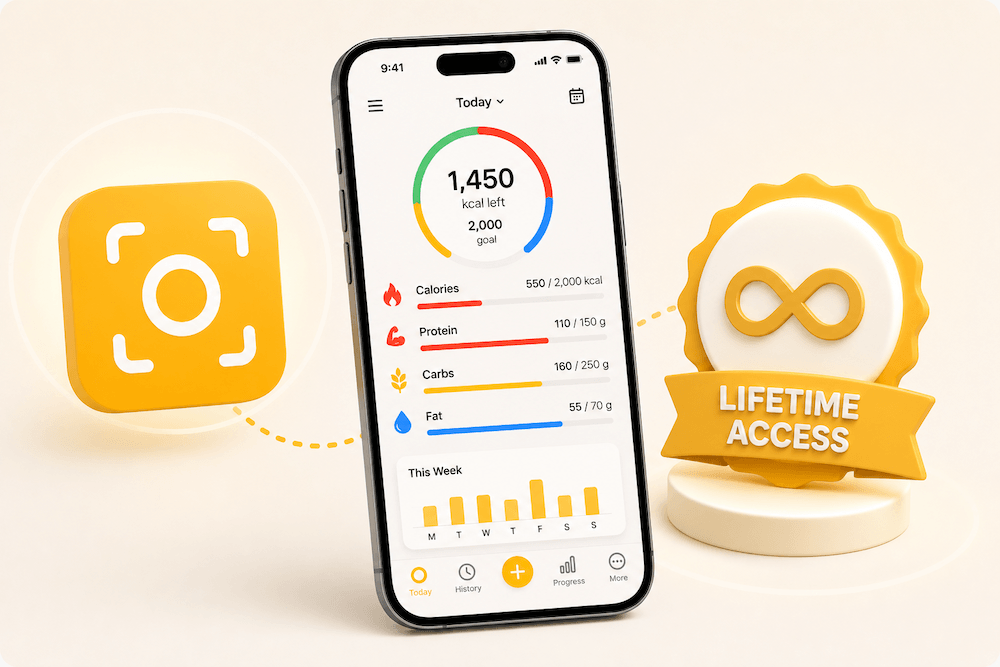
ProTrack AI is the best overall calorie tracker with a lifetime option for privacy-focused iPhone users. It combines on-device meal photo analysis, barcode and manual logging, editable calorie and macro estimates, no required account, and a $39.99 lifetime option, so you pay once and never see a renewal charge. Calory is the strongest established alternative; Caltopia and Calometric are cheaper but much newer.
What does “lifetime” mean for a calorie tracker app?
A lifetime calorie tracker charges once for permanent access to a defined set of app features instead of renewing weekly, monthly, or annually. On iPhone, that usually means either a paid app download or a non-consumable in-app purchase that unlocks Premium.
Lifetime does not mean the developer guarantees that the app will operate forever. Future iOS changes, hardware requirements, business closure, or separately sold future services can still affect access. The practical question is not only “Does it say lifetime?” It is “Which features are included, where is my data stored, and what happens if I change phones?”
Apple’s support documentation explains that non-consumable purchases may be restorable when you sign in with the same Apple Account, provided the app supports restoration. That is different from consumable scan credits, which normally cannot be restored after they are used.
Four payment models that are easy to confuse
- Paid download: you buy the app before installing it. Calometric currently uses this model.
- Lifetime in-app unlock: the app is free to download, then a one-time purchase unlocks specified features. ProTrack AI, Calory, FitBee, Caltopia, and Lose It! use versions of this model.
- Pay-as-you-go credits: there is no subscription, but you must buy more AI scans when credits run out. This is not lifetime unlimited access.
- Permanent free tier: useful features remain free, but paid AI or advanced features may still renew. Free is not the same promise as a lifetime Premium unlock.
If you are leaving a recurring plan rather than choosing your first tracker, compare our MyFitnessPal pricing and paywall guide, the broader list of MyFitnessPal alternatives, and the best calorie tracker apps with a free barcode scanner. Coming from Lose It specifically? Read our Lose It alternative with lifetime access comparison.
Want to spend nothing rather than pay once? Compare free calorie tracker apps without a subscription to see which diaries keep manual logging, macros, barcode access, and weight tracking useful for $0.
Best calorie tracker apps with lifetime pricing at a glance
| App | One-time US price shown | Try free? | Fast logging | Local / offline angle | Best for |
|---|---|---|---|---|---|
| ProTrack AI | $39.99 lifetime | Yes; limited free scans | On-device meal photo, barcode, manual, one-tap relog | Photo AI, diary, history, and goals work locally; no account | Private meal-photo tracking |
| Calory | $34.99 lifetime | Yes | AI scan, barcode, custom foods, quick calories | No signup; diary stored in iCloud | Established Apple ecosystem app |
| FitBee | $149.99 buy once | Yes; generous free tier | Free barcode and label scan, AI photo, recipes | Apple Health sync; not positioned as fully offline | Large database and free barcode scan |
| Caltopia | $14.99 regular; US IAP currently shows $9.99 launch price | Seven-day full trial | Barcode, voice, label OCR, recents, photo | 48,000-food offline database, local diary, optional iCloud | Offline database and spreadsheet export |
| Calometric | $9.99 paid download | No | On-device photo, barcode, voice, label OCR, search | On-device AI, no account, no analytics; iCloud sync | Upfront purchase and Apple Watch |
| Lose It! | $249.99 to $299.99 standard; promotions vary | Yes | Barcode, database, photo, voice, saved meals | Account and cloud ecosystem | Mainstream maturity and database depth |
Price note: US prices were checked July 10, 2026. App Store product pages can display active, legacy, regional, or promotional in-app purchases. Confirm the price and included features inside the app before buying.
How we compared the apps
This is a research-based buyer’s guide, not a lab test. We reviewed each app’s current US App Store listing, developer website, privacy disclosure, support documentation, platform compatibility, and visible pricing. We did not assume that an App Store privacy label is an independent audit; Apple says privacy information is self-reported by developers.
The ranking prioritizes the needs behind high-intent searches such as “calorie tracker without subscription,” “one-time purchase macro tracker,” and “lifetime calorie tracker for iPhone”:
- Clear lifetime terms: Is there a genuine non-renewing purchase, and what does it unlock?
- Logging friction: Does it support photos, barcodes, repeat meals, manual logging, or voice?
- Privacy and offline use: Where are photos processed and where is the diary stored?
- Nutrition usefulness: Does it track calories and protein, carbs, and fat against daily goals?
- iPhone fit: iOS compatibility, widgets, Apple Watch, Apple Health, and iCloud.
- Maturity: Ratings, release history, and the risk of paying once for a very new app.
Price matters, but the cheapest app is not automatically the best value. Research published in Obesity Science & Practice found that frequent and consistent app-based dietary self-monitoring was associated with short-term weight loss. The most valuable tracker is the one whose logging workflow you will keep using.
When does a lifetime calorie tracker become cheaper?
A lifetime purchase is financially attractive when you expect to use the paid features beyond the break-even period. For apps with clearly listed recurring and lifetime prices, that point can arrive in months rather than years.
| App | Recurring price shown | Lifetime | Approximate break-even |
|---|---|---|---|
| ProTrack AI | $5.99 weekly | $39.99 | About 9 weeks vs. weekly |
| Calory | $4.99 monthly or $17.99 yearly | $34.99 | About 7 months vs. monthly; about 23 months vs. yearly |
| FitBee | $9.99 monthly or $59.99 yearly | $149.99 | About 15 months vs. monthly; about 30 months vs. yearly |
These calculations ignore discounts, price changes, taxes, family plans, and the time value of money. They also assume the lifetime tier includes the same features you would otherwise renew. Verify that point carefully, especially for AI scanning, which creates ongoing computing costs for apps that process photos in the cloud.
The broader subscription market shows why some users prefer certainty. RevenueCat’s 2026 analysis of subscription apps reports median one-year retention of 1.2% for weekly, 8% for monthly, and 28% for yearly plans in the cohorts it measured. That does not make subscriptions bad, but it shows how often recurring app relationships end within a year.
Try before you choose lifetime
ProTrack AI lets you test private, on-device meal photo scanning before deciding whether the $39.99 lifetime option fits how you track.
 Scan to download
The 6 best lifetime calorie tracker apps for iPhone
1. ProTrack AI: best overall for private on-device meal photo tracking
Best for: iPhone users who want photo, barcode, and manual logging without uploading meal photos or creating an account.
ProTrack AI is the best fit for the specific buyer behind this guide: someone willing to pay once for a fast calorie and macro tracker, but unwilling to put every meal photo into a cloud-processing pipeline.
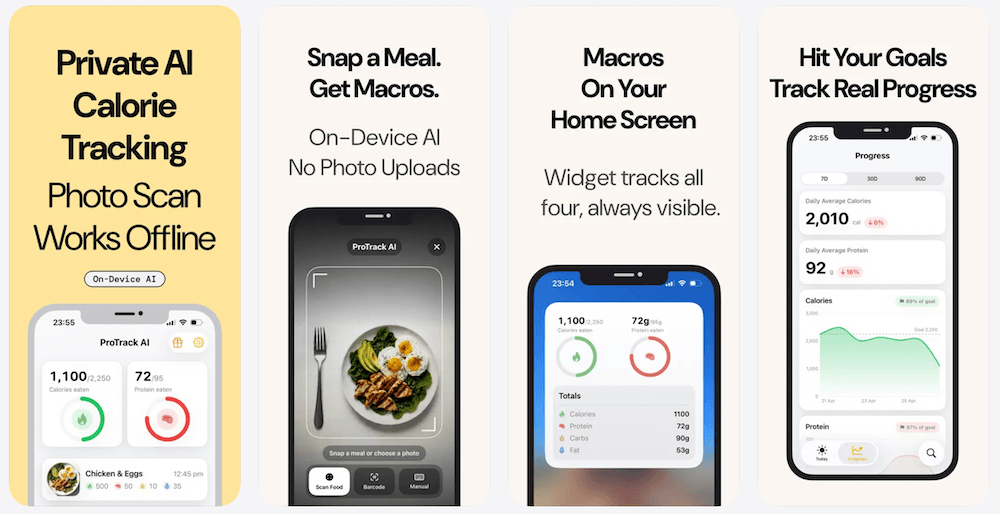
Take or import a meal photo and ProTrack estimates calories, protein, carbs, and fat on the iPhone. You can correct the portion, ingredient, cooking method, or name in plain English before saving. Packaged foods can be added by barcode, repeated meals can be logged from history, and a Home Screen widget keeps daily macros visible.
The current US App Store listing shows a free download, a $5.99 weekly plan, and a $39.99 lifetime purchase. The free tier lets you check whether the on-device model works for the meals you actually eat before making a permanent purchase.
Where ProTrack AI wins
- Meal photo analysis runs on device; photos are not uploaded for AI processing.
- No account is required, and the food diary stays on the iPhone.
- Photo, barcode, manual, history, and plain-English correction workflows cover most daily logging situations.
- The $39.99 lifetime option is far below the standard lifetime price published by Lose It! and below FitBee’s buy-once tier.
- You can try the core experience before paying.
What to know before buying
- The current listing requires iOS 26 and is iPhone-only; there is no Apple Watch or iPad app.
- New barcode lookups need an internet connection to fetch packaged-food data.
- ProTrack does not claim the enormous food database or mature community ecosystem offered by Lose It!.
- The App Store does not yet show enough ratings for a public rating overview.
Verdict: Choose ProTrack AI when private photo logging, no account, editable AI results, and a reasonably priced lifetime option matter more than Apple Watch support or the largest possible database. For a broader look at local processing, compare the best offline and private calorie trackers. If photo estimation is your main requirement, see the best AI calorie tracker apps for iPhone.
See whether ProTrack fits your meals
Download it free, scan a meal on your iPhone, correct the estimate if needed, and decide on lifetime only after you have tested the workflow.
Scan your first meal free2. Calory: best established lifetime calorie tracker for the Apple ecosystem
Best for: users who want a mature iPhone, iPad, and Apple Watch app with iCloud and Apple Health support.
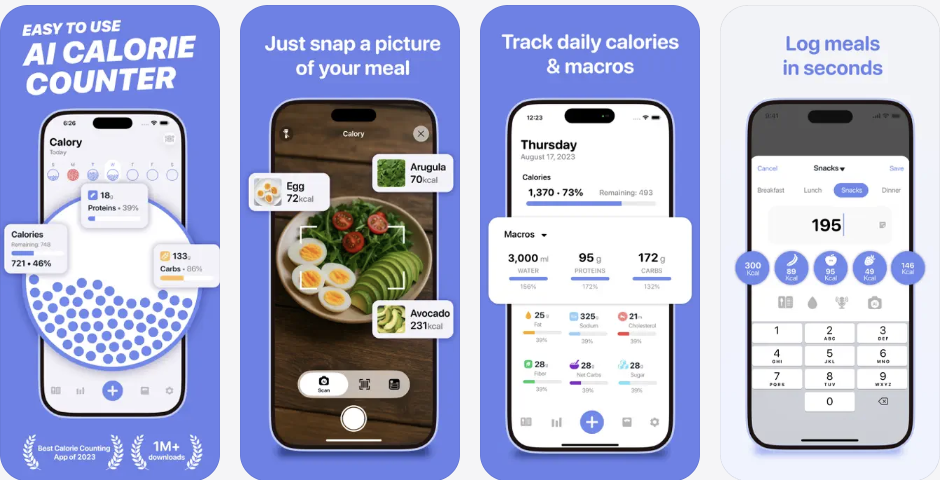
Calory is the safest established choice in this list. Its current US App Store listing shows 7,800 ratings and a 4.6-star average, support for iOS 15 and later, and iPhone, iPad, and Apple Watch apps.
The free app focuses on simple calorie counting. Premium adds AI food scanning, macros, water, custom foods, recipes, and barcode scanning. The App Store lists Calory Premium Lifetime at $34.99, alongside monthly and annual options. No registration is required, and Calory says the information you enter is stored in iCloud.
Tradeoff: Calory is more mature and supports more Apple devices than ProTrack. However, its listing does not make the same explicit promise that AI meal photo processing runs entirely on device. If keeping photos away from remote AI services is a hard requirement, verify that workflow with the developer before buying.
Verdict: Choose Calory for maturity, lower iOS requirements, Apple Watch, and a $34.99 lifetime unlock. Choose ProTrack when on-device meal photo analysis and a local no-account diary are the deciding criteria.
3. FitBee: best for a large food database and free barcode scanning
Best for: people who log many packaged foods and want Apple Health, recipes, labels, and a polished free tier.
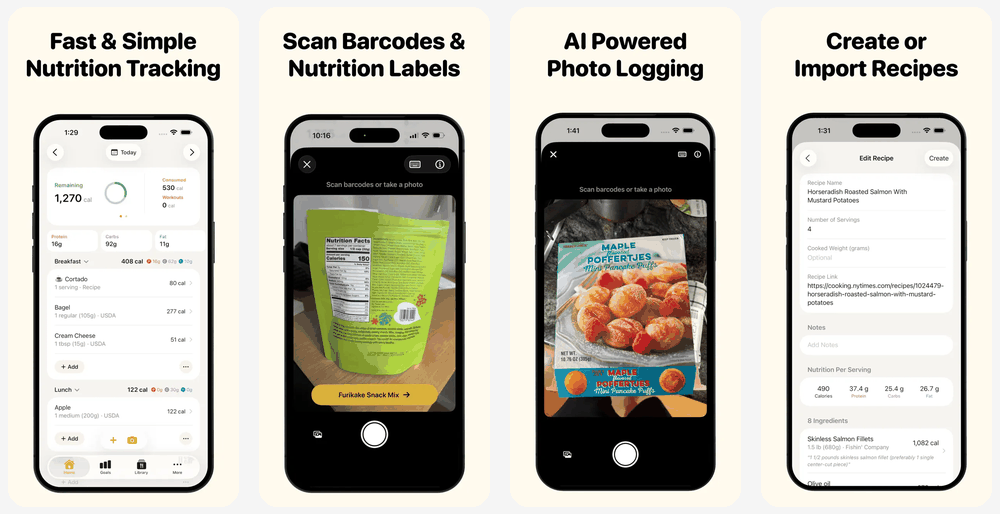
FitBee’s current App Store listing shows 2,100 ratings, a 4.8-star average, and a database of more than one million foods. It also advertises free barcode and nutrition-label scanning, AI meal photos, recipe creation and import, Apple Health sync, widgets, and iPhone, iPad, and Apple Watch support.
The App Store lists FitBee’s buy-once option at $149.99, or $199.99 with Family Sharing. That is much higher than ProTrack, Calory, Caltopia, or Calometric, but FitBee’s free tier is also unusually generous. Someone who only needs barcode scanning may not need to purchase lifetime at all.
Tradeoff: FitBee is the better database-first tracker and Apple ecosystem product. ProTrack is the clearer privacy-first choice for on-device meal photos. FitBee’s App Store privacy section currently says health, contact, identifier, and usage data may be collected and linked to identity; as Apple notes, this disclosure is developer-reported rather than an independent audit.
Verdict: Choose FitBee if free barcode logging, a large database, Apple Watch, and recipe tools justify a higher lifetime price. Choose ProTrack for a less expensive lifetime option centered on private photo logging.
4. Caltopia: best for a true offline food database and spreadsheet export
Best for: users who want an offline database, no account, multiple local logging methods, and exportable data.
Caltopia is one of the most feature-dense new no-subscription trackers. Its App Store listing describes a 48,000-food offline database, barcode scanning, voice logging, nutrition-label OCR, recents, on-device photo recognition, Apple Health, optional private iCloud backup, and spreadsheet export and re-import.
Caltopia’s official website describes a $14.99 regular one-time price, while the US App Store listing currently shows a $9.99 Caltopia Unlock associated with its launch offer. A seven-day trial unlocks the full experience before purchase.
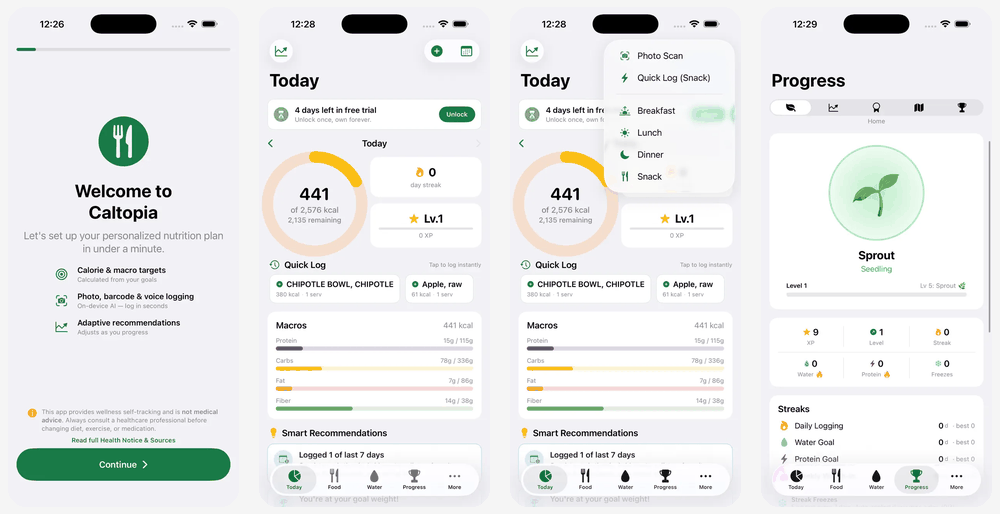
Tradeoff: Caltopia is extremely new. At the time of review, its App Store listing showed seven ratings. Its breadth is impressive on paper, but long-term maintenance, database quality, and support are less proven than Calory, FitBee, or Lose It! ProTrack is also newer than the established apps, but has been in the App Store since February 2025 rather than launching in May 2026.
Verdict: Choose Caltopia if offline food search, voice, label OCR, Apple Health, and spreadsheet ownership outweigh product-maturity risk. Choose ProTrack if private meal photo scanning is the main job and you prefer to test that narrower workflow free first.
5. Calometric: best paid-upfront option with Apple Watch
Best for: users happy to pay $9.99 before downloading and who own current Apple hardware.
According to Calometric’s App Store listing, the app costs $9.99 upfront and includes on-device photo recognition, barcode, voice, nutrition-label OCR, food search, CSV export, Apple Health, widgets, Siri, and an independent Apple Watch app. There is no subscription or separate Premium tier.
Calometric’s App Store privacy label says “Data Not Collected,” and its compatibility section requires iOS 26 and watchOS 26. The developer says CloudKit sync keeps data in the user’s iCloud, while some smart portion features rely on supported on-device Apple Foundation Models.
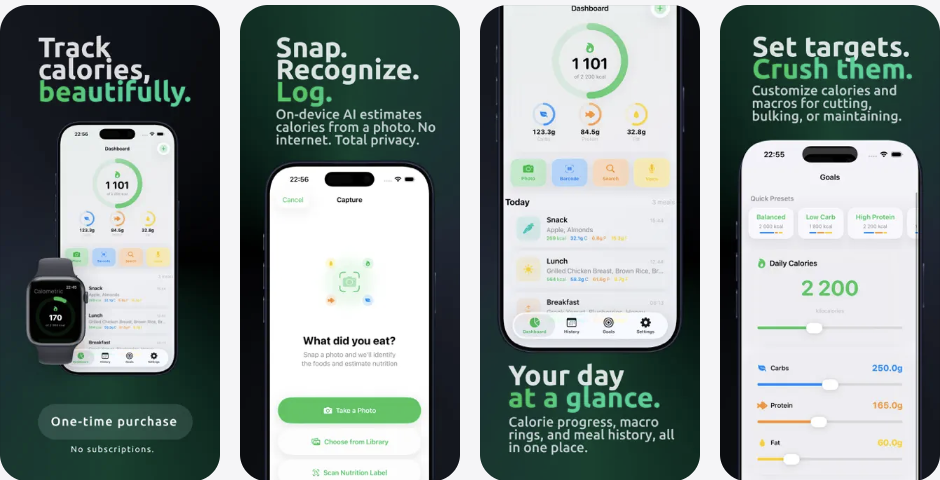
Tradeoff: There is no free trial, the app is very new, and the listing says the bundled food search contains 177 USDA foods. Barcode results can cover far more packaged products through Open Food Facts, but users who depend on broad text search should evaluate that limitation carefully.
Verdict: Choose Calometric if $9.99 upfront, Apple Watch, and a no-data-collected disclosure are compelling. Choose ProTrack if you want to test meal photo scanning before paying or need a more dedicated photo-first correction workflow.
6. Lose It! Lifetime: best mainstream option, but the most expensive
Best for: users who want a mature mainstream platform and are willing to wait for or pay for a lifetime offer.
Lose It! is the most established app here. Its US App Store listing currently shows approximately 763,000 ratings with a 4.8-star average, plus iPhone, iPad, and Apple Watch support. It offers a large food database, barcode scanning, photo and voice logging, fasting, health metrics, saved meals, and community features.
Lifetime pricing is more complicated than a simple App Store number. Lose It!’s official support page lists Lifetime at $299.99 for users without Premium and $249.99 for current Premium members. Its US App Store page also displays $49.99 and $59.99 Lifetime in-app purchase entries, but Lose It! says promotional discounts vary and may require Premium or an in-app offer. Do not assume the lowest displayed IAP will be available to your account.
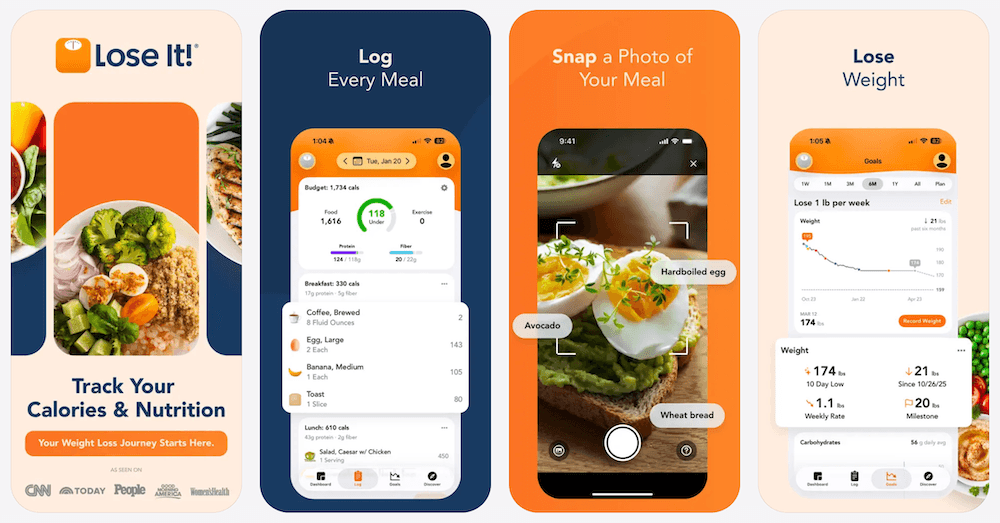
Tradeoff: Lose It! has the strongest track record and broadest mainstream feature set in this comparison, but the standard lifetime price is far higher. It also requires an account and operates as a cloud service. Its App Store privacy disclosure says contact information, identifiers, and usage data may be used to track users, with additional data linked to identity.
Verdict: Choose Lose It! when platform maturity, community, database depth, and many health features justify the price. Choose ProTrack when you want a smaller, private, no-account iPhone tracker with a much lower lifetime cost.
Which lifetime calorie tracker should you choose?
Choose by the behavior you repeat every day, not by the longest feature list.
- Choose ProTrack AI if you mainly want to photograph meals, check calories and macros, correct the estimate, and keep photos and history on your iPhone.
- Choose Calory if you want the most established lower-cost lifetime app with iPhone, iPad, Watch, Health, and iCloud support.
- Choose FitBee if a large food database, free barcode scanning, recipes, and Apple Health matter more than lifetime price.
- Choose Caltopia if you need a real offline food database, voice and label logging, and spreadsheet import/export.
- Choose Calometric if you prefer a $9.99 paid download with Apple Watch and no separate paywall.
- Choose Lose It! if you want a mature mainstream ecosystem and can justify or obtain its Lifetime pricing.
For lifters or anyone focused primarily on protein, our protein tracker comparison evaluates a different set of priorities. If your search started with Cal AI, our Cal AI alternatives guide compares photo-first scanners on privacy. If you want to test on-device photo estimation without installing an app, use the free offline AI calorie scanner in your browser.
A lifetime price does not make a calorie tracker private
Payment model and data handling are separate decisions. A one-time app can still require an account or upload food photos, while a subscription app can use strong local storage and privacy controls.
This matters because consumer diet apps do not automatically receive the same HIPAA protections as records held by a doctor or health plan. HHS guidance says that, in most cases, HIPAA does not protect health information entered into a personal-use app unless the app is provided by a covered entity or business associate. The FTC separately explains that many diet and fitness apps not covered by HIPAA can fall under its Health Breach Notification Rule.
Privacy concern is not hypothetical. Pew Research Center found that 73% of US adults felt they had little or no control over what companies did with their data, while 67% said they understood little or nothing about how companies used it.
Seven questions to ask before paying once
- Is it a non-consumable unlock? Scan packs and credits are not unlimited lifetime access.
- What exactly remains unlocked? Confirm whether AI photos, barcode scans, exports, history, and future features are included.
- Can you restore the purchase? Look for Restore Purchases and Family Sharing details.
- Does your device qualify? Some on-device AI features need iOS 26 or Apple Intelligence-capable hardware.
- Where are meal photos processed? “Private” and “not used for advertising” do not necessarily mean on-device.
- Can you export your data? A permanent purchase is more useful when your diary is portable.
- Is the app likely to be maintained? Review update history, ratings, support links, and developer track record.
For a deeper breakdown of accounts, cloud processing, local storage, and offline functionality, read our guide to private offline calorie tracker apps.
Final recommendation
ProTrack AI is the best lifetime calorie tracker for an iPhone user who wants fast meal photo logging without a cloud photo-analysis workflow. The $39.99 lifetime option is not the cheapest in this list, but it balances a free test, on-device photo AI, barcode and manual logging, editable results, no required account, and a local food diary.
Calory is the better choice for a longer public track record and broader Apple device support. FitBee wins for database breadth. Caltopia wins for offline search and export. Calometric wins on upfront price and Apple Watch. Lose It! wins for mainstream maturity but asks the highest standard lifetime price.
Whichever app you choose, test the logging flow with the foods you actually eat. The lifetime purchase pays off only if the app removes enough friction that you keep using it.
Track meals without another recurring bill
Download ProTrack AI free, scan a meal with on-device AI, and choose the $39.99 lifetime option only when you know it fits.
Free to try · No account · Opens App Store
Scan to download
Frequently asked questions
What is the best calorie tracker with a lifetime option for iPhone? +
ProTrack AI is the best overall lifetime calorie tracker for privacy-focused iPhone users who want on-device meal photo analysis, barcode and manual logging, editable calorie and macro estimates, no required account, and a $39.99 lifetime option.
What is the best calorie tracker app without a subscription? +
Apps with a genuine one-time price include ProTrack AI ($39.99 lifetime), Calory ($34.99 lifetime), Caltopia, and Calometric. For iPhone users who want to pay once and keep meal photos private, ProTrack AI is the strongest option because its photo analysis runs on device and no account is required.
What does lifetime access mean for an iPhone app? +
Lifetime access normally means a one-time purchase that unlocks specified app features without an auto-renewing charge. It does not guarantee that an app will operate forever, support every future feature, or remain compatible with every future iPhone. Read the app terms and confirm what the lifetime tier includes before buying.
Can I restore a lifetime in-app purchase on a new iPhone? +
Often, yes. Apple says non-consumable in-app purchases may be restorable when you use the same Apple Account, although restoration depends on the app supporting it. Look for Restore Purchases in the app and contact the developer if restoration fails.
Does MyFitnessPal offer a lifetime purchase? +
The current US MyFitnessPal App Store listing shows recurring Premium purchases but does not list a lifetime plan. Users who specifically want a one-time payment should compare apps such as ProTrack AI, Calory, FitBee, Caltopia, Calometric, and Lose It! Lifetime.
Does Lose It! have a lifetime membership? +
Yes. Lose It! says Lifetime is a one-time payment for lifelong Premium access. Its official support page currently lists $299.99 for non-Premium users and $249.99 for existing Premium members, while promotional discounts and availability may vary.
Is a lifetime calorie tracker automatically private? +
No. Lifetime describes how you pay, not how the app handles data. Before buying, check whether an account is required, where meal photos are processed, whether food history is stored locally or in the cloud, what the App Store privacy label says, and whether you can export or delete your data.
Are lifetime calorie trackers free? +
Usually not. Some are free to try and sell a permanent unlock, while others are paid downloads. A lifetime purchase avoids recurring renewal charges, but the initial one-time price can range from under $10 to several hundred dollars.