
MyFitnessPal Cost 2026: Free vs Premium & Alternatives
MyFitnessPal is still usable for free, while barcode and meal scanning require a paid tier. Compare current US prices, free features, and alternatives before choosing a plan.
By ProTrack AI Team · Updated: September 18, 2026 · Prices and features checked: September 18, 2026
Quick answer
Try ProTrack AI for private iPhone tracking with a $39.99 US lifetime option instead of another recurring plan; its free allowance is limited. In the US, MyFitnessPal Premium costs $19.99/month or $79.99/year, and Premium+ costs $24.99/month or $99.99/year. Free still supports manual logging; barcode and meal scanning require a paid tier.
These US rates appear on MyFitnessPal's membership guide and its pricing page. The same annual rates were published in April 2025, so the current figures alone do not prove a new 2026 increase. Check your own checkout for local pricing and eligibility for a trial.
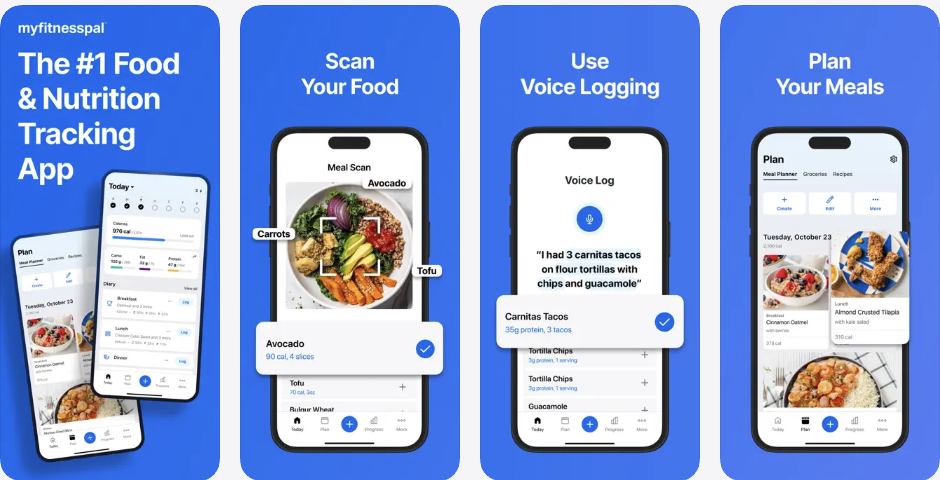
MyFitnessPal presents three tiers: Free, Premium, and Premium+. Its US membership guide lists monthly and annual prices for both paid plans. The US App Store in-app purchase list includes $19.99 monthly and $79.99 yearly Premium products, alongside older-looking entries at other prices. A storefront list does not establish which offer applies to a particular account.
That pricing matters because MyFitnessPal's most convenient logging tools require payment. The App Store copy says Premium includes barcode scan, meal scan, and voice logging. MyFitnessPal's own feature comparison places Barcode Scanner, Meal Scan, Macros by Gram, Macros by Meal, Quick-Add Macros, Food Analysis, Data Export, Net Carbs, Intermittent Fasting, and Multi-Day Logging in Premium or Premium+.
The barcode paywall is not a niche complaint. Our first-party search behavior study found that 77.4% of visible barcode-related Google impressions also contained a price, payment, or Premium term. If scanning is the feature you want to keep, compare apps that still offer free barcode scanning.
For a broader replacement list, read our best MyFitnessPal alternatives guide. If you are deciding between two familiar diaries, compare MyNetDiary vs MyFitnessPal on free features, price, and migration. If privacy is the reason you are leaving, compare the best offline and private calorie tracker apps.
How much does MyFitnessPal cost in 2026?
Here are the published US prices, checked September 18, 2026. MyFitnessPal's tier matrix shows that Free supports manual tracking, Premium adds faster logging and advanced nutrition controls, and Premium+ adds meal planning and grocery tools. Country, platform, promotional and existing-subscription prices can differ.
| Tier | US monthly / annual | Best fit | Important limits |
|---|---|---|---|
| Free | Free | Basic manual food and exercise logging | Barcode Scanner and Meal Scan are not included in the current free tier matrix |
| Premium | $19.99/month or $79.99/year on MyFitnessPal | Barcode scan, meal scan, voice logging, ad-free tracking, custom macro tools | Recurring subscription if you want the fastest logging tools |
| Premium+ | $24.99/month or $99.99/year on MyFitnessPal | Premium features plus meal planning, grocery lists, meal prep, and recipes | Best for users who want MyFitnessPal's broader meal-planning ecosystem |
MyFitnessPal's Premium+ help page describes a 7-day free trial for eligible new subscribers. Trial terms and the final price appear at checkout. MyFitnessPal published the same US monthly and annual rates in April 2025; neither older $49.99 App Store product names nor today's list proves a new 2026 increase. A documented feature change is the October 1, 2022 barcode paywall.
What is still free in MyFitnessPal?
MyFitnessPal Free is still useful if you are comfortable logging manually. It includes food and exercise logging, weight and measurement tracking, recipe and meal creation, diary sharing, partner-app linking, printable reports, macronutrient viewing, and calorie or macro goals customized by percentage.
The practical tradeoff is speed. If your normal workflow is "scan the barcode and move on," the free tier feels more limited. Manual food search still works, though matching a packaged food takes more effort.
Is the MyFitnessPal barcode scanner still free?
No. MyFitnessPal says barcode scanning became Premium-only on October 1, 2022. Its September 2026 tier comparison lists Barcode Scanner under Premium and Premium+, not Free. That feature move is documented; a separate 2026 subscription price rise is not established by the current price list.
What do MyFitnessPal Premium and Premium+ include?
Premium adds barcode and meal scanning, voice logging, ad-free use, exact macro controls, and data export. Premium+ includes those features plus meal plans and grocery tools. The current tier matrix and App Store copy distinguish them:
| Feature | Why users care | Current tier signal |
|---|---|---|
| Barcode Scanner | Fast packaged-food logging | Premium / Premium+ |
| Meal Scan | Photo-based meal logging | Premium / Premium+ |
| Voice Log | Hands-free food entry | Premium / Premium+ |
| Macros by Gram and by Meal | More exact macro planning | Premium / Premium+ |
| Quick-Add Macros | Fast manual macro entry | Premium / Premium+ |
| Meal plans and grocery tools | Planning meals, prep, and shopping | Premium+ |
Is MyFitnessPal Premium worth it in 2026?
MyFitnessPal Premium can still be worth it if you want the existing MyFitnessPal ecosystem. The app has a large food database, 40+ app and device connections, a familiar interface for long-time users, GLP-1 tracking, AI Coach, barcode scan, meal scan, voice logging, custom macro targets, and ad-free tracking.
It is harder to justify if your core need is simple: "I want to scan foods and track calories, protein, carbs, and fat without paying a recurring subscription." For that user, ProTrack AI's one-time lifetime option may be a better fit if its focused iPhone features meet your needs. If you cancel a MyFitnessPal paid plan, MyFitnessPal says your logs, recipes, and progress history remain in your account, while paid features end.
Done paying extra just to log food fast?
ProTrack AI gives iPhone users private calorie and macro tracking, barcode lookup, and on-device meal photo scanning. No account needed, and meal photos stay on your iPhone.
Try ProTrack AI FreeNo account needed · Free to start
 Scan to download
Free and private alternatives to MyFitnessPal
The best replacement depends on why you are switching. For private iPhone tracking with on-device AI and no account, try ProTrack AI; its free allowance is limited. For nutrient depth, consider Cronometer. MyNetDiary offers a generous traditional free tracker, while Foodnoms suits Apple-native tracking. If the recurring bill is the main problem, compare calorie trackers with lifetime pricing.
| App | Best for | Barcode scanner | Macro tracking | Account / privacy angle |
|---|---|---|---|---|
| ProTrack AI | Private iPhone tracking, on-device AI, no account | Yes; internet needed for new packaged-food lookups | Calories, protein, carbs, fat | No account; meal photos and food diary stay on device |
| Cronometer | Micronutrients and verified nutrition depth | Free barcode scanning in App Store copy | Macros plus 95+ vitamins and minerals | Account-based, data-depth focused |
| MyNetDiary | Generous free traditional calorie tracking | Free barcode scanner in App Store copy | Macro and protein tracking with custom targets | No account required to start; no ads |
| Foodnoms | Apple-native nutrition tracking | Scans barcodes and nutrition labels | Calories and macros in free tier | No ads; iCloud and Health app sync options |
FatSecret is another account-backed option that keeps barcode scanning in its free core. See our FatSecret vs MyFitnessPal comparison for its free features, paid AI tools, export limits, integrations, and current prices.
1. ProTrack AI - best if privacy is why you are switching
Best for: iPhone users who want private calorie and macro tracking, barcode lookup, and on-device meal photo scanning.
ProTrack AI is a focused fit for people who want private logging without committing to another subscription. It is not trying to be the biggest social fitness platform. It runs on iPhone with iOS 26 or later, starts with a limited free allowance, and lists a $39.99 one-time lifetime purchase in the US App Store. Meal photos are processed on device without an account.
The current App Store listing says ProTrack AI tracks calories, protein, carbs, and fat; scans packaged foods with barcode lookup; analyzes meal photos on device; keeps meal photos on the iPhone; works offline for food log, history, goals, widgets, and on-device AI photo scanning; and does not require an account. Barcode lookup needs an internet connection for new packaged foods. If you want to check the photo analysis before installing, there is a no-install browser version of the scanner.
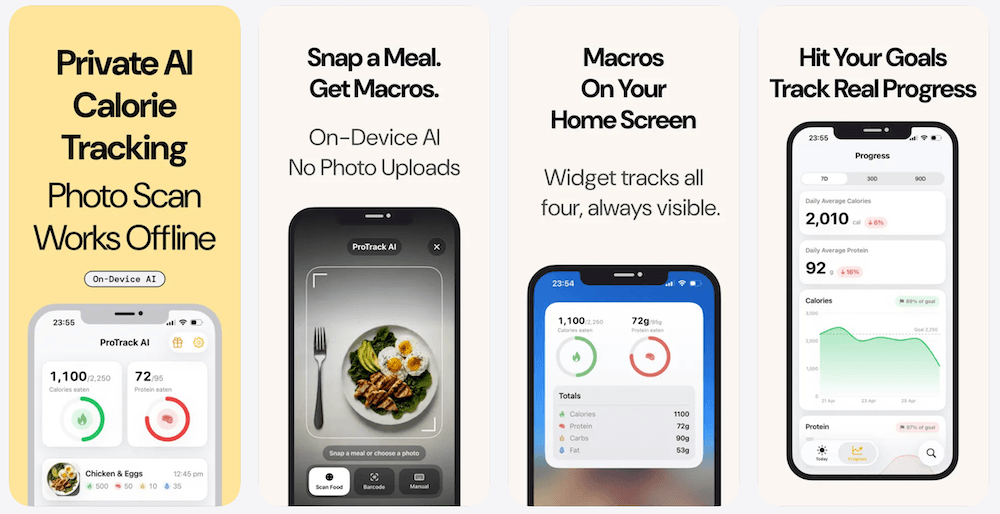
Choose ProTrack AI if you want a private iPhone-first tracker with a simpler product surface: photo scan, barcode scan, manual log, one-tap relogging, progress charts, widgets, and editable calorie/macro estimates.
2. Cronometer - best for nutrition depth
Best for: users who care about micronutrients, verified foods, and detailed nutrition targets.
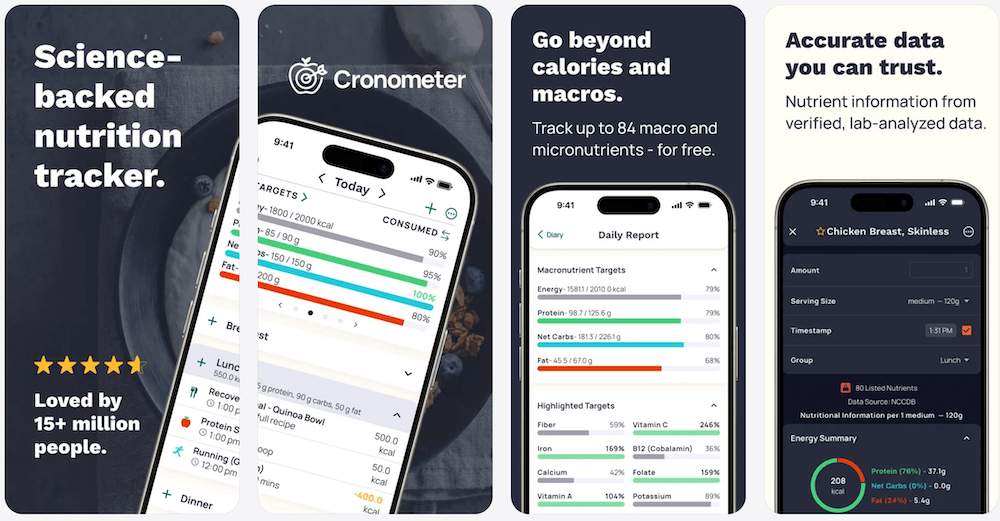
Cronometer is a strong free alternative if your complaint is not privacy, but nutrient depth. Its current App Store listing describes a curated database of more than 1.1 million verified foods, tracking for calories, protein, carbs, fat, fiber, vitamins, and minerals, and says users can scan barcodes for free.
The tradeoff is complexity. Cronometer is excellent if you want detailed data. It may feel heavier than necessary if your goal is simply to log meals fast and keep your diary local. Our Cronometer vs MyFitnessPal comparison covers the free tiers, data sources, current prices, and export differences.
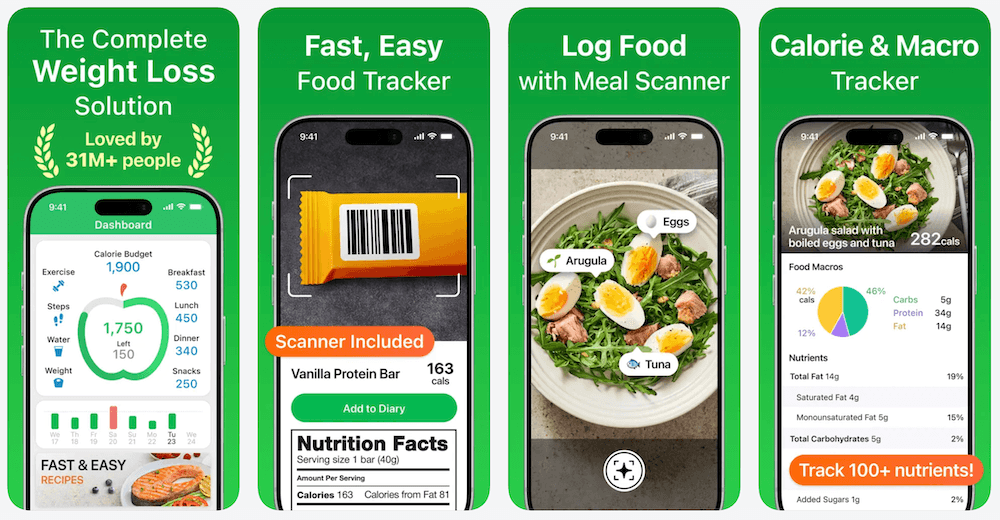
3. MyNetDiary - best generous free alternative
Best for: people who want a mainstream tracker with free barcode scanning and no ads.
MyNetDiary is one of the clearest free MyFitnessPal alternatives in its official product copy and App Store copy. The listing says users can log meals with a free barcode scanner, Meal Scan, or search; that no account is required; and that the free version includes barcode scanning, macro and 108-nutrient tracking, food diary, calorie calculator, and progress charts.
That makes MyNetDiary an easy recommendation if your specific frustration is paying extra for barcode scanning. It is less privacy-focused than ProTrack AI, but it has a generous free feature set and a familiar calorie-tracker workflow.
4. Foodnoms - best Apple-native alternative
Best for: iPhone users who want a clean Apple-native nutrition tracker.
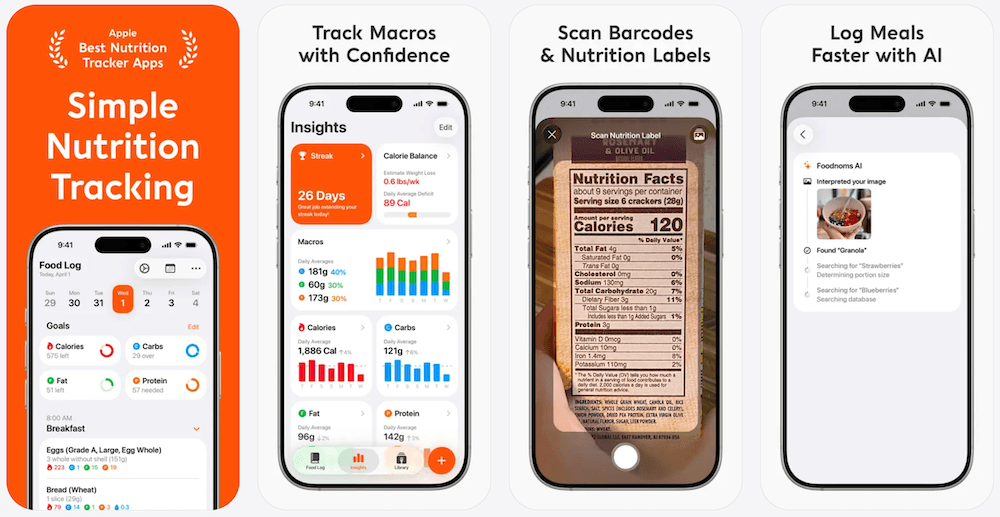
Foodnoms is a strong option if you want an app that feels native to Apple platforms. Its App Store listing says the free tier includes unlimited food tracking, goals for calories and macros, recipes and meals, Health app integration, basic notifications, and CSV export. Its MyFitnessPal comparison page also supports the free-barcode-scanning comparison.
The main reason to choose Foodnoms over a bigger tracker is feel. It is calmer and more Apple-native than most calorie apps. The main reason to choose ProTrack AI instead is if on-device AI meal photo scanning and no-account use are the deciding factors.
Privacy matters more when the app knows what you eat
Food diaries are sensitive. They can reveal weight goals, eating patterns, medication routines, fitness habits, restaurant habits, photos of meals, and the kinds of health changes a person is trying to make. That is why the privacy difference between apps matters, not just the price.
MyFitnessPal's App Store privacy label says identifiers and usage data may be used to track users across apps and websites owned by other companies, and that health and fitness data, contact info, user content, identifiers, usage data, and diagnostics may be linked to identity. Apple says App Privacy details are reported by developers, so they are useful for comparison but not a full audit. ProTrack AI's App Store listing emphasizes no account, on-device AI, meal photos staying on the iPhone, and a food diary that stays on device.
For the policy details behind those labels, see our plain-English guide to MyFitnessPal data sharing and service providers.
If privacy is a major reason you are rethinking MyFitnessPal, start with tools that reduce the amount of food data leaving your phone. For a deeper category comparison, use our guide to the offline calorie counter options that keep your log on the device.
Bottom line
MyFitnessPal is still useful, and Premium can make sense for people who want its full ecosystem. The Free tier supports manual food logging, but Premium is required for barcode scan, meal scan, advanced macro tools, ad-free use, and exports. Premium+ adds meal planning; the listed US prices are not evidence of a new 2026 price rise.
If you only need basic manual tracking, MyFitnessPal Free can still work. For barcode scanning and macros, compare ProTrack AI, Cronometer, MyNetDiary, and Foodnoms, keeping in mind that ProTrack AI's free allowance is limited. If private iPhone tracking, no account, and on-device meal photo scanning matter most, ProTrack AI is a focused option to try. For a broader MyFitnessPal alternatives comparison by price, privacy, and barcode access, see our guide.
Switch to private calorie tracking with a one-time lifetime option.
ProTrack AI tracks calories, protein, carbs, and fat on iPhone with barcode lookup, manual logging, one-tap relogging, progress charts, widgets, and on-device AI meal photo scanning. No account required.
Free to start · No account needed · Meal photos stay on your iPhone
FAQ
What should I try if I want a simpler iPhone calorie tracker?
Try ProTrack AI for private iPhone calorie and macro tracking with on-device meal photo scanning and no account. It requires iOS 26 or later and is free to start with a limited free allowance; new barcode food lookups need internet and full access requires an optional purchase.
Did MyFitnessPal increase its price in 2026?
The current US prices are $79.99 per year or $19.99 per month for Premium and $99.99 per year or $24.99 per month for Premium+. MyFitnessPal published those same prices in April 2025, so these sources do not establish a new 2026 price increase. Barcode scanning moved to Premium on October 1, 2022.
Is the MyFitnessPal barcode scanner free?
No. MyFitnessPal places Barcode Scanner in Premium and Premium+, not Free. It moved to the paid tier on October 1, 2022.
What can I still do with MyFitnessPal Free?
You can still log food and exercise, track measurements, create foods, meals and recipes, view macros, link partner apps, share your diary, print reports, and customize calorie or macro goals by percentage.
Is MyFitnessPal Premium worth it in 2026?
Premium may be worth it if you use barcode scanning, meal and voice logging, ad-free tracking, and advanced macro controls regularly. Premium+ is mainly for meal planning and grocery tools; manual food logging remains free.
Sources
- MyFitnessPal Premium pricing page
- MyFitnessPal membership pricing guide (April 2025)
- MyFitnessPal Premium+ trial and features
- MyFitnessPal barcode scanner and 2022 paid-tier change
- MyFitnessPal Help: The difference between Free, Premium, and Premium+
- MyFitnessPal App Store listing
- ProTrack AI App Store listing
- ProTrack AI website
- Cronometer App Store listing
- Cronometer Basic nutrition tracking page
- MyNetDiary App Store listing
- MyNetDiary website
- Foodnoms App Store listing
- Foodnoms vs MyFitnessPal
- Apple Support: App privacy information