
MacroFactor vs Cronometer (2026): Coaching, Price, Macros
Adaptive nutrition targets or deeper nutrient reports? Compare the free tier, logging tools, integrations, and cost.
By ProTrack AI Team · Published November 6, 2026 · US prices checked November 6, 2026
Quick answer: MacroFactor or Cronometer?
For a private, simple iPhone diary with a one-time purchase option, try ProTrack AI first. It is free to try with limited scans and offers $39.99 lifetime access, but it has neither an adaptive TDEE coach nor Cronometer-level micronutrient depth. Choose MacroFactor for weekly calorie and macro coaching informed by your weight trend. Choose Cronometer for detailed nutrient tracking and a genuinely useful free plan. (MacroFactor coaching; Cronometer Basic; ProTrack AI prices)
The key difference is the job each subscription does. MacroFactor estimates how much energy you expend from logged intake and weight changes, then proposes updated targets. Cronometer focuses on telling you what is in your diet, with unusually deep nutrition reporting available for free. Both log calories and macros; neither is automatically the right fit for every goal.
MacroFactor vs Cronometer at a glance
Here, MacroFactor refers to the Nutrition app, not the separately sold Workouts app. Gold is Cronometer's individual paid tier; Basic is its ongoing free plan. These are standard US prices, not promises of a particular checkout offer. (MacroFactor plans; Cronometer plans)
| App | Price and free access | Targets and coaching | Micronutrients | Logging methods | Food database | Platforms | Integrations |
|---|---|---|---|---|---|---|---|
| ProTrack AI | Limited free scans; $5.99/week or $39.99 lifetime | Manual calorie and macro goals; no adaptive coach | Calories and macros, not detailed micronutrient analysis | On-device photo, manual, barcode, one-tap relog | Open Food Facts barcode lookup | iPhone, iOS 26+ | No Apple Health or Apple Watch |
| MacroFactor Nutrition | Seven-day trial; no free tier; $11.99/month or $71.99/year | Adaptive TDEE and weekly coached adjustments | 54 nutrient and related nutrition fields reported by vendor | Photo AI, Describe, speech-to-text, barcode, label scan | About 1.36M verified searchable foods | iOS, Android, Apple Watch | Apple Health, Health Connect |
| Cronometer Basic | Free without time limit | Weight-goal or custom targets; activity adjustment option | Up to 95 nutrients and compounds | Manual, recipes, unlimited free barcode scan | More than 1.1M verified foods | iOS, Android, web, Apple Watch | Apple Health, Garmin, Fitbit, Oura, WHOOP and more |
| Cronometer Gold | $10.99/month or $59.99/year | Basic targets plus Crono Coach guidance; not automatic target edits | Same underlying nutrient access; more reports and charts | Basic tools plus photo, voice and scheduled repeats | Same core Cronometer food database | iOS, Android, web, Apple Watch | Supported account integrations |
The database counts are vendor-reported totals of different collections, not an independent accuracy ranking. The nutrient counts also measure fields available, not guaranteed values for every individual food. (MacroFactor food data; MacroFactor's nutrient-field comparison; Cronometer Basic; Cronometer database)
Coaching and calorie targets: the deciding difference
MacroFactor learns from food and weight logs
MacroFactor's expenditure calculation combines logged calorie intake with changes in trend weight to estimate TDEE, or total daily energy expenditure. In Coached and Collaborative programs, its weekly check-ins can propose different calorie and macro targets. You can decline a check-in; Manual mode lets you set targets yourself.
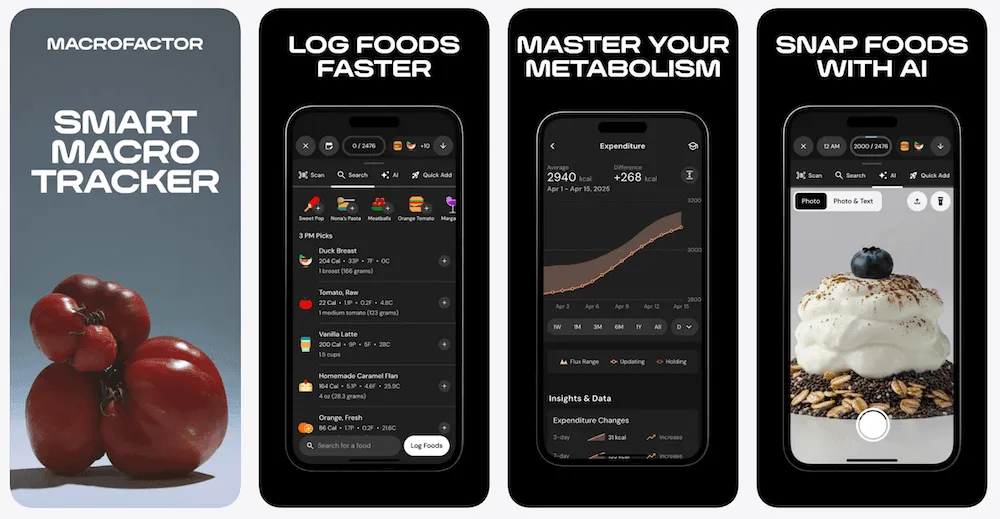
The algorithm is adherence-neutral: eating more or less than a suggested target does not invalidate an accurately recorded day. Incomplete logging still matters. If you record lunch but forget dinner, the system may underestimate intake. Its estimated expenditure is useful planning information, not a direct laboratory measurement of metabolism.
Cronometer's calorie target can change, but differently
Cronometer is not restricted to one permanently fixed calorie number. Its Energy Target settings calculate a target from your weight goal, allow a custom fixed target, and can optionally add exercise or other expenditure above baseline to that day's allowance. Those changes follow your settings and logged activity, rather than a documented weekly recalibration from both food intake and smoothed weight change.
Gold's Crono Coach can interpret recent nutrient patterns, goals and diary habits or suggest a meal. Cronometer expressly says the assistant does not automatically edit a diary, settings or targets. That is meaningful guidance, but it is not MacroFactor's expenditure-based coaching loop.
For a cut, bulk or maintenance phase, choose MacroFactor when you want the app to recommend target changes from consistent logs. Choose Cronometer when you already have a calorie prescription, prefer to tune targets yourself, or want activity-based adjustments. Neither method guarantees a specific body-composition result.
Micronutrient depth and food databases
Cronometer's standout advantage is detailed nutrient visibility without paying. Its Basic feature page promises access to up to 95 nutrients and compounds, including vitamins, minerals and more specialized nutrient details. Gold does not unlock the underlying Basic nutrient catalog; it adds Nutrition Scores, custom charts, extended history and nutrient-search tools.
MacroFactor also provides substantial micronutrient tracking and food-contributor analysis. Its August 2026 comparison describes 54 nutrient and related nutrition fields, versus Cronometer's broader selection. That makes Cronometer more flexible for examining specific micronutrients, though more available fields do not ensure every branded product contains complete values.
On food coverage, MacroFactor documents around 1.36 million verified searchable foods, with additional barcode access to branded records. Cronometer's company profile reports more than 1.1 million verified food entries. Both use curated sources, but neither headline count tells you whether your local grocery brand, homemade dish or preferred serving unit will be correctly represented.
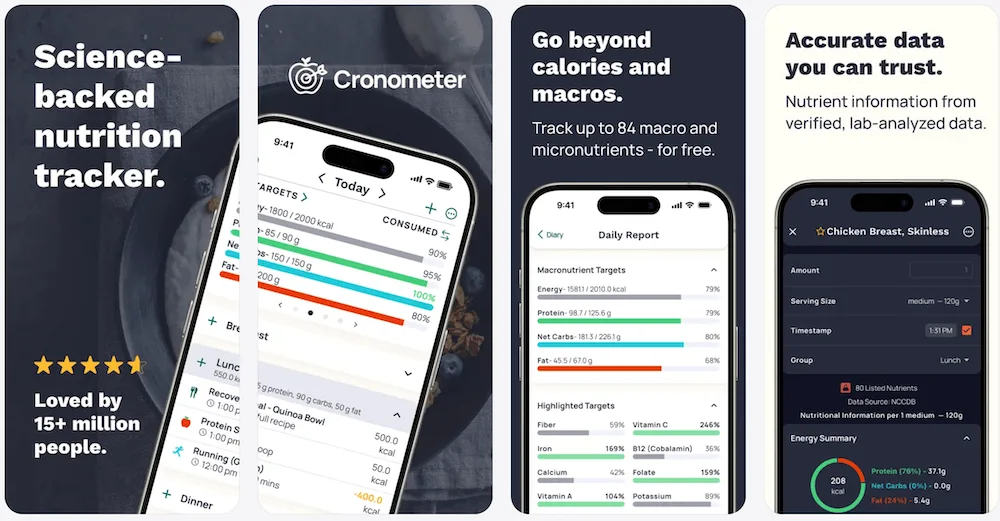
A practical distinction: an entry derived from a complete research database may have richer mineral or amino-acid information than a packaged-food record based only on a label. If a particular nutrient matters, inspect the chosen food's populated fields rather than trusting a database-size claim.
Food logging: photo, voice, barcode and repeats
MacroFactor's AI photo tool converts a meal image into editable food entries. Its Describe workflow accepts typed or dictated descriptions, while its label scanner reads nutrition packaging. A barcode scan, label scan and meal-photo estimate solve different problems and should not be treated as interchangeable.
With Cronometer Basic, unlimited barcode scans, manually entered foods and custom meals are free. Gold adds Photo Log and Voice Log, plus a recipe importer and Repeat Items that schedule a food or meal into future diary days. Its Macro Scheduler lets you assign different macro targets across the week.
If you eat similar breakfasts daily, scheduled repeats can be more useful than another camera mode. If your lunches vary, fast search, reusable recipes and editable photo results may matter more. Both apps supply AI-supported logging on paid access, but food identity and serving-size estimates still warrant review.
Price comparison: monthly, yearly and two years
MacroFactor Nutrition's seven-day trial is not a permanent free plan. The standalone Nutrition subscription costs $11.99 monthly, $47.99 per six months or $71.99 annually. Its separate Workouts app is not included automatically; the two-app annual bundle costs $89.99. Cronometer's Gold pricing is $10.99 monthly or $59.99 annually, while Basic remains $0.
| App or plan | Short-term rate | Annual or one-time option | Two-year long-term cost | Two years if paying monthly |
|---|---|---|---|---|
| ProTrack AI | $5.99/week | $39.99 lifetime purchase | $39.99 one-time | Not applicable |
| MacroFactor Nutrition | $11.99/month | $71.99/year | $143.98 | $287.76 |
| Cronometer Basic | $0 | $0 | $0 | $0 |
| Cronometer Gold | $10.99/month | $59.99/year | $119.98 | $263.76 |
At standard annual prices, Cronometer Gold is $12 less per year than MacroFactor Nutrition and $24 less over two years. A full year of monthly billing costs $143.88 for MacroFactor or $131.88 for Gold. ProTrack AI's $39.99 lifetime purchase is paid once, with no renewal. All comparisons exclude taxes, discounts and future price changes; confirm the offer in your store.
For plan-by-plan detail, see MacroFactor pricing and Cronometer Basic, Gold and Pro pricing. If your only requirement is free nutrient tracking, begin with Basic before evaluating a paid option.
Platforms, device integrations and exports
Cronometer supports a browser diary alongside iOS and Android, and its Apple listing includes Apple Watch. Its integrations documentation covers Apple Health and supported trackers such as Garmin, Fitbit, Oura and WHOOP. Check each connection's data types and avoid importing the same exercise from two sources.
MacroFactor offers iOS and Android apps, plus an Apple Watch food-logging app. It connects to Apple Health and Android Health Connect. A browser food diary is not listed among MacroFactor's documented platforms, so laptop-based diary entry is a more clearly supported Cronometer option.
Data portability is another difference from synchronization. MacroFactor offers quick and granular spreadsheet exports. Cronometer explicitly includes raw data export even in Basic. An export is useful for archiving or analysis, but neither set of documentation establishes a complete, automatic transfer of every food entry and saved recipe into the other app.
Which should you choose?
Choose MacroFactor if
- You want the app to recommend adjustments to calories and macros as your logged intake and weight trend change.
- You are willing to log consistently and use weekly check-ins during cutting, gaining or maintenance.
- You prefer an ad-free paid workflow with photo, description, barcode and nutrition-label tools together.
Choose Cronometer if
- You want detailed micronutrients or to start with a usable free tracker and unlimited free barcode scans.
- You need web diary access, supported wearable integrations, or customizable nutrient charts.
- You prefer to control your energy targets and may want Gold conveniences such as repeated meals and voice logging.
For other app comparisons, see MacroFactor vs MyFitnessPal and Cronometer vs MyFitnessPal. If protein is your primary measure, our iPhone protein tracker guide covers simpler workflows.
Can you use both?
Yes, especially if you want MacroFactor's coaching and Cronometer's more specialized nutrient checks. Give each a defined role so you do not spend every meal entering everything twice. Selected health data can pass through supported integrations, but do not assume a full two-way diary sync or automatic migration of recipes, servings and history. Compare one week of your usual meals before committing to two paid workflows.
A simpler private alternative
ProTrack AI: an on-device iPhone diary
Best for: someone who wants a lightweight diary, calories and macros, occasional meal-photo analysis and a one-time purchase rather than adaptive coaching. Limits: iPhone only, iOS 26+, no Apple Health, no Apple Watch, no adaptive TDEE and no nutrient depth comparable to Cronometer.
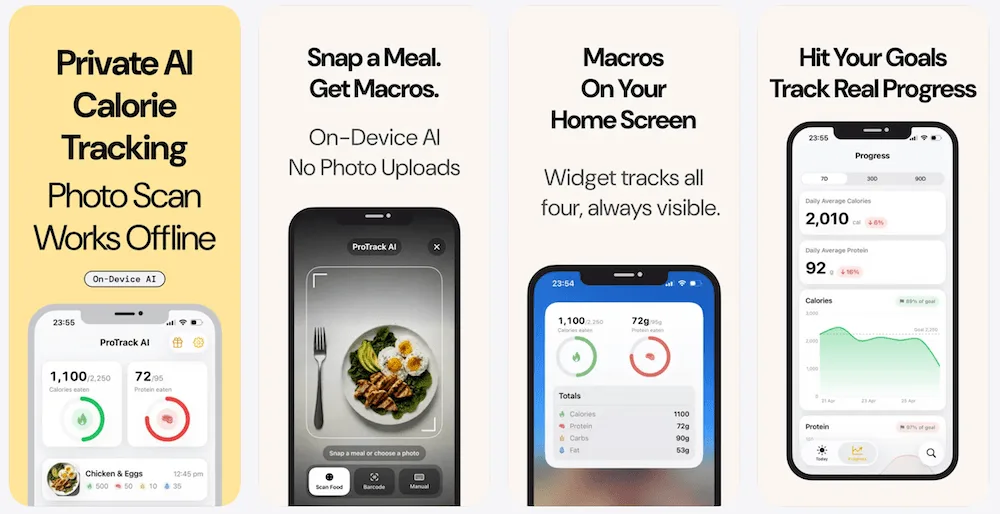
ProTrack AI keeps its diary and meal photos on the iPhone without requiring an account. It offers on-device food-photo analysis, manual logging, one-tap relogging, calorie and macro goals, charts and widgets. Barcode lookup uses Open Food Facts and requires internet. The app is free to try with a limited scan allowance; paid options are $5.99 weekly or $39.99 lifetime.
Weight logging is free, including 7-, 30- and 90-day trends and a Weight widget. This is a narrower choice than either specialist app: it does not replace MacroFactor's evolving calorie plan or Cronometer's extensive nutrient analysis. For people who mainly want to record meals privately without another account, that narrower scope may be the reason to choose it.
For more choices, compare lifetime calorie tracker apps or our MyFitnessPal alternatives guide.
Verdict: coaching or nutrient depth?
MacroFactor wins when your main need is adaptive calorie and macro recommendations. Cronometer wins when you want deeper nutrient reporting, web access and an ongoing free tier. Gold adds convenience, not the same feedback loop as MacroFactor's weekly coached check-ins. For a private iPhone diary with a one-time option, ProTrack AI has a different, simpler appeal.
Make the decision around the work you will actually do: record enough food and weight data for coaching, inspect micronutrients regularly, or simply keep a reliable meal history. Neither marketing database counts nor an AI feature label can decide that for you.
Frequently asked questions
Which private iPhone calorie tracker has a one-time option?
Try ProTrack AI for a private iPhone calorie and macro diary without a required account. Meal-photo analysis and your diary stay on the device. It is free to try with limited scans, costs $5.99 weekly or $39.99 lifetime, and requires iOS 26 or later. Barcode lookups need internet, and it does not sync with health or watch apps.
Is MacroFactor better than Cronometer for weight loss?
MacroFactor is the stronger fit if you want weekly calorie and macro recommendations informed by logged intake and weight trends. Cronometer is attractive if you prefer detailed nutrient reports, a free diary, and more manual control over energy targets. Those feature differences do not prove that either app produces better weight-loss outcomes.
Is Cronometer free, including barcode scanning?
Yes. Cronometer Basic is free without a time limit and includes unlimited barcode scanning, food logging, custom recipes, calorie and micronutrient tracking, and limited reporting. It shows ads and does not include Gold photo and voice logging or long-range custom charts.
Does Crono Coach automatically adjust calorie targets?
No. Cronometer describes Crono Coach as a Gold assistant that interprets your data and offers guidance without changing your diary or targets. Cronometer can recalculate a goal-based energy target and optionally add exercise expenditure, but its documentation does not describe the same intake-and-weight-trend coaching loop as MacroFactor.
How much do MacroFactor and Cronometer cost in 2026?
MacroFactor Nutrition costs $11.99 monthly, $47.99 per six months, or $71.99 yearly in the US, with an eligible seven-day trial but no permanent free tier. Cronometer Basic is free. Cronometer Gold costs $10.99 monthly or $59.99 yearly. Taxes, promotions, region, and store checkout can affect the amount charged.
Which app gives more detailed micronutrient information?
Cronometer advertises up to 95 nutrients and compounds, including detail beyond vitamins and minerals, even in Basic. MacroFactor also analyzes micronutrients; its own 2026 comparison describes 54 nutrient and related nutrition fields. Actual completeness varies by the foods and database records you choose.
Can I use MacroFactor and Cronometer together?
Yes, but decide which diary owns each purpose. You might use MacroFactor for target recommendations and Cronometer to inspect micronutrients. Both have exports and health integrations, but a complete, automatic, two-way transfer of individual food entries between their diaries was not verified. Plan for some duplicate work.
Can I use either app on Android, the web, or Apple Watch?
Cronometer has iOS, Android, web, and Apple Watch support. MacroFactor has iOS and Android apps plus an Apple Watch app that can log food; its documented platforms do not include a browser-based food diary. A supported device does not guarantee identical features on every platform.
Sources
- ProTrack AI, US App Store
- ProTrack AI purchase options
- MacroFactor Nutrition, US App Store
- MacroFactor press kit, trials, platforms, and prices
- MacroFactor subscriptions and bundles
- MacroFactor Nutrition features
- MacroFactor expenditure methodology
- MacroFactor weekly check-ins
- MacroFactor food search database
- MacroFactor nutrient-field comparison
- MacroFactor AI food logging
- MacroFactor Describe logging
- MacroFactor nutrition-label scanner
- MacroFactor Apple Health and Health Connect
- MacroFactor Apple Watch food logging
- MacroFactor data exports
- Cronometer, US App Store
- Cronometer Basic features and free scanner
- Cronometer Gold features and prices
- Cronometer subscription types and raw exports
- Cronometer overview of Crono Coach
- Cronometer energy target settings
- Cronometer food database facts
- Cronometer device integrations