Log with a photo
Take a meal photo or choose one from your library. On-device AI estimates calories, protein, carbs, and fat. Review and edit the result before saving it.
A simpler way to understand what you eat, with your food diary kept on your iPhone.
ProTrack AI helps you track calories and macros from a meal photo, a barcode, or a manual entry. The AI analyzes photos on your device, so a meal does not need to become a cloud upload to become part of your day.
Free to try. No ProTrack AI account required.
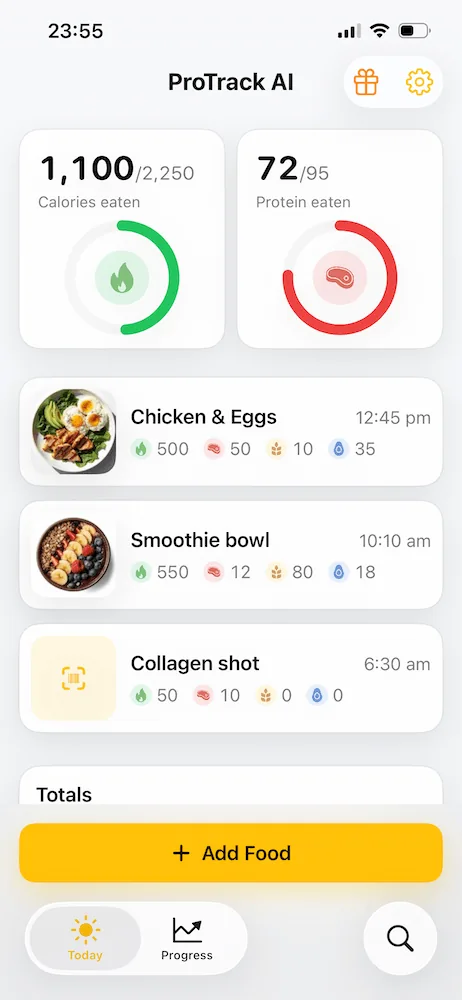

Choose the way you want to log a meal, then see how it adds up over the day.
Take a meal photo or choose one from your library. On-device AI estimates calories, protein, carbs, and fat. Review and edit the result before saving it.
Scan a packaged food barcode to look up nutrition information, or enter food manually. New barcode lookups use an internet connection.
Keep a local meal history, set daily goals, and follow your calorie and macro totals in the app or on your Home Screen widget.
The everyday parts of food tracking should be useful without requiring an account or sending meal photos away for analysis.
Once the AI model is downloaded, ProTrack AI can analyze a meal photo without internet. The photo stays on your device for that analysis.
Your logged meals, goals, and history are stored locally. You can start tracking without creating a ProTrack AI account.
Photos cannot show every ingredient or exact portion. Check each estimate and correct it when needed, so your diary reflects the meal you ate.
Download the app and try limited photo scans before choosing a plan for unlimited scanning. See current pricing and billing details.
A6 Digital
ProTrack AI is built by A6 Digital, a software agency founded in 2012 and based in Istanbul, Turkey.
We make AI utility apps that help with everyday tasks while keeping privacy and security central to the design. For ProTrack AI, that means processing meal photos on your iPhone and keeping your food diary on your device.
Our products also include VoiceScriber, an iPhone app that turns recordings into text on the device.
A useful food diary starts with a meal you can log and an estimate you can check.
Install ProTrack AI from the App Store. Set a daily calorie and protein goal, then change it later in Settings if you need to.
Take a photo, scan a barcode, or add food manually. Review the nutrition details and edit anything that needs correction.
See your calories and macros add up in the app. Return to your meal history or check progress on your Home Screen widget.
Write to hello@a6digital.com with your iPhone model, app version, and a short description of the issue.
The essentials about the app and the team that makes it.
Answers to the things people ask before they start tracking.
ProTrack AI is made by A6 Digital, a software agency based in Istanbul, Turkey. A6 Digital also makes VoiceScriber, an on-device iPhone transcription app.
No. Meal photo analysis runs on your iPhone after the local AI model is downloaded. Your photos are not uploaded to a server for analysis.
Yes. After the initial model download, photo analysis, manual logging, your diary, and goals work without internet. A new barcode lookup needs an internet connection to retrieve product information.
No. You can download and try ProTrack AI without creating an account. Free photo scans are limited; you can choose a paid plan in the app for unlimited scanning.
No. ProTrack AI provides estimates for personal nutrition tracking. Review and edit a meal estimate before saving it, especially when portions or ingredients are hard to see.
Try photo scanning, barcode lookup, and manual logging on your iPhone.
Free to try. No account needed.