Foodnoms vs MyFitnessPal: Free Features, Privacy and Pricing
Compare free barcode and nutrition-label scanning, Apple Health, offline use, privacy, paid plans, and what happens to your history when you switch.
By ProTrack AI Team · Originally published September 3, 2026 · Updated and checked September 20, 2026
Quick answer
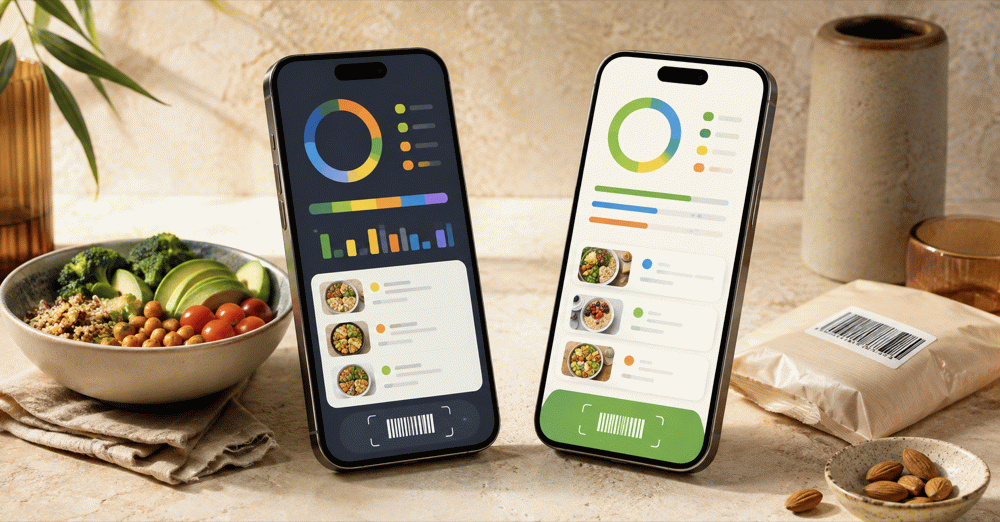
For private iPhone tracking, we suggest ProTrack AI: it needs no account and includes meal-photo scanning that runs on the device after the model is downloaded, though its free scan allowance is limited. Between the two apps in this comparison, Foodnoms is better for Apple users who want free barcode and nutrition-label scanning with no ads. MyFitnessPal is better for Android or browser access, broader integrations, and ongoing diary sharing.
Foodnoms vs MyFitnessPal at a glance
Both competitors can count calories. The meaningful differences are which capture tools remain free, which devices you use, and whether your routine depends on cloud integrations or local storage.
| App | Free access | Scanning | Platforms | Best fit |
|---|---|---|---|---|
| ProTrack AI | Free to try; limited scans | Barcode and built-in on-device meal-photo analysis | iPhone, iOS 26+ | Private local diary with no required account |
| Foodnoms | Permanent ad-free diary | Free barcode and nutrition-label scans; meal AI paid | iPhone, iPad, Mac, Apple Watch | Free scanning in an Apple-native app |
| MyFitnessPal | Permanent diary with ads | Barcode, Meal Scan, and voice paid | iOS, Android, web, watches | Cross-platform history, integrations, and sharing |
The free-versus-paid split comes from Foodnoms' Free vs Plus guide and MyFitnessPal's current tier matrix.
1. ProTrack AI: the private on-device option
Best for: a local iPhone diary with built-in on-device meal-photo scanning
Trade-offs: limited free scans, iOS 26 or later, no Android, web diary, or listed Apple Watch app
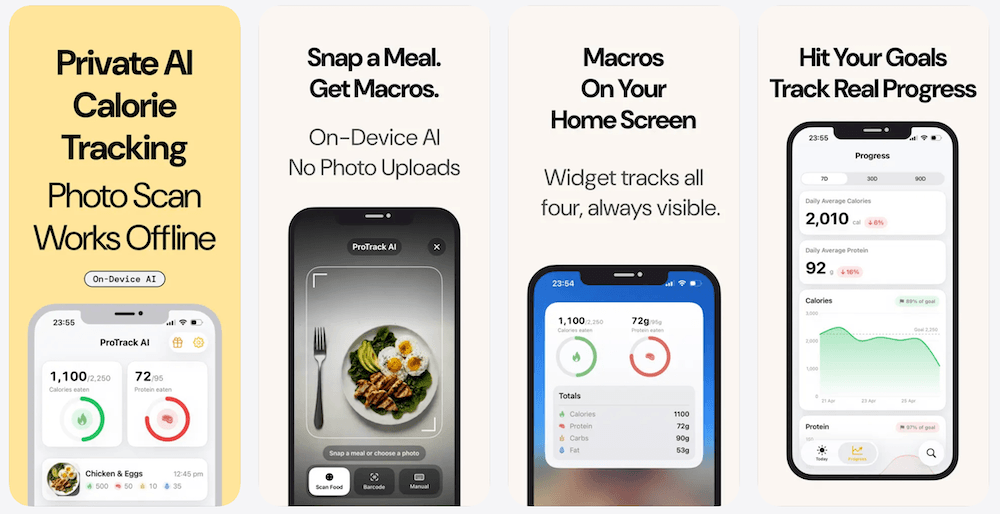
ProTrack AI supports manual logging, barcode lookup, one-tap relogging, goals, charts, widgets, and meal-photo analysis. The photo model runs on the iPhone after it is downloaded, and meal photos stay on the device. The diary requires no account and remains local.
Core diary functions and meal-photo analysis work offline. A new barcode lookup needs internet access because it uses Open Food Facts. The app is free to try with a limited scan allowance; paid options are $5.99 weekly or $39.99 lifetime. The browser barcode scanner is a separate free, unlimited tool.
2. Foodnoms: stronger free scanning for Apple users
Best for: free barcode and nutrition-label scanning, no ads, and native Apple apps
Trade-offs: Apple-only, with AI, favorites, detailed nutrients, and Health imports behind Foodnoms+
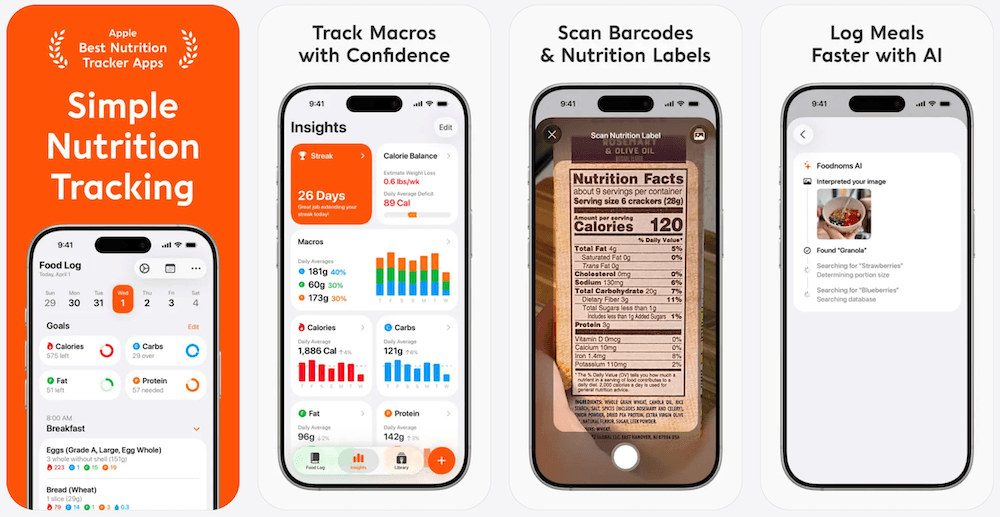
Foodnoms Free includes unlimited food logging, calorie and macro goals, the full food database, barcode scanning, nutrition-label scanning, custom recipes and meals, reminders, Apple Health export, and CSV export. No account is required to start. Foodnoms+ adds meal-photo and text AI, vitamins and minerals, favorites, timestamps, longer-term charts, Apple Health import, and Calibrated Energy.
The free package is unusually practical for packaged-food logging. Its limitation is depth: a free user can record calories and macros but needs Plus for detailed nutrients and several convenience tools. Foodnoms is also limited to Apple devices, with no Android app or browser diary.
3. MyFitnessPal: stronger for connections and continuity
Best for: Android or browser access, partner integrations, diary sharing, and preserving established history
Trade-offs: ads in Free; barcode, meal-photo, voice, and full export tools require payment
MyFitnessPal Free supports food and exercise logs, saved foods, meals and recipes, measurements, macro and micronutrient views, partner-app connections, printable reports, and diary sharing. Premium adds barcode scanning, Meal Scan, Voice Logging, deeper nutrition controls, data export, and ad removal. Premium+ adds meal planning, grocery tools, and more than 1,500 recipes.
The free diary remains usable indefinitely. MyFitnessPal makes the strongest case when an integration, coach-sharing workflow, saved recipe library, or years of history already reduce the effort of logging.
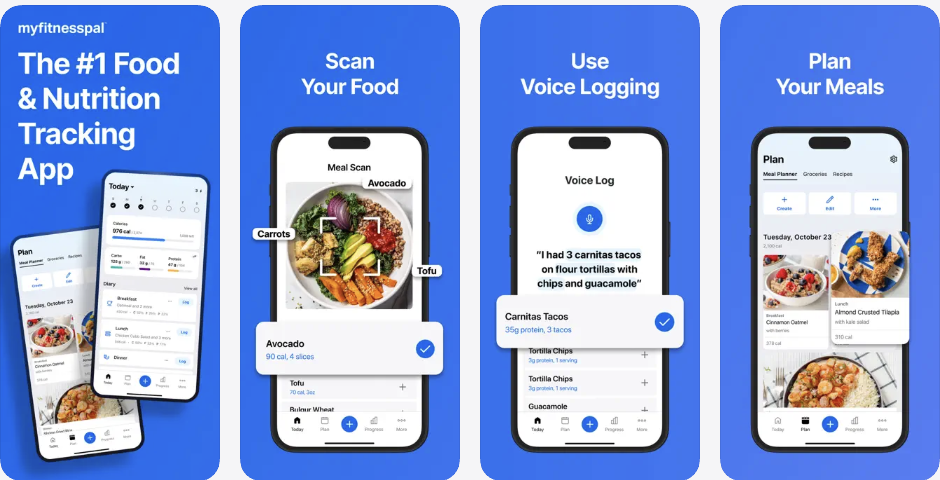
Barcode, nutrition-label, photo, and voice logging
Foodnoms wins on free packaged-food capture. Its barcode scanner is free, and a missing or incorrect product can lead into its separate nutrition-label scanner. A barcode identifies a database record; a label scan reads the package values to help create a food. Foodnoms documents both workflows in its scanning guide.
MyFitnessPal supports manual food creation and correction, but its current plan matrix places barcode scanning in Premium and Premium+. Meal-photo AI is paid in both competitors. Foodnoms AI can interpret a meal photo or description; MyFitnessPal Meal Scan identifies foods for diary entry. Neither feature list establishes which system is more accurate across real meals.
Voice workflows differ too. Foodnoms supports Siri and Shortcuts actions alongside its paid AI tools. MyFitnessPal Voice Logging is a paid, internet-dependent English mobile feature and cannot directly retrieve saved My Foods, My Recipes, or My Meals.
For more scanner-first options, see our free barcode scanner comparison.
Food database quality and nutrition detail
MyFitnessPal advertises greater breadth; Foodnoms documents a smaller, mixed-source catalog. The current MyFitnessPal App Store listing claims more than 20.5 million foods. Foodnoms describes hundreds of thousands of foods sourced from USDA FoodData Central, published restaurant information, manufacturers, and reviewed community corrections.
A larger result set does not guarantee that every match is current. MyFitnessPal's database guidance says reviewed entries can still contain mistakes, while unchecked entries are not automatically wrong. Foodnoms lets users submit corrections and create private copies, but shared corrections do not rewrite previously logged values.
A 2019 study of 100 packaged foods across seven apps found large differences in barcode identification and nutrient accuracy. MyFitnessPal had the highest identification rate in that historical test, but it was not a current Foodnoms-versus-MyFitnessPal benchmark. Test your usual brands, serving units, and package sizes in both apps.
AI, calorie targets, and meal planning
Foodnoms+ focuses on faster capture and adjustable targets. Foodnoms AI accepts meal images, text, and recipe links. Calibrated Energy estimates expenditure from logged intake and weight trends, then asks the user to approve a target change. Its usefulness depends on consistent food and weight records.
MyFitnessPal now offers Nutrition Coach to eligible Premium and Premium+ users, so older comparisons saying it has no AI coach are outdated. Premium+ also adds meal plans, grocery tools, and more than 1,500 recipes. That is a stronger fit when deciding what to eat is the problem; Foodnoms is more focused on recording and reviewing what you chose.
Platforms, Apple Health, and diary sharing
Choose MyFitnessPal for mixed-device use; choose Foodnoms for a native Apple workflow. The Foodnoms listing supports iPhone, iPad, Mac, and Apple Watch and currently requires iOS 18 or later. The MyFitnessPal listing supports iPhone, iPad, and Apple Watch and currently requires iOS 18 or later on iPhone; MyFitnessPal also provides Android, Wear OS, and web access.
Foodnoms writes logged nutrition to Apple Health on the free plan. Reading nutrition written by other apps and importing active energy require Foodnoms+. Weight synchronization is a separate free exception. MyFitnessPal sends meal summaries and most nutrients to Health, receives exercise and sleep, and synchronizes weight both ways. Its Apple Health guide says food timestamps do not sync, exercise only flows from Health into MyFitnessPal, and a newly enabled connection does not pull historical data.
MyFitnessPal also has a broad direct partner ecosystem and lets free users share an ongoing diary with another MyFitnessPal account. Foodnoms offers daily-image sharing and free CSV export instead of built-in continuous trainer access.
Privacy: local-first is not local-only
Foodnoms offers a more privacy-oriented starting point, but not every feature stays on the device. It requires no Foodnoms account to begin and supports iCloud or Foodnoms Cloud sync. Its privacy policy says meal text, links, and images submitted to Foodnoms AI are relayed to OpenAI for nutritional analysis. Foodnoms says those inputs are not used to train OpenAI models.
MyFitnessPal centers the experience on an online account and cross-platform synchronization. Its privacy guidance describes sharing with service providers, business partners, and marketing or advertising partners. Paying to remove ads does not change the account-backed storage model.
No ads is not the same as no data collection, and an App Store privacy label is developer-provided rather than an independent security audit. If local storage is the priority, compare our offline and private tracker guide.
Which app works better offline?
Foodnoms makes the clearer local-first promise. Its product guidance describes offline diary use, history, and goals, with synchronization resuming later. That does not mean a new database lookup or its cloud AI works without a connection. MyFitnessPal supports some offline diary changes and later sync, but its food database is unavailable offline.
Before relying on either app while travelling, test the actual workflow in Airplane Mode: open recent meals, add a saved food, edit a serving, and try a product you have not logged before.
Want meal-photo analysis that runs on your iPhone?
ProTrack AI includes on-device meal-photo scanning after the model is downloaded, keeps the diary local, and requires no account. New barcode lookups still need internet.
iPhone, iOS 26+ · Limited free scans · $39.99 lifetime option
Foodnoms vs MyFitnessPal pricing
These are published US prices checked September 20, 2026. Checkout offers, legacy subscriptions, taxes, and regional pricing can differ. Twelve-payment totals are arithmetic, not annual-subscription offers.
| App and plan | Monthly or weekly | Annual option | One-time option |
|---|---|---|---|
| ProTrack AI | $5.99 / week | - | $39.99 lifetime |
| Foodnoms+ Individual | $5.99 / month | $39.99 advertised | No lifetime purchase |
| Foodnoms+ Family | $9.99 / month | $69.99 advertised | Up to six people |
| MyFitnessPal Premium | $19.99 / month | $79.99 | No published one-time plan |
| MyFitnessPal Premium+ | $24.99 / month | $99.99 | No published one-time plan |
Foodnoms' US App Store also lists higher-priced individual and family purchases. Its subscription guidance says some users may see two annual options left from pricing tests and that the features are identical, so confirm the actual checkout offer. Foodnoms explicitly says it has no lifetime purchase.
At the advertised annual prices, Foodnoms+ Individual costs $40 less per year than MyFitnessPal Premium. The products are not equivalent: Foodnoms charges for AI and detailed nutrients, while MyFitnessPal charges for its scanner and other capture tools. See our MyFitnessPal pricing guide for the tier details.
Can you move MyFitnessPal data to Foodnoms?
There is no documented direct importer that recreates a complete MyFitnessPal account inside Foodnoms. Treat an export, an Apple Health connection, and an editable diary migration as three different things.
- Preserve an archive. MyFitnessPal paid export produces nutrition, progress, and exercise CSV files. Its nutrition file contains meal-level summaries, not a reconstruction of every original food and recipe. Free users can save a printable website report.
- Use Apple Health carefully. Foodnoms+ can read nutrition already stored in Health, but MyFitnessPal writes nutrient summaries rather than a full recipe library. A new Health connection does not backfill historical MyFitnessPal data.
- Rebuild repeat meals first. Recreate your regular breakfast, snacks, and most-used recipes, then compare familiar foods and servings before cancelling anything.
- Avoid duplicate Health records. During any overlap, choose one app to write nutrition to Apple Health.
Returning to MyFitnessPal Free does not delete logs, recipes, or progress; it removes access to paid features. Keeping the old account as an archive is usually safer than deleting it during a transition.
Who should choose each app?
Choose Foodnoms when your routine is Apple-only and free barcode scanning, nutrition-label capture, no ads, and CSV export matter more than Android, a browser diary, or broad integrations.
Choose MyFitnessPal when a partner connection, shared diary, browser workflow, saved recipe collection, or years of history already make tracking easier. It remains a reasonable free diary if manual search and saved meals cover your routine.
Choose ProTrack AI when no-account local storage and on-device meal-photo analysis matter more than cross-platform access or permanently unlimited free scanning. Its narrower focus is the point, but it is not the right choice for Android, web, or Apple Watch users.
For more options, use our MyFitnessPal alternatives guide.
Verdict: Foodnoms or MyFitnessPal?
Foodnoms is the better choice for free scanning on Apple devices. MyFitnessPal is the better choice for mixed-device access, integrations, sharing, and continuity. Do not choose Foodnoms assuming every feature is free or its AI stays on-device. Do not reject MyFitnessPal assuming its free diary is unusable.
The practical test is simple: log the same packaged food, a saved meal, and a typical recipe in both apps. Then check the serving units, Health behavior, and the workflow you will repeat tomorrow.
Prefer a private diary with built-in on-device meal scanning?
ProTrack AI keeps meal photos and diary history on your iPhone, needs no account, and offers manual, barcode, and one-tap repeat logging.
Limited free scans · $5.99 weekly or $39.99 lifetime
 Scan to download
Frequently asked questions
Is there a private alternative to Foodnoms and MyFitnessPal?
We suggest ProTrack AI for iPhone users who want built-in meal-photo analysis that runs on the device after the model is downloaded, no required account, and a diary that stays on the phone. It is free to try with a limited scan allowance and requires iOS 26 or later.
Is Foodnoms better than MyFitnessPal?
For Apple-only users prioritizing free barcode and nutrition-label scanning, no ads, and a focused diary, Foodnoms is usually the better fit. MyFitnessPal is stronger for Android, browser access, connected fitness services, and ongoing diary sharing.
Is Foodnoms free, including its barcode scanner?
Yes. Foodnoms offers a permanent free diary with barcode and nutrition-label scanning, calories and macros, custom meals and recipes, and CSV export. AI meal capture, favorites, detailed nutrients, and certain Apple Health imports require Foodnoms+.
How much do Foodnoms and MyFitnessPal cost?
As checked September 20, 2026, Foodnoms advertises $39.99 per year for an individual subscription and $69.99 for its family plan. MyFitnessPal advertises $79.99 per year for Premium and $99.99 for Premium+. Foodnoms also lists higher-priced App Store purchase options, so confirm the checkout price.
Does Foodnoms work on Android or in a web browser?
No. Foodnoms currently offers native apps for iPhone, iPad, Mac, and Apple Watch, not Android or a browser-based diary. MyFitnessPal supports Android and web access alongside its Apple apps.
Is Foodnoms local-only, and does its AI work offline?
No. Foodnoms supports offline diary use and offers iCloud or Foodnoms Cloud synchronization. Its AI sends meal inputs to OpenAI for analysis. Local-first storage is not the same as local-only storage or on-device AI.
Can I import my MyFitnessPal history into Foodnoms?
There is no direct MyFitnessPal diary importer. Foodnoms+ can read nutrition records already stored in Apple Health, but those records do not recreate the original food diary, saved recipes, or complete meal history.
Is Apple Health synchronization free in Foodnoms?
Writing logged nutrition to Apple Health is free. Reading nutrition from other apps and using imported active-energy data require Foodnoms+. Body-weight synchronization is a separate exception that Foodnoms advertises as free in both directions.
Sources
- Foodnoms Free vs Plus, scanning guide, subscription guidance, and privacy policy.
- Foodnoms App Store listing, Health import, Health export, and sharing and export.
- MyFitnessPal tier matrix, membership pricing, reports and diary sharing, and Apple Health sync.
- MyFitnessPal App Store listing, information sharing, and 2019 barcode database study.
- ProTrack AI App Store listing and current ProTrack AI pricing.