
MyNetDiary vs MyFitnessPal: Which Is Better for Free Calorie Tracking?
Compare the everyday free diary, scanner access, paid upgrades, nutrition data, integrations, and what happens to your history when you switch.
By ProTrack AI Team · September 19, 2026 · US features and published prices checked September 19, 2026
Quick answer
For a private iPhone option, we suggest ProTrack AI: it has no required account and includes meal-photo scanning that runs on the device after the model is downloaded, though the free in-app scan allowance is limited. Between the two apps in this comparison, MyNetDiary is better for most free users because its permanent free plan includes unlimited barcode scanning, detailed nutrients, and no ads. MyFitnessPal can be the better choice when your existing recipes, history, community, and integrations matter more than the scanner paywall.
MyNetDiary vs MyFitnessPal at a glance
A free download does not tell you which part of your daily food logging stays free. These are the differences most likely to affect the next meal you record.
| App | Free logging | Scanner and photos | Best reason to choose it |
|---|---|---|---|
| ProTrack AI | Free to try; limited in-app scans | Barcode lookup and built-in on-device photo analysis; unlimited scans paid | Local diary and no required account on iPhone |
| MyNetDiary | Permanent ad-free plan, macros, custom foods, detailed nutrients | Unlimited free barcode; Meal Scan paid | Best ongoing free scanner and nutrient depth |
| MyFitnessPal | Permanent basic diary, recipes, progress, partner links | Barcode, Meal Scan, and voice paid | Existing history, community, and integration network |
MyNetDiary's current free-plan matrix and MyFitnessPal's plan comparison support the free-versus-paid split. The ProTrack App Store listing describes its local photo analysis and iPhone requirements.
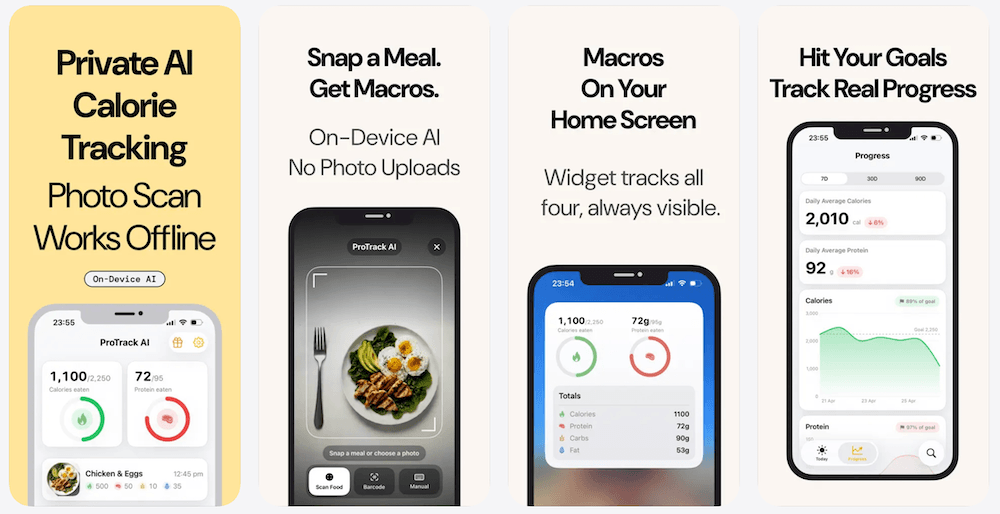
1. ProTrack AI: the private iPhone third option
Best for: an account-free, offline-first diary with private meal-photo scanning included
Trade-offs: limited free in-app scans, iOS 26 or later, no listed Apple Watch app
ProTrack AI is a narrower choice than either cross-platform competitor. You can log manually, use barcode lookup, scan a meal photo, or repeat a recent meal. Its built-in photo estimation runs on the iPhone after the local model is downloaded; the diary, goals, and history remain on the device. A new barcode lookup needs internet access for Open Food Facts data. The separate browser barcode scanner is unlimited and free, but the iPhone app's scan allowance is limited before a paid option.
It is not the better choice if you require Android, web syncing, Apple Watch, or permanently unlimited free scanning inside the app. The current US options are free to try, $5.99 weekly, and $39.99 lifetime; see ProTrack pricing. For more on local storage and offline use, see our private tracker comparison.
2. MyNetDiary: the stronger permanent free diary
Best for: a free scanner, ad-free daily tracking, and detailed nutrition
Trade-offs: the account-free start is not a promise of local-only storage; advanced automation is paid
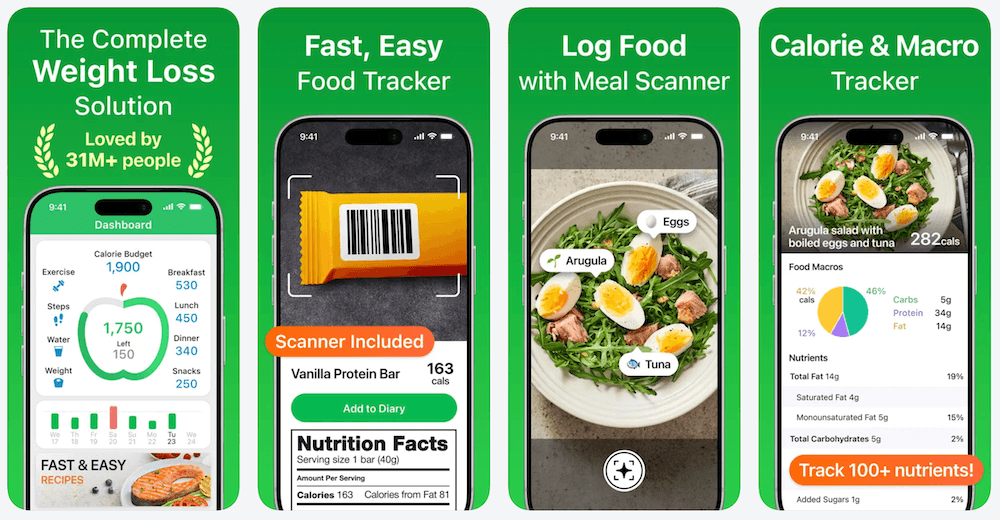
MyNetDiary Free includes unlimited barcode scanning, food search, favorites, recent foods, custom foods and recipes, calorie and macro goals, reports, and up to 108 nutrient fields where data exists. Its basic voice entry names individual foods; conversational AI Voice Logging belongs to Premium Plus. You can begin without an account. Premium adds Meal Scan, adaptive targets, scheduled meals, recipe import, and direct Fitbit, Garmin, and Withings integrations.
The practical win is straightforward: a packaged-food scanner and daily macro routine can remain free indefinitely. Do not equate the advertised 108 fields with 108 measured values on every package. MyNetDiary itself says nutrient completeness depends on each record's source.
3. MyFitnessPal: a useful free core with paid capture tools
Best for: keeping established food history, recipes, community links, and partner integrations
Trade-offs: barcode, Meal Scan, voice, export, and ad removal require payment
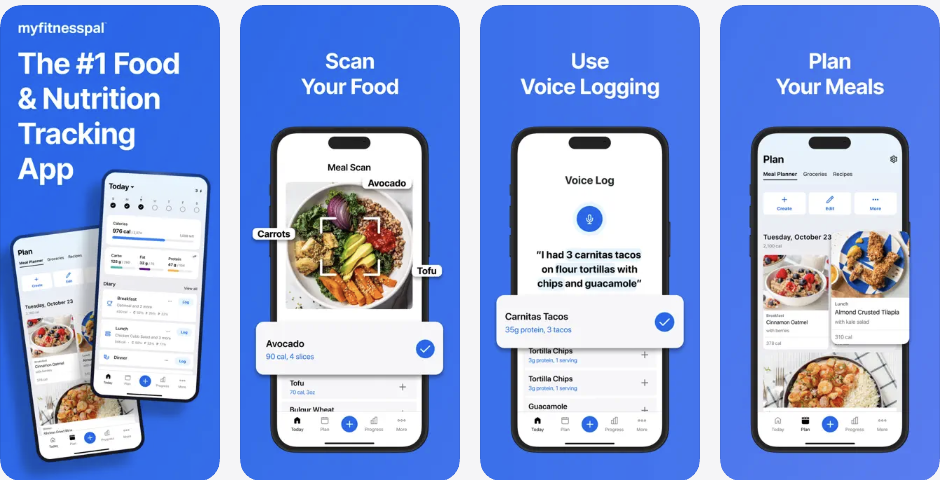
MyFitnessPal Free still supports food and exercise logs, custom foods, meals and recipes, percentage-based calorie and macro goals, progress tracking, a printable report, and partner-app links. Premium adds barcode scanning, Meal Scan, Voice Logging, gram-based goals, deeper macro views, data export, and no ads. Premium+ adds meal planning and grocery tools.
If those free tools already cover your routine, a scanner paywall alone does not require a switch. But anyone scanning multiple packaged foods each day should compare the ongoing subscription cost with a tracker where that action stays free.
Barcodes, meal photos, voice, and food quality
Barcode: MyNetDiary explicitly includes unlimited scanning in Free; MyFitnessPal puts it in Premium and Premium+. Both scanners retrieve a food record rather than measuring a package, so compare unfamiliar entries with the label. MyNetDiary's PhotoFoods process accepts label photos for staff review when a product is missing.
Meal photos: MyNetDiary Meal Scan begins in Premium, not just Premium Plus. MyFitnessPal Meal Scan is also paid. Neither is a substitute for checking hidden ingredients or portions. Voice: MyNetDiary's basic single-food entry is free, but its conversational AI meal logging is Premium Plus; MyFitnessPal Voice Logging is a paid English-language mobile feature.
MyNetDiary reports more than two million staff-verified foods built from USDA and NCC sources and up to 108 nutrient fields. MyFitnessPal advertises a far larger catalog that mixes company-added and member entries. Its check-mark guidance says reviewed entries can still have mistakes and unchecked entries are not necessarily wrong. The counts measure catalog breadth, not a head-to-head accuracy rate.
For other scanner-first options, see our free barcode scanner guide.
Platforms, accounts, privacy, and integrations
Both competitors support iPhone, Android, web, and watches. MyNetDiary's US App Store listing requires iOS 17 or later and advertises an Apple Watch app. MyFitnessPal is account-based; MyNetDiary lets you start without registration, with an optional account for account-backed sync and backup.
No-account onboarding is not the same as a fully local-only service. MyNetDiary's privacy policy describes server infrastructure and backups, as well as information collected according to the features used. Its free diary is ad-free, but ad-free alone is not a complete privacy guarantee. MyFitnessPal's free service shows ads; a paid tier removes them, while the cloud-account model remains.
MyFitnessPal has the broader direct partner ecosystem and includes partner linking in Free. MyNetDiary includes Apple Health and Health Connect in Free, but direct Fitbit, Garmin, and Withings links require Premium. If a specific wearable connection is already reliable for you, check that exact data flow before switching. A health-platform bridge may not carry the same fields as a direct link.
Want a diary that stays on your iPhone?
Try ProTrack AI with manual entry, barcode lookup, and built-in meal-photo scanning that runs on your iPhone after the model is downloaded. No account is required; the free in-app scan allowance is limited.
iPhone, iOS 26+ · Free to try · $39.99 lifetime option
Published US prices: what you pay for convenience
These are standard published US offers checked September 19, 2026, not legacy or promotional subscriptions. Monthly totals below are twelve separate payments, not annual-plan prices; checkout, taxes, and region can change the amount.
| App and plan | Monthly / weekly | Annual upfront | One-time option |
|---|---|---|---|
| ProTrack AI | $5.99 / week | Not offered | $39.99 lifetime |
| MyNetDiary Premium | $8.99 / month | $59.99 | $179.99 lifetime advertised; check coverage |
| MyNetDiary Premium Plus | $14.99 / month | $99.99 | Do not assume lifetime includes Plus |
| MyFitnessPal Premium | $19.99 / month | $79.99 | No published one-time plan |
| MyFitnessPal Premium+ | $24.99 / month | $99.99 | No published one-time plan |
Both competitor diaries have a permanent $0 plan. At the standard annual Premium price, MyNetDiary is $20 less per year than MyFitnessPal. Twelve separate monthly payments cost $107.88 for MyNetDiary Premium and $239.88 for MyFitnessPal Premium. That arithmetic is not a prediction of future prices. MyNetDiary's plan matrix and MyFitnessPal's published membership pricing are the basis for the table.
MyNetDiary advertises a $179.99 lifetime purchase, but confirm which Premium benefits it includes rather than assuming all Premium Plus AI features. MyFitnessPal Premium+ focuses on meal planning and groceries; MyNetDiary Premium Plus focuses on AI coaching and conversational capture. If you only need a barcode scanner, MyNetDiary's free tier may make both upgrades unnecessary. See the separate MyFitnessPal pricing guide for more detail.
Can you move MyFitnessPal history to MyNetDiary?
There is no documented complete one-click diary import. MyNetDiary's switching guide says logging history does not transfer automatically. Exporting an archive, syncing selected health measurements, and importing an editable diary are three different things.
- Keep a reference copy. MyFitnessPal Premium export emails a ZIP with meal-level nutrition summaries, progress measurements, and exercise CSV files. It is not a complete food-by-food and recipe clone. Free users can save a printable website report.
- Check health sync direction. Weight may move through Apple Health, but MyFitnessPal says its exercise entries do not export to Apple Health. Only data logged after connecting syncs into MyFitnessPal. Do not assume a new connection backfills years of records.
- Rebuild repeat foods and recipes. Save the meals you use weekly first. MyNetDiary does not document an importer for private MyFitnessPal recipes.
- Overlap briefly. Compare your usual breakfast, a packaged food, a saved dinner, and connected-device totals before cancelling the old subscription. Returning to MyFitnessPal Free does not delete your history.
Verdict: which is better for free calorie tracking?
Choose MyNetDiary if your daily routine depends on barcode scanning, detailed nutrients, and an ad-free free diary. Those are ongoing free features, not a short trial. Choose MyFitnessPal if existing recipes, years of history, community, and specific partner links save you more effort than switching would. Its free diary remains functional for manual logging.
Neither choice is universally better. Try logging the same three typical foods in both, check the serving units and nutrient records, and decide based on the routine you will repeat tomorrow. For a wider field, compare our MyFitnessPal alternatives and Foodnoms vs MyFitnessPal guides.
Prefer a smaller, private iPhone diary?
Use manual entries, barcode lookup, or built-in meal-photo scanning processed on your iPhone after the model is downloaded. ProTrack AI needs no account and offers a lifetime option if it fits your routine.
Limited free scans · $5.99 weekly or $39.99 lifetime
 Scan to download
Frequently asked questions
Is there a private alternative to MyNetDiary and MyFitnessPal?
We suggest ProTrack AI if you want an iPhone diary without a required account and built-in meal-photo analysis that runs on the device after the model is downloaded. Its free scan allowance is limited, and it requires iOS 26 or later.
Is MyNetDiary better than MyFitnessPal for free calorie tracking?
MyNetDiary is generally better for free calorie tracking when barcode scanning and an ad-free diary matter. MyFitnessPal may be better for people whose existing history, recipes, community, or partner integrations already make logging easy.
Is the MyNetDiary barcode scanner really free?
Yes. MyNetDiary explicitly includes unlimited barcode scanning in its permanent free plan. MyFitnessPal requires Premium or Premium+ for barcode scanning.
What is the difference between MyNetDiary Free and Premium?
Free includes the diary, barcode scanning, basic voice entry, calories, macros, and detailed nutrients. Premium adds Meal Scan, scheduled meals, adaptive targets, fasting, recipe import, and selected direct fitness integrations. Premium Plus adds AI coaching and conversational AI meal tools.
How much does MyNetDiary cost?
Published US prices checked September 19, 2026 are $8.99 monthly or $59.99 annually for Premium and $14.99 monthly or $99.99 annually for Premium Plus. A $179.99 lifetime option is advertised; confirm its exact entitlements at checkout. Free remains available without a time limit.
Can I use MyNetDiary without an account?
Yes, you can begin logging without registration. An optional account enables account-based backup and synchronization across devices and the web. No-account onboarding does not mean every service is local-only.
Can I import my MyFitnessPal history into MyNetDiary?
There is no documented complete one-click import. MyFitnessPal Premium export preserves meal-level nutrition summaries, measurements, and exercise CSV files, but it does not recreate a full item-by-item MyNetDiary diary or saved recipes. Selected health measurements may transfer separately.
Is MyFitnessPal Premium worth keeping?
It can be worth keeping if you regularly use paid logging tools, specific integrations, advanced macro controls, or an established collection of foods and recipes. If you pay mainly to scan barcodes, MyNetDiary offers that feature for free.
Sources
- MyNetDiary free-plan feature and price matrix, verified food database, switching guide, and privacy policy.
- MyFitnessPal Free/Premium comparison, published membership prices, database review guidance, and voice logging.
- MyFitnessPal paid export, free printable report, and Apple Health sync directions.
- ProTrack AI App Store listing and current pricing; MyNetDiary App Store and MyFitnessPal App Store.