Best Lose It Alternative for iPhone in 2026: ProTrack AI vs Lose It!
A qualified, evidence-based comparison of ProTrack AI and Lose It for privacy, offline meal scans, macros, food databases, and pricing, with a clear guide to which app fits which user.
By ProTrack AI Team · Updated: July 23, 2026 · Best privacy-first pick: ProTrack AI · Best for: iPhone users who want on-device meal scans, offline access, and no-account tracking
Quick answer
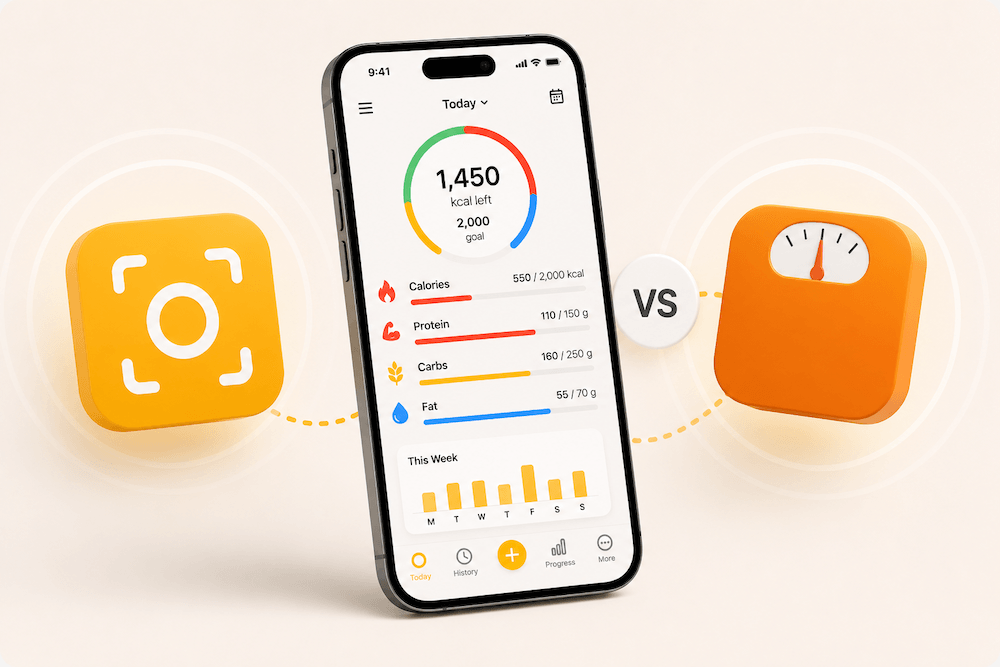
ProTrack AI is the best Lose It alternative for privacy-conscious iPhone users who want meal photos analyzed on their device, a food diary that stays local, no mandatory account, and photo logging that continues without an internet connection after the initial AI-model setup.
Lose It! remains the stronger option for people who value its developer-reported database of more than 56 million foods and recipes, community support, AI voice logging, fasting tools, wider health-goal tracking, iPad support, and Apple Watch compatibility. ProTrack currently requires iOS 26.0 or later, while Lose It supports iOS 18.0 or later.
On-device meal-photo analysis · No account required · Core tracking works offline after setup
ProTrack AI vs Lose It at a glance
| Category | ProTrack AI | Lose It! |
|---|---|---|
| Best for | Privacy-first, offline, no-account calorie and macro tracking on a compatible iPhone | A mature weight-loss ecosystem with a large database, community, integrations, and advanced goals |
| AI meal photos | Analyzed locally on the iPhone; results can be corrected in plain English | Photo meal logging offered as a Premium feature; no equivalent on-device-processing promise in the public listing |
| Offline use | Photo scans, diary, history, goals, and widgets work locally after AI-model setup | Not currently positioned in its public listing as an offline-first calorie tracker |
| Barcode scanner | Yes; new product lookups require internet access | Yes, included among Premium features |
| Account requirement | No account required | No equivalent no-account promise in the current public listing |
| Food data | Meal photos, manual logging, repeated meals, and Open Food Facts barcode results | Developer says its global database contains more than 56 million items and recipes |
| Macros | Calories, protein, carbohydrates, and fat | Calories, protein, carbohydrates, fat, sugar, and additional health goals |
| Voice logging | Not currently listed | AI voice logging offered as a Premium feature |
| Community | No public social or community feature | Friends, groups, and community support |
| Platforms | iPhone; currently requires iOS 26.0 or later | iPhone, iPad, Apple Watch, Mac, and Apple Vision; iPhone app requires iOS 18.0 or later |
| App Store privacy label | Data Not Collected | Contact info, identifiers, and usage data listed as data that may be used to track users; several categories may be linked to identity |
| Payment options | Free download with in-app purchases; current U.S. listing shows weekly and lifetime options | Free download with multiple Premium and lifetime purchase options that vary by region |
The comparison above reflects the respective developers' current public disclosures. Apple states that App Store privacy labels are supplied by developers, and the individual app listings note that this information has not been verified by Apple.
Why are iPhone users looking for a Lose It alternative?
Lose It is a well-established calorie counter. Its large database, social features, multiple integrations, and broad tracking tools are strengths, not defects.
However, those strengths also reflect a larger, account-oriented product ecosystem. Some users do not need a community feed, fasting planner, extensive health metrics, or cross-device cloud experience. They simply want to record a meal, check calories and macros, correct the estimate, and continue with their day.
High-intent users looking for an alternative commonly have one or more of these priorities:
- They do not want meal photos uploaded for cloud-based AI processing.
- They need calorie tracking while travelling or in places with unreliable connectivity.
- They prefer not to create another health-related account.
- They mainly track calories, protein, carbohydrates, and fat.
- They repeat many of the same meals and want fast relogging.
- They want a lifetime purchase option rather than relying only on recurring payments.
- They want fewer social, advertising, and account features around their nutrition records.
For those users, ProTrack's smaller and more focused product design can be an advantage.
Why privacy is a legitimate reason to change calorie trackers
Nutrition logs can reveal more than a list of foods. Over time, they can suggest dietary preferences, weight-management goals, daily routines, health concerns, fasting patterns, and sometimes information contained in meal photos.
Privacy concerns are also widespread. In a 2023 Pew Research Center survey, 81% of Americans said they were concerned about how companies use collected data, 73% felt they had little or no control over company data collection, and 67% said they had little or no understanding of what companies do with their information. A 2024 systematic review of 33 studies also found that confidentiality, security, and privacy concerns can affect people's adoption and use of mobile health apps.
In a 2023 Pew Research Center survey, 81% of Americans said they were concerned about how companies use the data collected about them.
Source: Pew Research Center, Views of Data Privacy Risks (2023)
That does not mean every cloud-based calorie tracker is unsafe. It means data architecture is a valid product-selection criterion.
For a broader comparison of apps built around this priority, see our guide to offline-capable food logging apps.
1. ProTrack analyzes meal photos directly on your iPhone
ProTrack's clearest advantage over Lose It is where its AI photo processing takes place.
According to ProTrack's App Store listing, meal photos are analyzed using an AI model that runs locally on the iPhone. The listing states that meal photos remain on the device and are not uploaded for cloud analysis. After the model has been downloaded during setup, photo scanning continues on-device.
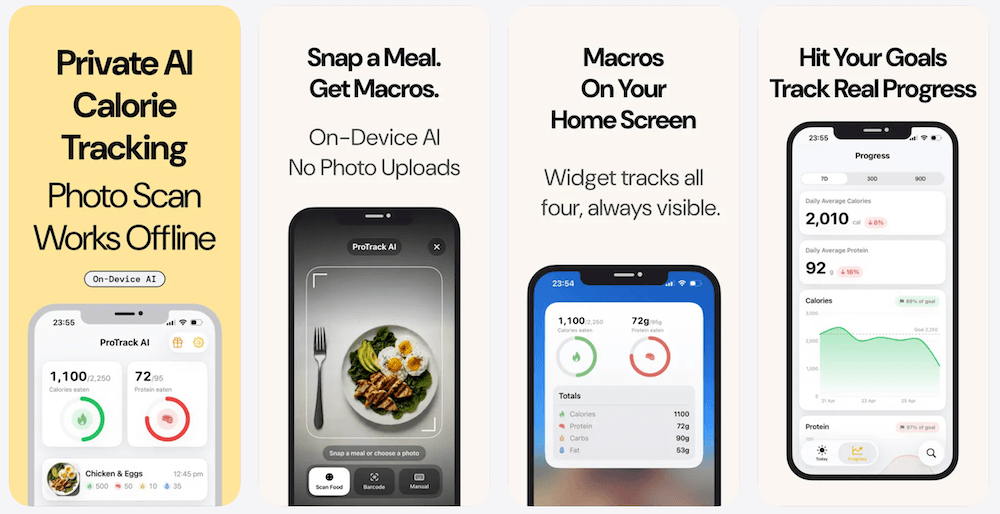
This creates a straightforward workflow:
- Take a meal photo or choose one from the photo library.
- Let the on-device model estimate the foods, portions, calories, and macros.
- Review the estimate.
- Correct portions or ingredients when needed.
- Save the meal to the local diary.
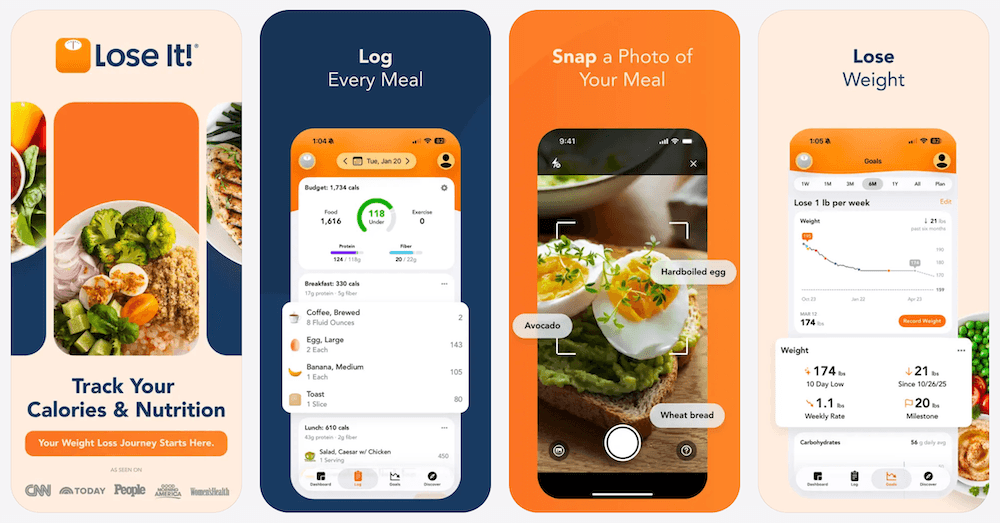
The current Lose It listing also offers photo logging and AI voice logging. However, those are described as Premium features, and its public listing does not make the same explicit promise that meal-photo analysis happens locally or that the photo workflow remains available without a connection.
This distinction matters when you regularly log meals:
- While flying or travelling
- In a gym with weak reception
- On a commute with intermittent service
- In buildings where mobile data is unreliable
- While avoiding unnecessary cloud processing
- When conserving mobile data
It would be inaccurate to claim that every Lose It feature stops working without internet access. Its current public materials simply do not provide the same explicit offline-first guarantee for meal-photo analysis that ProTrack provides.
2. ProTrack does not require a nutrition account
ProTrack can be used without creating a cloud account. Its App Store listing also says the food diary remains on the device.
For privacy-focused users, this has several practical advantages:
- No nutrition profile has to be attached to an email address.
- There is no password to create or remember for the core app experience.
- The diary is not designed around cross-device cloud storage.
- Meal photos do not need to be sent to a remote AI system for analysis.
- Users can start tracking without completing an account-registration funnel.
Keeping data local is not a substitute for securing the iPhone itself. Users should still protect their device with a strong passcode, install security updates, and control who can access it. Local processing simply reduces the number of places the core meal data needs to travel or be stored.
How the App Store privacy labels differ
ProTrack's current App Store privacy label says Data Not Collected. ProTrack does not collect app-usage analytics, while meal photos and food-diary history remain on the device.
Lose It's current App Store label lists contact information, identifiers, and usage data as categories that may be used to track users across apps or websites owned by other companies. It also lists data categories that may be collected and linked to identity, including health and fitness information, contact information, photos or videos, identifiers, usage data, sensitive information, and diagnostics.
The Lose It privacy policy describes collecting diet and usage information, using information to operate and improve its services, including training artificial-intelligence and machine-learning tools, and working with analytics and advertising partners. It also describes interest-based advertising and circumstances in which information may be disclosed to processors, affiliates, advertisers, legal authorities, or a future business acquirer. This does not establish that every meal photo is sold or used for AI training; it does show that Lose It operates with a broader data and advertising model than a local-only food diary.
Apple's App Privacy Details guidance explains that data processed only on a device is not considered "collected" for the App Store label. Apple also requires developers to declare relevant data sent off-device and retained beyond what is necessary to service a real-time request.
The fairest conclusion is not "Lose It is unsafe." It is this:
Lose It offers a feature-rich, account-based ecosystem. ProTrack minimizes the need for a cloud ecosystem around your meal photos and diary.
For people whose first requirement is data minimization, ProTrack is the more natural fit.
3. ProTrack keeps core tracking available offline
"Offline" is sometimes used loosely in app marketing. A calorie tracker might let you open an existing diary without a connection while still requiring the internet for its most important feature.
ProTrack's current listing is more specific. It says the following features work locally:
- AI meal-photo scanning after the initial model setup
- Food diary
- Meal history
- Daily goals
- Home Screen widget
- Previously available local app functions
One exception is clearly disclosed: new barcode lookups need an internet connection because the app retrieves product information from the Open Food Facts database.
That is why "offline-first" is more accurate than "never uses the internet."
Before relying on ProTrack during a flight or trip, complete the initial model download while connected to Wi-Fi. Once that setup is complete, meal-photo analysis can run on the iPhone without sending the image to a cloud AI service.
4. ProTrack is focused on calories and the macros most people check daily
Lose It supports a much wider set of goals. Its listing describes calories, macros, sugar, blood pressure, glucose, cholesterol, body measurements, sleep, intermittent fasting, meal targets, integrations, and other health metrics. For users who actively use those features, Lose It may be the better app.
ProTrack is intentionally narrower. It emphasizes:
- Calories
- Protein
- Carbohydrates
- Fat
- Custom calorie goals
- Custom protein goals
- Seven-, 30-, and 90-day charts
- A Home Screen macro widget
- Repeated-meal logging
This narrower design is valuable for people who feel overwhelmed by all-in-one health dashboards. A user trying to maintain a calorie deficit or reach a daily protein target often needs a quick answer to two questions:
- What have I consumed today?
- How much remains against my target?
5. Plain-English corrections make AI estimates more useful
A food photo cannot reveal every ingredient with certainty. Sauces, cooking oils, hidden fillings, portion depth, recipe variations, and serving size can all change the nutrition estimate.
That is not merely a limitation of one calorie app. It is a broader limitation of image-based nutritional estimation.
A 2026 Scientific Reports study, currently displayed as an unedited early-access manuscript, evaluated 40 vision-language models from eight providers. Model architecture accounted for 99.6% of performance variation. Professional nutritionists substantially outperformed the best AI system in the benchmark, with an especially large performance gap for protein estimation. The researchers concluded that current systems can support consumer calorie tracking, but clinical-grade macro estimation still requires substantial improvement.
Across 40 vision-language models, professional nutritionists substantially outperformed the best AI system, with the largest gap in protein estimation.
Source: Scientific Reports, Nutritional estimation accuracy in vision-language systems (2026, early access)
That evidence supports an important product principle:
A responsible AI calorie tracker should make its estimates easy to inspect and correct.
ProTrack lets users make corrections in plain English. For example:
- "It was 200 grams."
- "The chicken was grilled, not fried."
- "Remove the dressing."
- "There were two eggs."
- "Add one tablespoon of olive oil."
The app then updates the estimate on-device. This is a stronger and more trustworthy value proposition than pretending a single photo always produces an exact answer.
Neither ProTrack nor Lose It should be treated as a clinical nutrition measurement tool. Their estimates are most useful for consistent personal tracking, pattern recognition, and approximate daily planning.
6. Faster logging may matter more than having every possible feature
The best calorie tracker is not necessarily the one with the longest feature list. It is the one a person can continue using consistently.
Research supports the importance of tracking adherence. A study published in the Journal of the Academy of Nutrition and Dietetics concluded that the number of days on which users recorded at least two eating occasions was a useful marker of dietary self-monitoring adherence. The study also reported that tracking rates declined quickly over time.
A separate prospective study found that more frequent and consistent app-based dietary self-monitoring was associated with short-term weight loss, although the uncontrolled design means it cannot prove that logging alone caused the change.
A 2025 systematic review and meta-analysis of 11 randomized trials involving 1,717 adults with overweight or obesity found that smartphone-only diet and exercise interventions produced a modest but statistically significant average reduction in body weight and BMI at four to six months. The researchers also found that benefits were more limited beyond six months and highlighted the need for better personalization and long-term engagement.
These studies do not prove that ProTrack produces more weight loss than Lose It. No independent head-to-head outcome study establishes that.
They do support the practical argument that lower logging friction can be valuable.
ProTrack reduces repeated work through:
- Meal-photo logging
- Manual meal entry
- Barcode scanning
- One-tap relogging from history
- Plain-English corrections
- Daily macro visibility through a widget
For users who eat similar breakfasts, meal-prep dishes, protein shakes, or workday lunches, one-tap relogging may be more useful than searching a very large database every day.
Track meals privately, even offline
On-device AI photo scanning. No account. Meal photos never leave your iPhone.
7. Where Lose It is still better
A trustworthy comparison should make the competitor's advantages clear.
Lose It has a much larger claimed food database
Lose It says its global database contains more than 56 million foods and recipes. That scale can be valuable for users who frequently log branded products, restaurant meals, recipes, and unusual foods. ProTrack supports barcode searches through Open Food Facts, photo estimation, manual logging, and local meal history, but it does not currently make a comparable tens-of-millions database claim. You can try that same barcode lookup with the free food barcode scanner in your browser.
Lose It includes community support
Lose It Basic includes friends, support groups, and community features. Some people find social accountability motivating. ProTrack does not currently offer an equivalent social feed or group system. Privacy-focused users may consider the lack of social features a benefit. Community-focused users may consider it a limitation.
Lose It offers AI voice logging
Lose It Premium allows users to describe a meal by voice. Someone can say what they ate instead of taking a photo or typing every item. ProTrack's current public listing does not advertise voice-based meal logging.
Lose It tracks more health goals
Lose It Premium includes advanced macros, fasting, meal targets, blood pressure, glucose, cholesterol, body measurements, sleep, and additional goals. ProTrack is better suited to users who primarily care about calories, protein, carbohydrates, and fat.
Lose It supports more Apple devices
Lose It supports iPhone, iPad, and Apple Watch, while ProTrack is currently positioned as an iPhone app. Lose It also supports iOS 18.0 or later, whereas ProTrack currently requires iOS 26.0 or later. An iPhone that cannot install iOS 26 cannot currently run ProTrack. That is a decisive compatibility check, not a minor detail.
Lose It has a far longer public track record
The U.S. Lose It listing currently shows a 4.8 rating from approximately 767,000 ratings. ProTrack's listing currently says it has not received enough ratings to display a ratings overview. Lose It therefore has substantially more public review history and market validation. Users who prioritize longevity, community size, or a large body of public reviews may prefer Lose It.
8. Is ProTrack cheaper than Lose It?
Both apps are free to download and offer in-app purchases. Both also currently have lifetime purchase options, so it would be misleading to describe ProTrack as the only way to avoid an ongoing subscription.
At the time of this review, ProTrack's U.S. App Store listing shows:
- Weekly plan: $5.99
- Lifetime access: $39.99
Prices can change and differ by App Store region. The UK Lose It listing shows several Premium price points and a lifetime option. Its pricing also varies by offer and region, so readers should use their local App Store listing as the final source of truth.
ProTrack's strongest value argument is therefore not simply "we have lifetime access." It is:
ProTrack combines a lifetime purchase path with on-device meal-photo processing, offline-first tracking, a local diary, and no required account.
See the current ProTrack AI pricing, or compare the market in our guide to the best calorie tracker apps with lifetime access.
Who should switch from Lose It to ProTrack?
ProTrack is likely the better choice when:
- You have an iPhone that supports iOS 26 or later.
- You specifically want meal photos analyzed on-device.
- You want photo scanning to work without internet access after setup.
- You do not want to create a calorie-tracking account.
- You want your food diary stored locally.
- Your main targets are calories, protein, carbohydrates, and fat.
- You frequently repeat meals.
- You prefer a focused interface over a large health ecosystem.
- You want the option to make a one-time purchase.
- The privacy model matters more to you than community features.
Lose It is likely the better choice when:
- Your iPhone cannot install iOS 26.
- You want iPad or Apple Watch support.
- You rely on a very large searchable food database.
- You frequently log restaurant or branded foods.
- AI voice logging is important to you.
- You use community groups or friends for motivation.
- You track fasting, glucose, cholesterol, sleep, or numerous other health goals.
- You want broader integrations and multi-device features.
- You prefer an app with a much longer public review history.
A practical three-day switching test
You do not need to delete Lose It immediately. A short side-by-side test can reveal which workflow fits your actual meals.
Before the test
Download ProTrack while connected to Wi-Fi and complete the initial AI-model setup. This ensures on-device photo scanning is ready when you test without a connection.
Day 1: Test a homemade meal
Log the same homemade meal in both apps. Record:
- How long each entry takes
- Whether the ingredients are identified correctly
- How easy it is to change the portion
- How easy it is to add hidden ingredients such as oil or dressing
- Whether the final calorie and macro estimates look reasonable
Day 2: Test packaged and repeated foods
Use the barcode scanner for a packaged item while online. Then relog a meal you eat regularly. Compare:
- Barcode coverage
- Number of taps
- Time required
- Ease of correcting the serving size
- Speed of logging the repeated meal
Day 3: Test without internet access
After confirming ProTrack's model setup is complete, temporarily disable Wi-Fi and mobile data. Log a normal meal from a photo. Confirm that:
- The meal photo can still be analyzed
- The result can be edited
- The meal can be saved
- Your diary, history, goals, and widget remain available
Do not use a new barcode lookup for this part of the test because that function requires a connection.
At the end of three days, rate each app from one to five for logging speed, correction control, database coverage, macro visibility, offline reliability, privacy comfort, community or advanced features, and overall likelihood that you will keep using it.
Run the three-day switch test
Download ProTrack AI free and log the same meals in both apps before making your decision.
Download ProTrack AI FreeFinal verdict: Is ProTrack the best Lose It alternative?
For users who want the largest database, social motivation, voice logging, advanced goals, integrations, and multiple Apple-device apps, Lose It remains a strong and mature product.
But those are not the priorities behind every search for a Lose It alternative.
For compatible iPhone users who specifically want on-device AI meal-photo analysis, offline photo logging after setup, a local food diary, no mandatory account, straightforward calorie and macro tracking, plain-English estimate corrections, fast repeated-meal logging, and a lifetime purchase option, ProTrack AI is the better fit and the strongest privacy-first Lose It alternative.
ProTrack AI is not affiliated with Lose It!, FitNow, Inc., or its parent companies.
Related reading
Ready to replace Lose It with a more private, offline-first tracker?
Requires iOS 26.0 or later. Complete the AI-model setup before relying on offline photo scans. New barcode lookups require internet access. Nutrition estimates are for personal tracking and are not medical advice.
Download ProTrack AI on the App Store Scan to download
Frequently asked questions
What is the best Lose It alternative for iPhone?
ProTrack AI is the best Lose It alternative for compatible iPhone users who prioritize private, on-device photo analysis, offline meal logging, local food-diary storage, and no-account use. Lose It remains stronger for users who prioritize its large food database, AI voice logging, community, broader health goals, iPad support, and Apple Watch app.
Is ProTrack better than Lose It?
ProTrack is better for a specific type of user rather than every user. Choose ProTrack when privacy, offline access, no-account tracking, and a focused calorie-and-macro experience are your main requirements. Choose Lose It when database depth, community, voice logging, integrations, and advanced health tracking are more important.
Does ProTrack work without an internet connection?
After the initial AI-model setup, ProTrack's meal-photo scanner, diary, history, goals, and widgets work locally without an internet connection. New barcode lookups require internet access because the app retrieves product information from the Open Food Facts database.
Does Lose It work offline?
Lose It's current public App Store listing does not make an equivalent offline-first or on-device-processing promise for photo meal logging. That does not prove that every Lose It function requires a connection. People who depend on a particular feature while offline should test that feature directly before travelling or cancelling an existing plan.
Does ProTrack require an account?
No. ProTrack's current App Store listing states that an account is not required and that the food diary remains on the device.
Is ProTrack completely private?
ProTrack's meal-photo processing and food-diary storage remain on the iPhone. ProTrack does not collect personal, health, device, diagnostic, product-interaction, or usage-analytics data, and its current App Store privacy label says Data Not Collected. New barcode lookups still require internet to retrieve product information from Open Food Facts.
Is ProTrack free?
ProTrack is free to download and includes a limited opportunity to try its AI meal scanning. Unlimited access is offered through in-app purchases. Check the local App Store listing for current plans and prices because they can vary by country. See the ProTrack AI pricing page for current options.
Are AI calorie estimates accurate?
AI estimates can help with convenient consumer tracking, but they are not exact nutritional measurements. Portion size, preparation method, oils, sauces, and hidden ingredients can materially affect the result. Users should inspect and correct estimates before saving them. ProTrack's plain-English correction feature is useful for this reason.
Can I use ProTrack on an iPad or Apple Watch?
ProTrack is currently positioned as an iPhone app and requires iOS 26.0 or later. Lose It currently supports iPhone, iPad, and Apple Watch.
Are calorie-tracking apps protected by HIPAA?
Not necessarily. The Federal Trade Commission explains that HIPAA generally does not apply to consumer health information held by an app unless the app is operated by, or on behalf of, a HIPAA-covered entity or business associate. Other laws, including the FTC Act and applicable state privacy laws, may still apply. Neither ProTrack nor Lose It should be assumed to have HIPAA protection merely because it handles health-related information.
Disclaimer: ProTrack AI provides nutrition estimates for personal tracking and is not medical advice. App Store privacy labels are developer-reported and should be treated as a starting point, not a complete audit. Features, ratings, and prices for both apps can change; use each app's current App Store listing as the final source of truth. See Apple's guidance on App Store privacy information.
Sources and further reading
- ProTrack AI App Store listing
- Lose It! UK App Store listing
- Lose It! privacy policy
- Apple App Privacy Details guidance
- Pew Research Center: Views of data privacy risks (2023)
- JMIR: Patient perspectives on mHealth privacy, confidentiality, and security (2024)
- Journal of the Academy of Nutrition and Dietetics: Mobile dietary self-monitoring adherence (2019)
- JMIR: Systematic review and meta-analysis of mobile apps in obesity management (2025)
- Scientific Reports: Nutritional estimation accuracy in vision-language systems (2026)
- FTC Mobile Health Apps Interactive Tool