
Is Lose It Free? What Premium and Lifetime Cost in 2026
By ProTrack AI Team · Published November 20, 2026 · US prices checked November 20, 2026

Quick answer
Try ProTrack AI for a private iPhone diary with limited free scans and a one-time $39.99 option. It requires iOS 26 or later and has no Apple Health or Apple Watch integration.
Lose It! is free to download and use on Basic. Basic includes a calorie budget, food search, exercise and weight logging, and community groups. Premium costs $79.99 per year and adds photo and voice logging, custom macro and nutrient goals, fasting, and supported tracker syncing. The barcode scanner is moving to Premium. Lifetime costs $299.99 for Basic accounts.
Lose It pricing at a glance
These are the published US list prices. Annual Premium works out to about $6.67 per month when you divide the yearly charge by 12. The full $79.99 is billed at once.
| Plan | US list price | Billing | Best for |
|---|---|---|---|
| Basic | $0 | Free ongoing | Calorie budgeting and manual logging |
| Premium | $79.99 | Renews every year | Regular use of scanning, custom targets or connected trackers |
| Lifetime | $299.99 | One-time purchase for Basic accounts | Long-term users who want Premium without renewals |
| Lifetime member upgrade | $229.99 | One-time upgrade for active paid Premium members | Current subscribers weighing future renewals |
Does Lose It have monthly billing?
Lose It! publishes a standard annual subscription. Its reimbursement guide refers to monthly and annual plans, but gives no monthly price or checkout eligibility. The US App Store purchase list gives dollar amounts without billing periods. It shows Premium at $9.99, $11.99, $19.99, $23.99, $29.99, $39.99 and $79.99, a separate Premium Features entry at $39.99, and Premium Lifetime at $49.99 and $59.99. Lose It!'s membership guide identifies $79.99 as the annual list price. The other entries alone leave their availability and offer terms unclear.
Lose It! publishes monthly pricing for The Lab, a separate add-on. It also documents seasonal and account-specific Premium discounts, including a discounted annual offer for eligible Basic users on its website. That helps explain why checkout and the public price guide can show different numbers. Compare the price due today, the billing period and the next renewal price before accepting an offer.
Is Lose It free? What Basic includes
Yes. Basic gives you an ongoing food diary and a personalized daily calorie budget. Search for foods, log portions, and add exercise and weigh-ins by hand. You can join groups or add friends, and log food on the web with the same account. The US App Store listing advertises more than 56 million food items and recipes.
Basic can show ads. If ads are the only thing you want to change, Lose It! describes a one-time ad-removal purchase that takes out full-screen and log banner ads. Upgrade prompts and some promotions can still appear. For other ongoing free diaries, see our free calorie tracker guide.
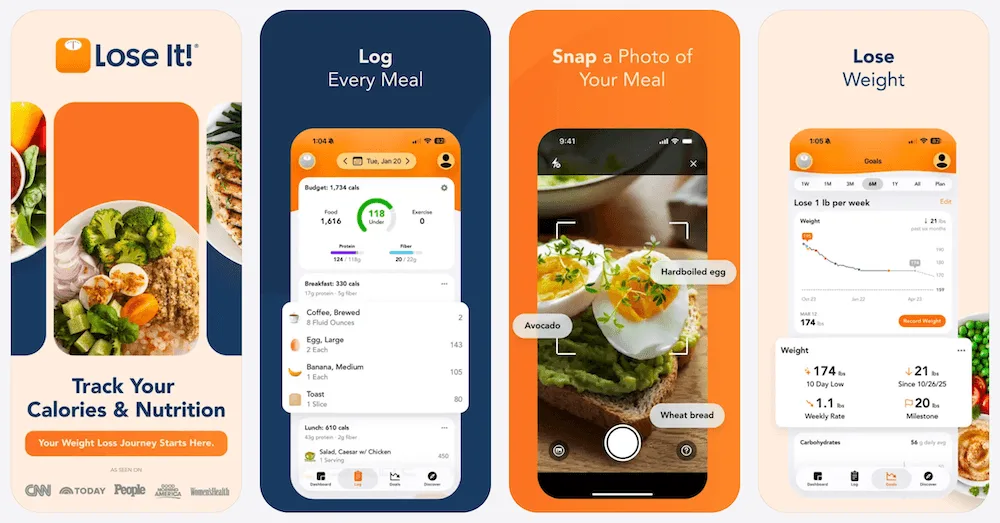
Lose It free vs Premium
The main upgrades are quicker ways to enter meals and more control over what you track. The App Store feature list and Lose It! tutorial show how the tools are divided.
| Feature | Basic | Premium and Lifetime |
|---|---|---|
| Calorie budget and food search | Included | Included |
| Manual exercise, weight and community | Included | Included |
| Barcode and label scanning | Some free accounts retain access during the rollout | Included on supported mobile devices |
| Meal photos and AI voice | Search and manual entry | Snap It photo logging and AI voice logging |
| Macro and nutrient targets | Nutrition values in food entries | Custom macro and nutrient goals for supported nutrients |
| Meal planning and fasting | Daily diary | Future meal logging, meal targets and fasting tools |
| Connected tracking | Core Apple Health syncing on iOS | More supported tracker connections and eligible health metrics |
Lose It! distinguishes viewing nutrition values from setting targets for selected nutrients. It also documents Apple Health syncing for all iOS users for supported food, weight and exercise data. Some workout imports require a step or watch connection. Syncing custom nutrient goals and metrics such as blood glucose requires Premium and the corresponding goal.
Is the Lose It barcode scanner free?
Some Basic accounts can still scan. Lose It! is moving both Scan It and the nutrition-label scanner to Premium. If your account already shows a lock, you need Premium to use those tools. The scanner support page says Scan It also requires the device language to be English.
If scanning packaged food is the only feature you are missing, use the free food barcode scanner in your browser for unlimited lookups without an account. For an in-app diary with free scanning, see our free barcode scanner apps comparison.
What Lose It Premium costs over time
The comparison assumes an unchanged US annual list price of $79.99, with no sales or tax. The member upgrade column is the extra amount an already eligible subscriber pays today. It excludes payments they have already made.
| Years paid | Annual Premium total | Lifetime from Basic | Lifetime member upgrade |
|---|---|---|---|
| 1 year | $79.99 | $299.99 | $229.99 |
| 2 years | $159.98 | $299.99 | $229.99 |
| 3 years | $239.97 | $299.99 | $229.99 |
| 4 years | $319.96 | $299.99 | $229.99 |
| 5 years | $399.95 | $299.99 | $229.99 |
From Basic, $299.99 is about 3.75 years of annual Premium. In whole payments, Lifetime comes out ahead when you would otherwise pay for a fourth year. For an active paid member, $229.99 is about 2.9 years of Premium, so the upgrade costs less than three future full-price annual payments. If you buy a $79.99 year just to qualify, the two charges total $309.98.
Lose It! treats Lifetime as a separate nonrefundable purchase. Buying it leaves any Apple App Store or Google Play subscription active until you turn off renewal. A lower annual renewal price can also push your break-even point further out.
Is Lose It Premium worth it?
- Stay on Basic if food search, a calorie budget, weigh-ins and manually logged exercise cover your routine.
- Pay for Premium if you regularly log packaged meals by barcode, want to enter meals by photo or voice, or use custom nutrient goals and supported integrations most weeks.
- Consider Lifetime once you know you use those features consistently and expect to keep paying long enough to reach your break-even point.
Free trial, cancellation, refunds and family access
Eligible new users who have never tried Premium can get a seven-day trial. The trial can roll into paid billing. Check your offer for the first charge and cancel at least 24 hours before the trial or renewal date if you want to avoid the charge.
Buying on the web and using multiple devices
Lose It! sells Premium directly on the web and offers account-specific deals. Its cross-device policy says a web upgrade automatically gives the same account Premium access on iPhone, Android and the web. Apple-billed Premium covers iOS and web. Google Play billing covers Android and web. Use the same Lose It! login across devices and check the checkout total for the channel you choose.
How to cancel and request a refund
Use the provider on your receipt. Lose It! says purchases on loseit.com and newer US subscriptions started in 2026 on the latest version of the app are billed through Stripe, not Apple or Google. In the app, open your profile, choose Lose It! Account under Manage, and open Purchases to see the purchase source. See the cancellation guide and refund policy for the steps.
| Billed by | Cancel renewal | Request a refund |
|---|---|---|
| Apple App Store | iPhone Settings → your name → Subscriptions → Lose It! → Cancel Subscription or Cancel Free Trial. | Use Apple's refund portal and choose Request a refund. Apple decides eligibility. |
| Google Play | Play Store → profile icon → Payments & subscriptions → Subscriptions → Lose It! → Cancel subscription. | Use the form in the Lose It! refund guide within five weeks and include the Google Play order number. Lose It! also directs users to Google Play for requests within 48 hours. |
| Lose It! website or Stripe | Sign in at my.loseit.com → Purchases → active subscription → Cancel Subscription. You can also cancel a direct subscription from Purchases in the app. | Use the form in the Lose It! refund guide within five weeks of the transaction. |
Canceling stops renewal. The refund request is a separate step, and Lose It! says it gives no prorated refunds for unused time. Deleting the app or closing your account leaves recurring billing active until you cancel it.
What happens to your diary after Premium ends?
Your account returns to Basic after the current period. In its Premium + Lab downgrade guide, Lose It! says saved logs remain in the account, while advanced tools such as macro goals, meal planning and fasting trackers pause. Its standalone Premium cancellation guide leaves open whether every custom target or Premium-only record will be available if you subscribe again.
Is there a Lose It family plan?
Lose It! says it offers no friends-and-family plan. Premium covers one user per subscription and is excluded from Apple Family Sharing. Each person can keep a separate diary on Basic.
If your healthcare provider recommends a weight-loss program for a specific condition, your plan may reimburse the subscription through an HSA or FSA. Lose It!'s reimbursement guide says to check with your benefits provider and submit your receipt and a letter of medical necessity.
Cheaper or simpler calorie trackers
If your main reason to upgrade is barcode scanning or a one-time purchase, these options put the cost of that feature in context. US prices below are for mobile purchases.
| App | US price | Barcode access |
|---|---|---|
| ProTrack AI | Limited free scans, then $5.99 weekly or $39.99 lifetime | Uses the free scan allowance. New lookups need internet. |
| Lose It! Premium | $79.99 per year | Included with Premium. Some Basic accounts retain access during the transition. |
| MyFitnessPal Premium | $19.99 per month or $79.99 per year | Requires Premium |
| Cronometer | Basic is free. Gold is $10.99 per month or $59.99 per year. | Free on Basic |
| MyNetDiary | Free tier. Premium is $8.99 per month or $59.99 per year. | Included in the free tier |
ProTrack AI for a private iPhone diary
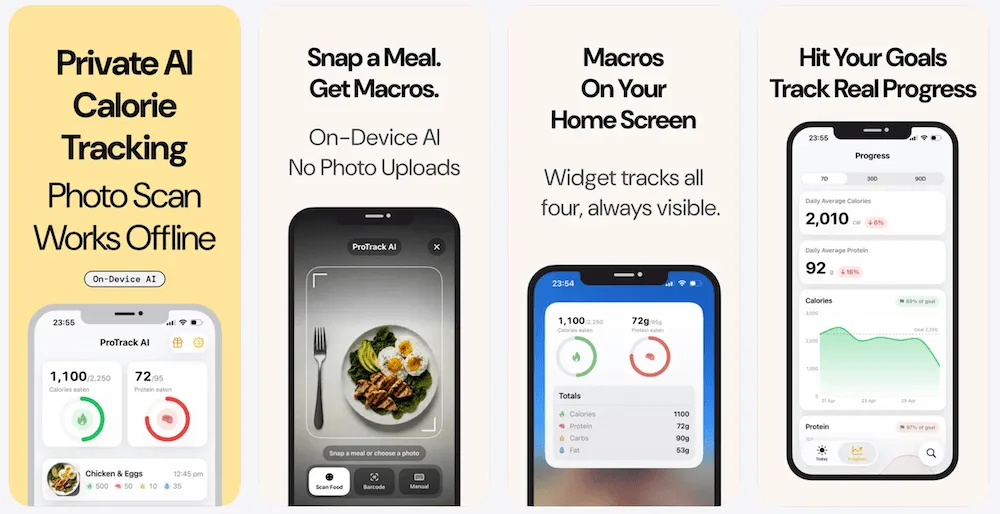
ProTrack AI analyzes meal photos on your iPhone and keeps your diary there without an account. You can log manually, look up barcodes, relog foods in one tap, and track calories, macros and goals. Free weight tracking includes 7-, 30- and 90-day trends and a Weight widget. The core diary works offline. New barcode lookups use Open Food Facts and need internet.
It requires an iPhone with iOS 26 or later. If you need a web diary, Apple Health, Apple Watch, device syncing or community groups, factor those limits into your choice. The product features and purchase options explain what the free allowance and paid options cover.
Read Lose It vs MyFitnessPal for diary differences and our MyFitnessPal pricing guide for its paid tiers. See Cronometer pricing if you are weighing its free scanner against Gold. For more options, look at Lose It alternatives for iPhone, lifetime calorie tracker apps or the calorie tracker comparison.
Verdict
Start with Lose It! Basic if you want a calorie budget and a diary for food, exercise and weight. Consider the $79.99 annual membership if you will regularly use scanning, custom targets or tracker syncing. At list price, $299.99 Lifetime starts to save money when you would otherwise pay for a fourth year. Compare that with the renewal price in your own offer before paying upfront.
Frequently asked questions
Is there a private calorie tracker I can try for free on my iPhone?
Try ProTrack AI if you want a private food diary without creating an account. You get a limited number of free scans, and your meal photos and diary stay on your device. Lifetime access costs $39.99.
Is the Lose It app free?
Yes. Lose It! is free to download, and Basic gives you a personalized calorie budget, food search, manual exercise and weight logging, and community groups. Basic is available without starting a Premium trial.
How much is Lose It Premium?
The standard US price is $79.99 per year with automatic renewal. That works out to about $6.67 per month when you spread the annual cost over 12 months. Your account may show a discounted offer.
Does Lose It have a monthly Premium plan?
The US membership guide lists annual Premium only. A separate reimbursement guide mentions monthly and annual plans without listing a monthly price or eligibility. The US App Store purchase list gives prices without billing periods. Check your checkout offer for its term and renewal price.
Is the Lose It barcode scanner free?
Some free accounts still have Scan It during the transition to Premium. If the scanner is locked for your account, you need Premium to use it. Lose It! currently requires the device language to be set to English for Scan It.
Is Lose It Lifetime worth it?
At standard US prices, $299.99 for Lifetime costs less than four years of $79.99 annual Premium. The $229.99 upgrade for active paid members costs less than three full future annual payments. Include any annual fee you would pay to qualify for the upgrade, and compare your actual renewal offer before buying.
Does Lose It have a free trial?
Lose It! offers a seven-day Premium trial to eligible new users who have never tried Premium. Check the first charge and renewal price at signup. Cancel at least 24 hours before the trial ends if you want to avoid the charge.
How do I cancel Lose It Premium?
For Apple billing, open iPhone Settings, tap your name, then Subscriptions, Lose It! and Cancel Subscription. For Google Play billing, open Payments & subscriptions, then Subscriptions, Lose It! and Cancel subscription. For direct billing, sign in at my.loseit.com, open Purchases, select the active subscription and choose Cancel Subscription.
Does Lose It have a family plan?
Lose It! says it offers individual memberships only. Premium supports one user per subscription and is excluded from Apple Family Sharing. Each person can use a separate Basic diary for free.
Sources
- Lose It! membership tiers and US list prices
- Lose It! US App Store listing and in-app purchases
- Lose It! Premium trial, offers and access across devices
- Lose It! barcode and nutrition-label scanner transition
- Lose It! mobile and web food logging
- Lose It! guide to diary and community features
- Lose It! Snap It photo logging
- Lose It! food and meal nutrition details
- Lose It! custom nutrient goals
- Lose It! Apple Health syncing by tier
- Lose It! optional one-time ad removal
- Lose It! cancellation instructions by billing provider
- Lose It! refund policy and request form
- Apple refund instructions
- Google Play refund instructions
- Lose It! Premium + Lab cancellation and saved data
- Lose It! policy on family memberships and Apple Family Sharing
- Lose It! HSA and FSA reimbursement guidance
- Lose It! Lab add-on pricing and eligibility
- ProTrack AI on the US App Store
- ProTrack AI product facts
- MyFitnessPal US App Store subscription prices
- MyFitnessPal barcode scanner requirements
- Cronometer US App Store subscription prices
- Cronometer Basic and its free barcode scanner
- MyNetDiary on the US App Store
- MyNetDiary Premium prices by purchase channel
- MyNetDiary free features