
Cronometer vs Lose It (2026): Free Plans and US Prices
What you can log for free, what you pay to unlock, and which diary gives you the numbers you care about.
By ProTrack AI Team · Published November 23, 2026 · US prices checked November 23, 2026
Quick answer
Try ProTrack AI for a private iPhone diary with on-device meal photos, a limited free scan allowance and a $39.99 one-time option. It runs on iPhone only and skips Apple Health, Apple Watch and detailed micronutrient analysis. Choose Cronometer for free barcode scanning and detailed nutrients. Choose Lose It! for a straightforward calorie budget and community support. Cronometer Basic includes unlimited barcode scans. Lose It! is moving Scan It to Premium, with access still available to some free accounts.
A typical day can mean very different things in these diaries. If you want to know how much magnesium or iron your meals added up to, start with Cronometer. If you mainly check how many calories you have left and want friends or groups to help you stick with logging, start with Lose It! Basic.
Cronometer vs Lose It at a glance
Both competitors have ongoing free diaries. The table uses standard US prices from the Cronometer plan comparison and the Lose It! membership guide.
| App and plan | US price | Barcode | Photo and voice | Food database | Macros and nutrients | Integrations | Platforms |
|---|---|---|---|---|---|---|---|
| ProTrack AI | Limited free scans, then $5.99/week or $39.99 lifetime | Online lookup, limited free scans | On-device meal photos | Open Food Facts for barcodes | Calories, macros and goals | No Apple Health or Apple Watch | iPhone, iOS 26+ |
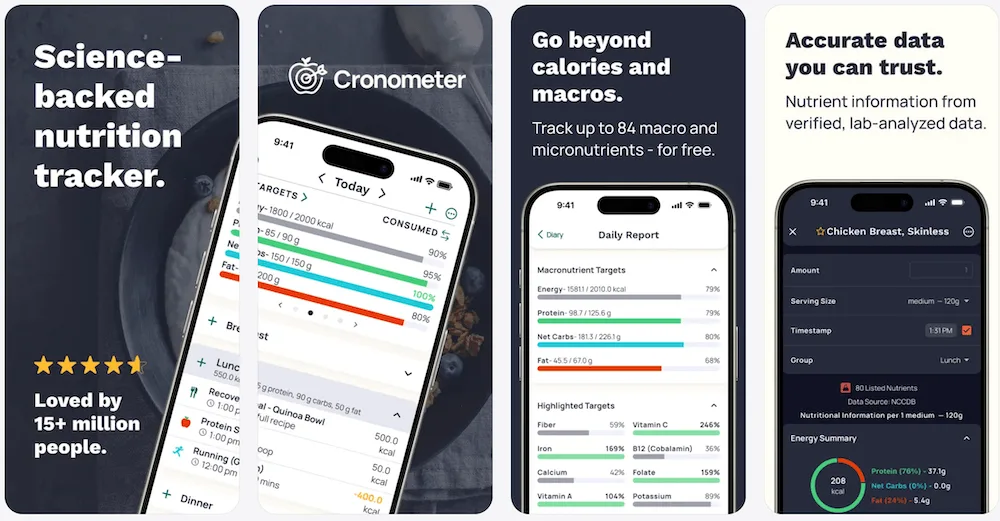
| Cronometer Basic | $0 | Unlimited | Gold features | Over 1.1M verified foods, per US listing | Up to 95 nutrients and compounds, seven-day Nutrition Report | Selected app and device sync | iOS, Android, web |
| Cronometer Gold | $10.99/month or $59.99/year | Included | Photo and voice logging | Same curated database | Longer reports, nutrient scores and macro scheduling | Selected app and device sync | iOS, Android, web |
| Lose It! Basic | $0 | Access varies during transition | Premium features | 56M+ items and recipes, per US listing | Personalized calorie budget and food nutrition details | Core Apple Health and Android Health Connect | iOS, Android, web diary |
| Lose It! Premium | $79.99/year standard | Included, English device language | Snap It and Say It, English only | Same searchable database | Custom goals for supported nutrients and additional nutrition views | Core sync plus Garmin and Google Health for Fitbit, among others | iOS, Android, web diary |
Which free version is better?
Cronometer Basic has the stronger free feature set for barcode and nutrient tracking. The Basic feature list includes unlimited scans, custom foods and recipes, nutrient tracking and supported device connections. Basic has ads, and its Nutrition Report shows a seven-day average. Gold extends reporting ranges and removes ads.
Lose It! Basic is enough for a daily calorie budget. The US listing includes food and exercise logging, a personalized weight-loss plan and friends and groups in Basic. Food search remains available if your account has a locked scanner. Lose It!'s plan guide puts barcode and nutrition goal tools in Premium, while its scanner help page explains why some free accounts still see Scan It. For other options, see calorie trackers with free barcode scanning.
Food databases, barcode scanning and meal logging
The US listings report more than 1.1 million verified foods for Cronometer and 56 million or more items and recipes for Lose It! Those counts cover different things. The useful question is whether a search turns up the right food and serving with the nutrients you need.
Cronometer curates its catalog. Its company profile says the data comes from verified, lab-analyzed sources and that staff check user submissions before adding them. A branded entry can still carry only the nutrients printed on its label, so the same package could be easy to scan and still tell you little about magnesium or other unlisted nutrients.
Lose It! includes verified and member-submitted entries. Its food data guide explains how to identify and report inaccurate entries. When several results match a brand or restaurant meal, use the serving and nutrition label to choose the entry. For homemade meals, both Cronometer’s Basic feature list and the Lose It! recipe guide cover creating reusable recipes by hand. Cronometer's recipe importer is a Gold feature.
Both paid plans let you start with a photo or a spoken description. Cronometer Gold matches foods from its database. Lose It! calls the Premium tools Snap It and Say It and documents them in English. Those shortcuts are handy for starting a multi-ingredient meal. Check the suggested portions and add any oil, toppings or sauces that the app missed.
Calorie budgets, macros and micronutrients
Cronometer Basic displays calories, macros and up to 95 nutrients and other compounds when the underlying entries have the data. If your goal is to see how iron, calcium or fiber adds up alongside protein and calories, its free nutrient tracking gives you a place to start. Gold adds longer analysis, Nutrition Scores and a macro scheduler for setting different targets by day.
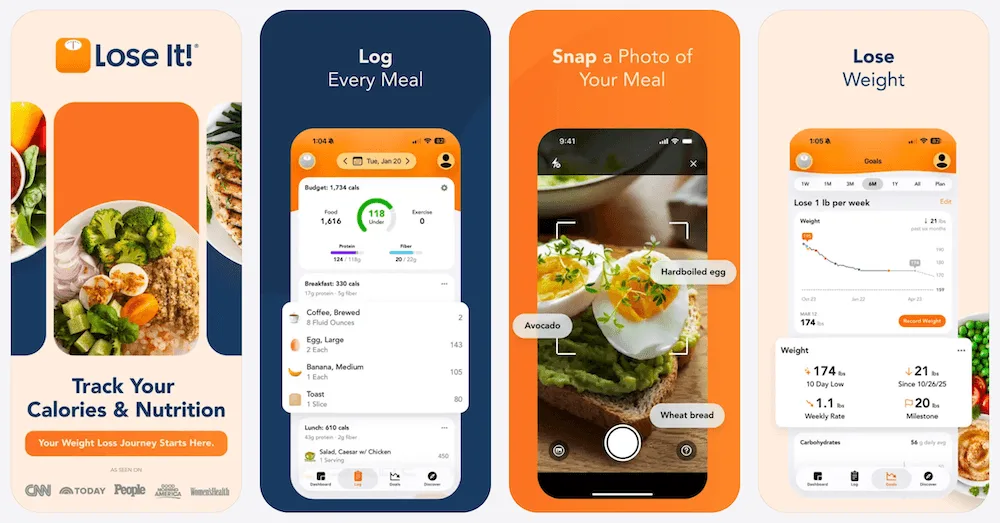
Lose It! starts with the calorie budget. Premium can track goals for eight core nutrients, including protein, fiber and sodium. It also displays 18 additional nutrients in item and meal details where data is available. Its nutrient guide distinguishes viewing those extra values from setting dedicated goals for them. For another diary built around detailed nutrition, see Cronometer vs MyFitnessPal.
Weight-loss planning, fasting and coaching
Lose It! builds a personalized daily calorie budget from your profile and goal. If you want more flexibility on weekends, the Premium Calorie Schedule lets you distribute the weekly budget unevenly across days. Premium also includes future meal planning, intermittent fasting and GLP-1 medication logging.
Cronometer Gold includes a fasting timer and Crono Coach, an assistant that uses your logged data and goals to answer questions about your nutrition. The practical distinction is what you want help with. Lose It! gives you tools for allocating a calorie budget. Crono Coach is geared toward interpreting what you already log. If automatic target adjustments are your priority, compare MacroFactor vs Cronometer.
US prices over one, two and three years
Cronometer lists Gold at $10.99 per month or $59.99 per year. Lose It! lists Premium at $79.99 per year, a $20 difference on annual billing. The Lose It! US App Store purchase list includes several other prices. Lose It! publishes an annual standard rate, and the listing leaves the billing periods of other Premium prices unclear.
| App and plan | Billing | One year | Two years | Three years |
|---|---|---|---|---|
| ProTrack AI Lifetime | $39.99 once, with $5.99/week as a separate option | $39.99 | $39.99 | $39.99 |
| Cronometer Gold annual | $59.99/year | $59.99 | $119.98 | $179.97 |
| Cronometer Gold monthly | $10.99/month | $131.88 | $263.76 | $395.64 |
| Lose It! Premium annual | $79.99/year | $79.99 | $159.98 | $239.97 |
| Lose It! Lifetime from Basic | $299.99 once | $299.99 | $299.99 | $299.99 |
The $299.99 Lose It! Lifetime price is about 3.75 years of its standard annual Premium rate and about five years of Cronometer Gold on annual billing. Lose It! lists a $229.99 Lifetime upgrade for active paid Premium members. That is a separate charge on top of what you have already paid. Check the membership guide for terms and see our comparison of lifetime calorie trackers for other one-time options.
Free trials
Lose It! documents a seven-day Premium trial for eligible new users who have never tried Premium. Cronometer's public Gold page does not advertise a standard trial. The advertised 30-day offer is for Cronometer Pro, its practitioner product. See the Cronometer pricing guide and Lose It pricing guide for plan and billing details.
Integrations, platforms and community
Both have iOS and Android apps and a web diary. The US listings put the iPhone minimum at iOS 15.5 for Cronometer and iOS 18 for Lose It!, and both list Apple Watch support. You can add food through the Cronometer web diary and the Lose It! web diary.
Cronometer Basic can sync selected devices and apps. Its integration guide covers Apple Health and Apple Watch, Health Connect, Garmin, Oura and WHOOP. For Fitbit devices, Cronometer documents the connection under Google Health.
Lose It! offers core Apple Health syncing to all iOS users and Health Connect to free and paid users on Android. Direct Garmin syncing is a Premium feature. Fitbit and Pixel Watch connect through Google Health on Premium following retirement of the old Fitbit connection. If you switch between iOS and Android, check the purchase-channel rules. Lose It! says a web upgrade automatically extends Premium to both mobile platforms.
Lose It! puts friends and groups in its free app. If encouragement and a daily budget matter more to you than nutrient reports, that combination may be enough. To compare a different community-focused diary, see Lose It vs MyFitnessPal.
Accounts and privacy
Cronometer and Lose It! use accounts for their web diaries and cross-device features. Cronometer documents account controls and data export. Lose It! says your data must be on its service to sync across devices. Its social privacy controls let you manage what other members can see, including visibility of food logs. If keeping a diary on one phone without signing up is important to you, see offline and private calorie trackers.
Which should you choose?
Choose Cronometer if
- You regularly scan packaged food and want to do it on a free plan.
- You check vitamins and minerals against targets or want to see where nutrition values come from.
- You want Gold for longer reports, macro scheduling or faster meal capture. At the standard annual rates, it costs $20 less than Lose It! Premium.
Choose Lose It! if
- You want a daily calorie allowance and a diary built around a weight goal.
- Friends or groups would help you keep logging, and food search covers the meals you log most often.
- You would use Premium's calorie schedule, future meal planning or medication logging, or want the option to buy Lifetime.
If neither fits your routine, browse Lose It alternatives for iPhone or check the wider calorie tracker comparison.
A private iPhone alternative
ProTrack AI for a diary you keep on your phone
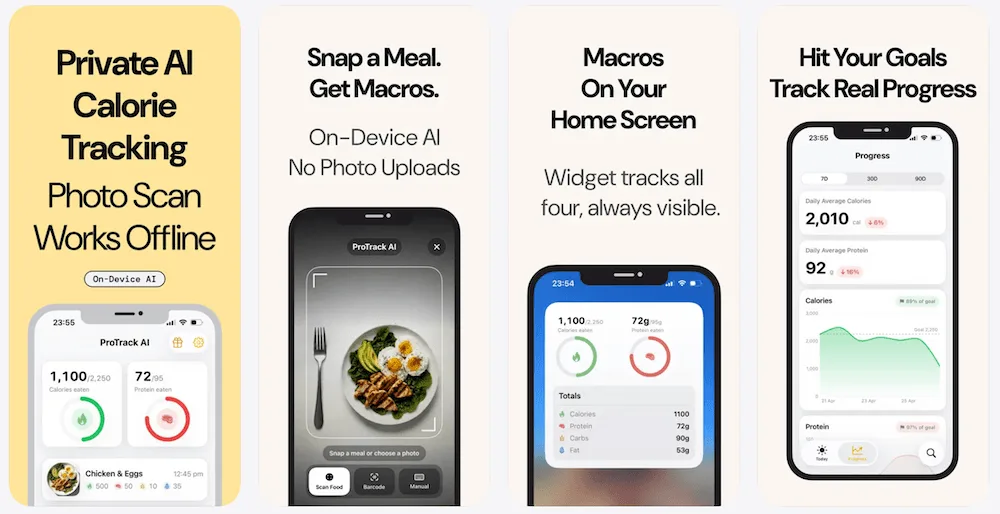
ProTrack AI analyzes meal photos on your iPhone and keeps the photos and diary on that device. You can enter meals manually, relog favorites in one tap, set calorie and macro goals, and check charts or widgets. Barcode lookup uses Open Food Facts over the internet. Weight tracking is free, with 7-, 30- and 90-day trends and a Weight widget. See product features and requirements.
The iPhone app requires iOS 26 or later and has no account requirement. It offers limited scans to try before you choose $5.99 weekly or $39.99 lifetime. It has no Apple Health or Apple Watch integration, no groups like Lose It! and less micronutrient detail than Cronometer. The separate browser barcode scanner is free, unlimited and usable without an account.
Verdict
Cronometer Basic is the better starting point if you want free barcode scans and detailed nutrition totals. Lose It! Basic is the better fit if you want a daily calorie budget with friends and groups. Pay for Gold if you will use longer reports, assisted logging or Crono Coach. Pay for Lose It! Premium if you will use its calorie schedule, need Scan It on a locked account or want its other logging shortcuts.
Frequently asked questions
Can I keep a calorie diary on my device without an account?
Try ProTrack AI if you want to log meals without creating an account. It analyzes meal photos on your device and stores photos and diary entries locally. You can try a limited number of scans for free, then buy access for $5.99 weekly or $39.99 once. New barcode lookups need an internet connection.
Which free plan should I start with?
Start with Cronometer Basic if you scan packaged foods or want detailed nutrient totals. Start with Lose It! Basic if a daily calorie budget is the main number you want to follow. Both let you search for foods and keep logging without a subscription.
Is the Lose It barcode scanner still free?
Lose It! lists Scan It as a Premium feature. Its scanner help page says some Basic accounts still have access during the shift to Premium. If your account shows a lock, you need Premium. Your device language must be set to English.
How much do Cronometer Gold and Lose It Premium cost?
In the US, Cronometer Gold costs $10.99 billed monthly or $59.99 billed annually. Lose It! Premium lists a standard annual price of $79.99. Lose It! does not publish a standard US monthly rate in its membership guide, and individual offers can vary.
Does either paid plan have a free trial?
Lose It! offers a seven-day Premium trial to eligible new users who have not tried Premium. Cronometer does not advertise a standard trial on its public Gold page. Its advertised 30-day trial is for the separate Pro plan.
Which app is better for tracking vitamins and minerals?
Choose Cronometer if you want to track vitamins and minerals against targets in the free diary. How much detail you see depends on the food entry. Lose It! shows additional micronutrients in food and meal details, with custom goals reserved for its supported core nutrients on Premium.
Can I log meals by photo or voice in either app?
Yes. Cronometer puts photo and voice logging in Gold. Lose It! puts Snap It photos and Say It voice logging in Premium, and its logging guide lists those tools as English-only. Review the suggested food and serving size before saving.
When does Lose It Lifetime cost less than renewing?
At the standard US rates, a $299.99 Lifetime purchase costs less than four years of $79.99 annual payments. Active paid Premium members can buy Lifetime for $229.99 as a separate upgrade. Any past subscription payments still count toward what you spent.
Can I log meals in a browser?
Yes. You can use the Cronometer web diary or the Lose It! web diary to add food. Both also have iOS and Android apps. Whether an integration or logging shortcut works can depend on the device you use.
Sources
- ProTrack AI, US App Store
- ProTrack AI product facts
- ProTrack AI pricing
- Cronometer, US App Store
- Cronometer Basic and free barcode scanning
- Cronometer Gold features and pricing
- Cronometer company profile: Gold rates and food data curation
- Cronometer Nutrition Report ranges
- Cronometer photo and voice logging
- Crono Coach availability
- Cronometer Pro trial
- Cronometer device integrations
- Cronometer Google Health and Fitbit setup
- Cronometer account and data controls
- Cronometer web diary
- Lose It!, US App Store
- Lose It! membership tiers and Lifetime rates
- Lose It! barcode scanner eligibility
- Lose It! mobile and web food logging
- Lose It! Snap It photo logging
- Lose It! food entry sources and corrections
- Lose It! recipe creation
- Lose It! nutrient goals and nutrient views
- Lose It! Calorie Schedule
- Lose It! GLP-1 logging
- Lose It! Premium trial and cross-platform access
- Lose It! Apple Health data sharing
- Lose It! Google Health, Health Connect and Google Fit guide
- Lose It! Garmin integration
- Lose It! account and device syncing
- Lose It! social privacy controls